AI logo generators can turn a business name and a few preferences into a finished-looking mark in minutes. This balanced guide explains how they work, weighs their strengths against hiring a designer, flags the quality, uniqueness, and trademark caveats, and shows you exactly when each option fits.
How AI Logo Generators Actually Work
Understanding the mechanics helps you set realistic expectations for what these tools can and cannot do.
From Prompt to Preview
Most tools start by asking for your business name, industry, and a few style preferences such as color mood or whether you want a symbol, a wordmark, or both. Some also accept a free-text description of the feeling you want the logo to convey.
The generator then assembles candidate designs and shows a gallery of options. Because the process is fast, you can iterate quickly, adjusting inputs and regenerating until something feels close to your vision. That speed is the core appeal.
Template Engines vs. Image Models
There are two broad approaches. Template-based generators combine curated icons, fonts, and layout rules, then apply your name and colors. The output is clean and editable but draws on shared building blocks that many users see.
Image-model generators produce artwork from a text prompt, similar to a free AI image generator. These can feel more original but often lack clean vectors and may render text imperfectly, so they suit exploration more than final production.
The Role of Icon Libraries
Many generators lean on large libraries of pre-made symbols mapped to keywords. Type "coffee" and you will likely see cups and beans; type "tech" and you get circuits and abstract shapes. This mapping makes results relevant but predictable.
Because the same libraries serve every user, the icon at the heart of your logo may appear in dozens of other brands. Recognizing this limitation early helps you plan for customization rather than accepting the first pleasing result.
Customization Controls
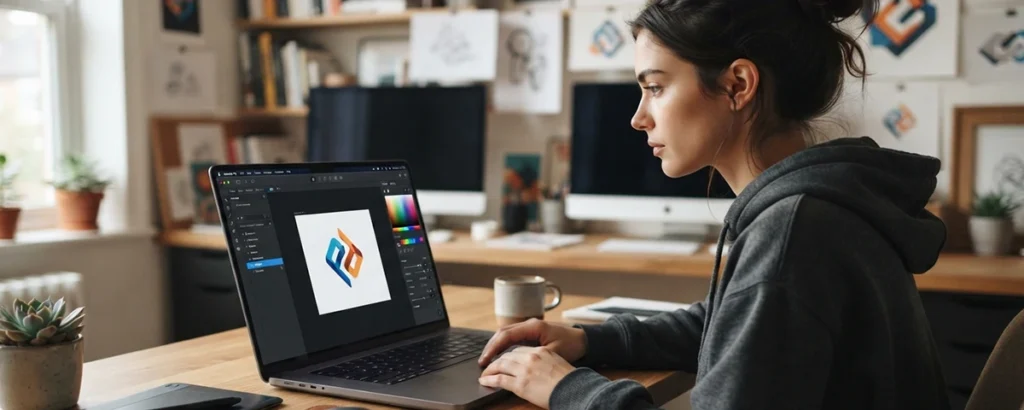
After generating options, most tools let you tweak colors, swap fonts, reposition elements, and adjust spacing. Better platforms expose fine controls over layout and export, while lighter ones offer only a handful of presets.
The depth of these controls largely determines how unique and polished your final mark can become. Before you invest time, test how far a tool lets you move away from its defaults toward something that feels like yours.
The Advantages of AI Logo Tools
AI logo generators earn their popularity by removing real barriers for early-stage founders and small teams.
Speed and Convenience
The clearest benefit is speed. You can go from an idea to a set of usable-looking concepts in minutes, at any hour, without briefing, scheduling, or waiting on revisions. For a launch under time pressure, that immediacy is genuinely useful.
This rapid turnaround also makes experimentation cheap. You can try several directions, share them with your team, and gather quick reactions before committing effort or money to any single concept.
Lower Upfront Cost
AI tools typically cost far less than commissioning custom work, and many let you explore for free before paying. For a side project, a prototype, or a business validating an idea, that low barrier can be the difference between having a logo and having none.
Keep in mind that advertised free access usually applies to previews. Actual costs depend on the plan and the file rights you need, so read the terms before assuming the price is zero.
A Useful Starting Point
Even when the output is not final, it can clarify your own taste. Seeing many variations quickly helps you articulate what you like and dislike, which makes any later brief to a designer sharper and more productive.
Founders who struggle to describe abstract preferences often find that reacting to concrete options is easier. In that sense, AI generation works well as an idea catalyst, not just a delivery mechanism.
Accessibility for Non-Designers
You do not need software skills or design vocabulary to use these tools. The guided interface handles alignment, color harmony, and spacing that a beginner might get wrong, producing something reasonable without a learning curve.
For entrepreneurs juggling many responsibilities, that self-service accessibility removes a task that once required either budget or specialized knowledge, letting them move forward and refine later.
The Limitations to Weigh
A balanced view means acknowledging where AI logo generators fall short of professional work.
Uniqueness Is Not Guaranteed
Because generators rely on shared templates and icon libraries, similar inputs produce similar outputs. Two competitors could end up with logos that share the same symbol or layout, undermining the distinctiveness a brand mark is supposed to provide.
This matters most in crowded markets where standing out is the whole point. A design that blends in with the field does little to help customers remember or recognize you.
Limited Strategic Thinking
A generator arranges shapes; it does not understand your positioning, audience, or the story you want to tell. Professional identity work connects a mark to meaning, tone, and long-term strategy in ways a prompt cannot fully capture.
Strong brands often carry deliberate ideas in their logos. Recreating that intentionality usually requires a human who has interviewed you and studied your market, which is central to branding and identity design services.
File and Format Gaps
Not every tool delivers the scalable vector files that professional printing and large-format use demand. Some free outputs are low-resolution or watermarked, and image-model results may not be vectors at all.
Before relying on a logo, confirm you can export SVG or EPS files plus transparent PNGs and the variations you will need. A mark that looks fine on screen but pixelates on a banner creates avoidable problems later.
Refinement Still Required
Raw AI output frequently needs cleanup: uneven spacing, off-brand colors, or an icon that is too busy at small sizes. Achieving a polished result often means editing the design yourself or handing it to someone who can.
Treating the generated file as a draft rather than a finished asset sets more realistic expectations and produces a far better outcome than shipping the first export untouched.
AI Generator vs. a Designer
Neither option is universally better. The right choice depends on what your brand needs from its logo.
Cost and Turnaround
AI wins on both when speed and budget dominate. A designer or agency typically costs more and takes longer because the process includes discovery, concepting, and revision rounds tailored to your business.
That extra time is not waste; it is where research and refinement happen. The trade-off is straightforward: pay less for speed, or invest more for a considered, custom result.
Originality and Ownership
A designer creates a mark intended to be yours alone and can advise on the rights you receive. AI output may echo other logos and can carry unclear authorship, which matters if you later want strong legal protection.
If exclusivity and defensibility are priorities, custom work has a clear edge. Working with a brand agency also brings a documented process around ownership and usage.
Strategic Depth
Human designers ask why before they draw. They connect the logo to your audience, competitors, and values, and they can extend that thinking into a full identity system with color, type, and usage rules.
AI tools focus narrowly on the mark itself. If you need the logo to lead a broader visual system, a designer's strategic depth becomes hard to replace with prompts alone.
A Hybrid Path
The choice is not strictly either-or. Many teams use AI to explore directions and gather reference, then bring a designer in to refine the strongest idea into a distinctive, production-ready mark.
This hybrid approach captures the speed of AI and the craft of a professional, and it often makes the paid engagement more efficient because your preferences are already clear.
When an AI Generator Is the Right Fit
These tools shine in specific, well-defined situations where speed and cost matter more than long-term distinctiveness.
Early Validation and Prototypes
When you are still testing whether an idea has legs, a placeholder logo is enough. AI lets you present a credible face to early customers without committing budget that the venture may not yet justify.
If the concept succeeds, you can invest in a professional identity later. If it does not, you have spent very little on branding, which is exactly the right risk posture for an unproven idea.
Tight Budgets and Deadlines
Nonprofits, student projects, and bootstrapped founders often cannot justify professional fees. When the choice is between an AI logo and no logo at all, the generator is the practical answer.
Similarly, when an event, campaign, or launch needs a mark tomorrow, the instant turnaround of AI beats a process that would miss the deadline no matter how good the result.
Short-Lived or Internal Uses
A logo for a one-off webinar, an internal team, or a temporary microsite does not need to anchor a decade of brand equity. Here, a quick generated mark is proportionate to the modest role it plays.
Reserving professional investment for assets that will endure keeps your spending aligned with the value each mark actually delivers over its lifetime.
Inspiration and Mood-Setting
Even brands headed for custom work can use AI to generate a wide range of visual directions cheaply. The results become reference material that sharpens a creative brief.
Pairing generated concepts with study of established styles, such as the geometric rigor of the Bauhaus logo tradition, can help you communicate taste far more precisely.
When You Should Hire Instead
Certain situations call for the judgment, originality, and legal care that a professional provides.
Long-Term Flagship Brands
If the logo will represent your company for years across every touchpoint, the stakes justify custom work. A mark you expect to become synonymous with your name deserves deliberate design rather than a template.
Rebranding later is costly and disruptive, so getting a durable identity right the first time usually pays off for any business planning to grow.
Crowded, Competitive Markets
Where many rivals fight for attention, blending in is a real cost. A designer can craft a mark that deliberately contrasts with the category and helps customers pick you out at a glance.
The predictability of template output is a liability in exactly these environments, making professional differentiation worth the investment.
Complex Application Needs
A logo that must work on packaging, signage, embroidery, tiny app icons, and huge banners needs careful construction and multiple variants. Professionals plan for these demands from the start.
They deliver the full file set and adaptations required, often as part of a wider set of graphic design services that keep every asset consistent.
Trademark and Legal Priority
If you intend to trademark your mark and defend it, a distinctive, original design supports that goal far better than a generic one. Human designers can also help you avoid unintentional similarity to existing brands.
Given unsettled questions around ownership of purely AI-generated work, businesses with serious legal ambitions usually favor custom design plus professional advice.
Quality, Uniqueness & Trademark Caveats
The most common regrets with AI logos stem from overlooking these three areas. Understanding them protects your brand.
Judging Quality Honestly
A logo that looks good in a preview may fail in practice. Test it small, in one color, on a busy background, and beside your competitors. Weaknesses in legibility and balance surface quickly under these conditions.
Ask whether the mark still reads clearly as a tiny favicon and whether it holds up without color. If it fails these tests, refine it before committing rather than discovering the problem after launch.
Checking for Similarity
Before adopting a generated logo, search for lookalikes. Because tools share icon libraries, another brand, possibly a competitor, may already use something nearly identical. A reverse image search and a scan of your category help you catch overlaps.
Heavy customization reduces this risk. Combining elements from multiple attempts and altering the default icon meaningfully moves your mark away from the crowd and toward something recognizably yours.
Trademark Realities
Trademark protection rewards distinctiveness and depends on prior use by others, not on how a mark was produced. A generic AI design can be hard to register or defend, and rules differ by country.
Run a proper trademark search and, for anything commercially important, consult an attorney in your jurisdiction before you rely on the logo.
Ownership and Usage Rights
Read each tool's terms to learn what rights you actually receive. Some grant broad commercial use; others restrict it or reserve elements. The question of who owns purely AI-generated art also remains legally unsettled in many places.
Documenting the rights you obtain, and keeping records of your customization, gives you a stronger footing if questions about ownership arise later.
A Practical Workflow
Following a deliberate process turns a quick generator into a genuinely useful branding tool.
Prepare Before You Generate
Clarify your name, the feeling you want to convey, and a rough color direction before you open a tool. Gathering a few logos you admire, and a few you dislike, gives you a reference point for judging output.
A little preparation makes your prompts and preferences sharper, which in turn produces more relevant candidates and less aimless regenerating.
Generate Broadly, Then Narrow
Resist settling on the first appealing result. Produce several directions, vary your inputs, and collect a shortlist. Seeing contrast between options makes the strengths and weaknesses of each much clearer.
Some of the most distinctive marks come from blending an icon from one attempt with the typography or color of another, so keep promising fragments even from rejected concepts.
Customize and Refine
Push past the defaults. Adjust spacing, refine colors for contrast and accessibility, simplify a busy icon, and make sure the wordmark aligns with your intended tone. This step is where a generic result becomes yours.
If the tool's controls run out before you are satisfied, this is the natural point to bring in a designer to finish the job with a clear head start.
Validate and Export Properly
Before finalizing, run your similarity and legibility checks, confirm you can export vector and transparent files, and gather the variations you will need for light and dark backgrounds.
Save your source files and note the usage rights you received. Thorough validation at this stage prevents the frustration of rework once the logo is in circulation.
Key Tips
Keep these practical reminders in mind to get the most from any AI logo generator.
- ✓Treat output as a draft - The first export is rarely finished. Plan to refine spacing, color, and detail, or hand the raw file to a designer for polish.
- ✓Check for lookalikes - Search your category and run a reverse image lookup before you commit, so you do not launch with a mark that mirrors a competitor.
- ✓Confirm vector files - Make sure you can export scalable SVG or EPS files plus transparent PNGs before paying, so the logo works everywhere.
- ✓Read the usage rights - Terms differ. Verify you have commercial rights and understand any restrictions before building your brand on the mark.
- ✓Test at real sizes - View the logo as a tiny icon and in a single color. If it stays clear and balanced, it will serve you well across applications.
- ✓Match the effort to the stakes - Use AI for quick or short-lived needs, and reserve professional design for flagship, long-term brands.
Frequently Asked Questions
Common questions about using AI logo generators for your business.
Are AI-generated logos really free?
Many AI logo generators let you design and preview a logo for free, but downloading usable, high-resolution files usually requires a paid plan. Free tiers often deliver small, watermarked, or low-resolution images that are not suitable for print or professional use. Read each tool's terms carefully, because pricing, file formats, and the commercial usage rights included can vary widely between platforms.
Can I trademark a logo made by an AI generator?
Trademark protection depends on how distinctive your mark is and whether it is already in use by someone else, not on how it was created. A generic AI-generated design that resembles thousands of other logos may be difficult to protect. In several jurisdictions, purely AI-generated work also raises unsettled questions about copyright authorship. Before you rely on any logo, run a trademark search and consult a qualified attorney for your region.
Will my AI logo look the same as someone else's?
It can. AI logo generators draw on shared templates, icon libraries, and common style patterns, so two businesses entering similar prompts may receive strikingly similar results. To reduce that risk, customize the output heavily, combine ideas from multiple attempts, and check your final design against competitors before committing to it.
When should I hire a designer instead of using AI?
Hire a designer when your logo must anchor a long-term brand, differentiate you in a crowded market, or work across many complex applications such as packaging, signage, and merchandise. A professional develops a unique concept, delivers proper file formats, and considers strategy, meaning, and legal risk. AI tools fit better for quick, budget-limited needs and early experimentation.
What file formats should a logo come in?
A usable logo package should include scalable vector files such as SVG or EPS so the mark stays sharp at any size, plus raster formats like PNG with transparency for web use. You typically also want variations for light and dark backgrounds and a simplified icon version. Confirm that any AI generator you use actually delivers vector files before you pay.
How much editing does an AI logo usually need?
Most AI logos benefit from meaningful refinement. Common adjustments include fixing awkward spacing, correcting color values for accessibility and print, simplifying overly busy icons, and aligning the design with the rest of your brand. Budget time for revision, or hand the raw output to a designer who can polish it into something distinctive and production-ready.
Can AI logo generators handle text and typography well?
Results are mixed. Many tools pair your brand name with preset fonts and spacing that look acceptable but generic, and some image-based generators still struggle to render clean, legible letterforms. If typography is central to your identity, treat AI output as a starting point and refine the wordmark manually, or choose a tool that uses real fonts rather than generated text.
Conclusion
AI logo generators are a genuine tool with a genuine place, provided you understand their limits.
AI logo generators have made basic branding faster, cheaper, and more accessible than ever. They excel at speed, low upfront cost, and rapid exploration, which makes them a sensible choice for prototypes, tight budgets, short-lived uses, and early idea validation. Used with realistic expectations, they can put a credible mark in front of customers when time or money is scarce.
Their limits are equally real. Shared templates threaten uniqueness, strategic depth is thin, file formats can fall short, and trademark and ownership questions demand caution. When your logo must anchor a long-term brand, cut through a crowded market, or stand up to complex applications and legal scrutiny, a professional designer or agency remains the stronger investment.
The smartest approach is often a blend: use AI to explore and clarify your taste, then customize heavily or bring in a designer to finish the strongest idea. Match your effort to the stakes, validate quality and similarity carefully, and confirm your rights and file formats. Do that, and you can enjoy the convenience of AI without sacrificing the distinctiveness a good logo is meant to deliver.