Create Stunning Interactive Websites with Webflow
Build beautiful, modern websites using Webflow's powerful visual development platform. Our expert designers create stunning, interactive sites that engage visitors and drive conversions.
Why Choose Webflow for Your Website?
Webflow is the modern visual development platform that empowers designers and developers to create beautiful, responsive websites without writing code. It offers enterprise-level features with unmatched design flexibility.
Visual Development
Build websites visually with Webflow's powerful drag-and-drop designer. See changes in real-time without switching between code and preview.
CMS Built-in
Create dynamic content with Webflow CMS. Perfect for blogs, portfolios, and content-heavy websites without database management.
Enterprise Security
SSL certificates, SOC 2 compliance, and enterprise-level security protect your website and customer data.
What is Webflow Development?
Webflow is a powerful visual website development platform that combines the flexibility of custom coding with the ease of drag-and-drop builders. It allows designers to create custom websites without waiting for developers, while giving developers the power to extend functionality with custom code.
Unlike traditional website builders, Webflow produces clean, semantic HTML, CSS, and JavaScript that exports to any hosting platform. This means you own your code completely and can move your site anywhere without being locked into a specific platform.

Webflow Development Services
Comprehensive Webflow solutions for businesses, portfolios, and online stores.
Custom Webflow Design
We create unique, brand-aligned designs using Webflow's visual designer. Every pixel is crafted to match your vision.
CMS Setup
Build dynamic content structures with Webflow CMS. Perfect for blogs, news, and resource libraries.
E-commerce Stores
Create online stores with product catalogs, inventory management, and secure payment processing.
Member Areas
Create gated content, member portals, and exclusive content areas for registered users.
Interactive Animations
Add stunning animations and interactions that engage visitors and enhance user experience.
SEO Optimization
Optimize your site for search engines with meta tags, sitemaps, and structured data markup.
Who Should Use Webflow?
Webflow is ideal for various business types and project requirements.
Startups
Launch quickly with beautiful, professional websites that scale with your business growth.
Design Agencies
Deliver client projects faster with visual development and consistent results.
E-commerce
Build online stores with beautiful product displays and seamless checkout experiences.
Content Publishers
Manage blogs, magazines, and content-heavy sites with powerful CMS capabilities.
Portfolio Creators
Showcase work with stunning, image-focused designs that highlight your creative abilities.
Enterprises
Create brand-compliant, scalable websites with advanced security and team workflows.
Our Webflow Development Process
A systematic approach to creating your perfect website.
Discovery
We analyze your brand, goals, and requirements to create a detailed project brief.
Design
We create visual designs in Webflow, iterating until the design perfectly matches your vision.
Development
We build responsive layouts, add interactions, and set up CMS collections.
Content
We populate your site with content, optimize images, and configure SEO settings.
Testing
We thoroughly test across devices, browsers, and user scenarios.
Launch
We deploy your site and provide training on managing content.
Webflow vs WordPress vs Wix
Understanding the differences helps you choose the right platform.
Wix
Easy but limited design
WordPress
Flexible but needs plugins
Squarespace
Beautiful but less flexible
Webflow
Best design control
Why Webflow Excels
Visual Freedom
Create any design without code limitations.
Clean Code Export
Own your HTML, CSS, and JavaScript.
No Lock-in
Export and host anywhere.
Advanced Webflow Features
Powerful capabilities that set Webflow apart.
Symbol Library
Reusable components
Interactions
Scroll-based animations
Forms
Built-in form builder
SEO Manager
Complete SEO control
Multi-Language
Built-in localization
E-commerce
Full online store
Benefits of Webflow Development
Discover why businesses choose Webflow for their websites.
Enterprise-Grade Security
Webflow provides SSL certificates, SOC 2 compliance, and enterprise-level security to protect your website and customer data from threats.
99.9% Uptime Guarantee
Your website stays online with enterprise-level hosting infrastructure that ensures maximum availability.
24/7 Expert Support
Get help anytime with Webflow's round-the-clock support team available via live chat and email.
Mobile-First Design
All Webflow templates are optimized for mobile devices, ensuring your site looks great on any screen size.
Built-In SEO Tools
Optimize your site for search engines with meta tags, clean URLs, sitemaps, and schema markup.
CMS Flexibility
Create custom content collections without database management or technical setup.
Deep Dive: Webflow CMS Capabilities
Understanding the powerful content management system behind Webflow.
Custom Collection Types
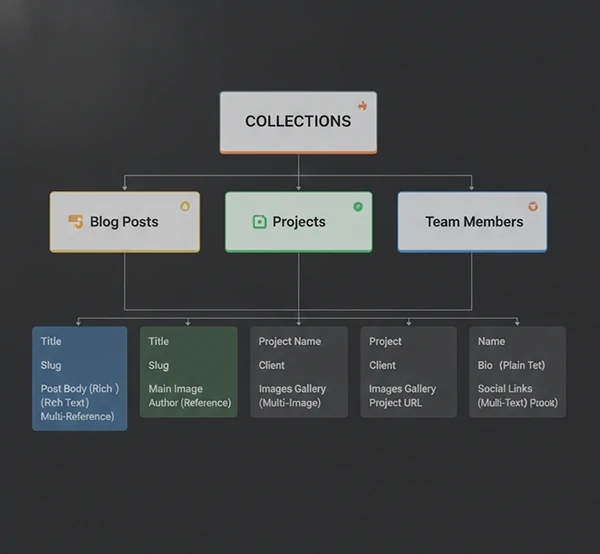
Webflow CMS allows you to create entirely custom content structures called Collections. Unlike traditional CMS platforms with fixed templates, Webflow lets you define exactly what fields your content should have. You can create Collections for blog posts, team members, case studies, testimonials, job listings, event calendars, knowledge base articles, and virtually any other content type your business needs.
Each Collection can have multiple field types including text, rich text, images, files, numbers, dates, booleans, multi-reference links, and even color pickers. This flexibility means you never have to compromise on your content structure. You design exactly what your content management experience should be.
The multi-reference field type is particularly powerful, allowing you to connect content in meaningful ways. For example, you can link team members to the projects they worked on, connect blog posts to related products, or connect events to their sponsors. This creates a rich, interconnected content ecosystem that serves both editors and visitors.
Dynamic Content Workflow
How content moves through your Webflow site.
Content Creation
Add and edit content through the Webflow Edit panel. Content editors work in a clean, familiar interface without seeing the design.
Dynamic Binding
Content automatically appears in all bound locations throughout your site without manual updates.
Filtering & Sorting
Display content with sophisticated filters and sorting without coding.
User Roles
Assign different permission levels to various team members and content editors.
E-commerce Capabilities
Complete online selling functionality built into Webflow.
Product Management
Upload products with images, variants, SKU numbers, pricing, and inventory tracking. Organize products into categories and use tags for filtering.
Payment Processing
Accept payments through Stripe, PayPal, and Apple Pay. Support for multiple currencies and automatic tax calculation.
Shipping Options
Configure flat rate, weight-based, and live shipping rates. Integration with major carriers for real-time quotes.
Order Management
Full order management dashboard with status updates, fulfillment tracking, and customer communication tools.
Interactions & Animations
Creating engaging experiences without code.
Triggers and Actions
Webflow Interactions let you trigger animations and actions based on various user behaviors. You can create scroll-based animations that reveal content as users scroll down the page, hover effects that respond to mouse movements, click animations that provide feedback, and even page load animations that create stunning entrances.
The trigger system includes While Scrolling In View, While Scrolling Out Of View, While Hover, During Hover, After Hover, On Click, On Mouse Move, Page Load, and Before Page Load triggers. Each trigger can affect any element's CSS properties, creating possibilities limited only by your imagination.
Advanced users can chain multiple actions together to create complex sequences. Combine different triggers with delays and durations to create sophisticated interactive experiences that rival native applications.

Performance Optimization
Making your Webflow site lightning fast.
Image Optimization
Webflow automatically optimizes uploaded images for different screen sizes and quality levels, ensuring fast loads.
Lazy Loading
Images and content below the fold load only when needed, dramatically improving initial page load times.
CDN Delivery
Global content delivery network ensures fast loading regardless of visitor location.
SEO Strategy for Webflow
Complete search engine optimization tools.
Built-in SEO Tools
Webflow includes comprehensive SEO tools that address every aspect of search engine optimization. Each page and Collection item has dedicated SEO settings including meta title, meta description, URL slug, social sharing preview, and canonical tags.
The SEO panel provides visual feedback showing how your content will appear in search results and social media shares. You can preview how your page looks when shared on Facebook, Twitter, and LinkedIn before publishing.
Webflow automatically generates XML sitemaps that you can submit to Google Search Console, Bing Webmaster Tools, and other search engines. The sitemap updates automatically as you add or remove content.

Accessibility Features
Building inclusive websites that work for everyone.
Semantic HTML
Webflow automatically generates semantic HTML5 elements, making content accessible to screen readers.
Alt Text Support
Every image has built-in alt text fields for describing content to visually impaired users.
Focus States
Interactive elements have visible focus states for keyboard navigation users.
Color Contrast
Design tools warn when color combinations fail WCAG contrast requirements.
Webflow Security
Enterprise-grade security for your website.
SSL Certificates
Every Webflow site includes free SSL certificates from Let's Encrypt. Your site is always served over HTTPS.
SOC 2 Compliance
Webflow infrastructure meets SOC 2 Type II compliance standards for enterprise security requirements.
DDoS Protection
Built-in distributed denial of service protection keeps your site available during attacks.
Migration to Webflow
Moving your existing site to Webflow made easy.
Migration Process
Migrating to Webflow from other platforms is straightforward with our proven process. We start with a comprehensive audit of your current website, documenting all content, functionality, and design elements. This ensures nothing is lost in the migration.
Content is carefully exported, cleaned, and imported into Webflow CMS Collections. We preserve SEO value by maintaining URL structures where possible and setting up proper redirects for any changes. This protects your search rankings during and after the transition.
Before launching, we thoroughly test the new site against the old one to ensure all functionality works correctly. We also monitor search rankings during the transition to catch and fix any issues quickly.

Ongoing Maintenance
Keeping your Webflow site performing optimally.
Content Updates
Regular updates to keep your content fresh and relevant.
Design Tweaks
Minor design adjustments and improvements.
Performance
Ongoing optimization for fast loading.
Security
Updates and monitoring for security.
Industry-Specific Solutions
Tailored Webflow solutions for different industries.
Restaurants
Menu displays, online reservations, and food ordering systems tailored for restaurants and cafes.
Real Estate
Property listings, agent profiles, search functionality, and inquiry management for real estate businesses.
Healthcare
Doctor profiles, appointment booking, patient portals, and medical information websites.
Education
Course catalogs, student portals, event calendars, and resource libraries for educational institutions.
Non-Profits
Donation processing, event management, volunteer sign-ups, and impact storytelling.
Creative Agencies
Portfolio showcases, case study presentations, and client engagement for creative professionals.
Common Webflow Issues We Fix
Expert solutions for technical problems and performance issues.
Design Errors
Fix broken layouts, positioning issues, and design inconsistencies that affect your site's appearance.
Performance Issues
Optimize images, enable lazy loading, and implement performance best practices for faster loading times.
CMS Problems
Fix collection issues, dynamic content problems, and content management errors.
SEO Issues
Fix missing meta tags, optimize content structure, and improve search rankings.
Mobile Display Issues
Fix responsive design problems and ensure your site works perfectly on all device sizes.
Integration Problems
Connect third-party tools, APIs, and external services seamlessly.
Signs You Need a Webflow Redesign
Know when it is time to update your website.
Declining Conversions
If your conversion rates are dropping, your site may need a modern redesign to build trust and encourage action.
Slow Page Loads
Slow websites lose visitors. An optimized redesign can significantly improve loading speeds.
Poor Mobile Experience
With most traffic coming from mobile devices, a mobile-optimized design is essential.
Low Search Rankings
If you are not ranking well, a SEO-friendly redesign can help improve your visibility.
Outdated Design
An old-looking website damages your brand credibility and makes potential customers leave.
Non-Responsive Design
If your site does not adapt to different screens, you are losing mobile customers.
Webflow Development Pricing
Transparent pricing tailored to your project scope.
Frequently Asked Questions
Common questions about Webflow development.
Do I need coding skills to use Webflow?
No, Webflow is designed to be user-friendly with its visual editor. You can create and manage your website using the drag-and-drop interface. However, working with a professional developer helps achieve more complex functionality and cleaner code.
How long does it take to build a Webflow website?
Timeline depends on complexity. A simple site can be ready in 2-3 weeks. More complex sites with CMS, e-commerce, or custom interactions typically take 4-8 weeks. We provide a detailed timeline during consultation.
Can I migrate my existing website to Webflow?
Yes, we can help migrate your content from platforms like WordPress, Squarespace, or other builders to Webflow. We ensure a smooth transition while preserving your content and SEO rankings.
What is included in the Webflow subscription?
The Webflow subscription includes hosting, SSL certificate, CDN, form submissions, and the visual website builder. Additional costs may apply for CMS, e-commerce, or custom domain email.
Can I sell products on my Webflow website?
Yes, Webflow e-commerce includes product catalogs, inventory management, multiple payment options including Stripe and PayPal, shipping calculations, and order management features.
Do you provide ongoing support after launch?
Yes, we offer various support packages ranging from 1-month to 6-month support after launch. We can help with updates, additions, troubleshooting, and ongoing optimization.
Still have questions? Contact us!
Ready to Create Your Dream Website?
Let us help you build a stunning Webflow website that engages visitors and drives results. Get in touch today for a free consultation.
Related guides and services
Use these paths to continue with the closest practical topic, service, or decision guide.
- TopicWeb Design & Development article library
- ArticleWebsite Development Agency
- ArticleWebsite Development Company: Complete Guide for 2025
- ArticleWebsite Development Near Me
- ArticleAffordable Website Design
- ServiceWix Website Development Service
- ServiceJoomla Website Development
- ServiceWebsite Accessibility Audit Service
All Webflow Website Development services
- ADA WCAG Compliance
- API and Third-Party Integration
- Backup and Restore
- Bug Fixing and Optimization
- Business Website Development
- Chatbot and Live Chat Integration
- CMS and Plugin Updates
- CMS Migration
- CMS Website Development
- Code Cleanup
- CRM and ERP Integration
- CRM Integration
- Custom CMS Development
- Database Integration
- Django Development
- dotNET Development
- Drupal Website Development
- ERP Integration
- Ghost CMS Development
- Joomla Website Development
- Laravel Development
- Node.js Development
- Payment Gateway Integration
- PHP Development
- RESTful API Development
- Ruby on Rails Development
- Social Media Integration
- Squarespace Website Design
- Website Accessibility Audit
- Website Content Updates
- Website Design
- Wix Website Development
- WordPress Web Design
Why clients trust Pro Pixel
Try the work on your own files before you commit, and know what you'll pay before anything starts.
-
Free trial first
Send a sample and see the result on your own material before you pay for anything.
-
Quote within 24 hours
A personalized estimate for your project within a day, with the price agreed up front.
-
Satisfaction guarantee
Every plan includes revision rounds, and our work is backed by a satisfaction guarantee.
-
Confidential by default
Your files stay on secure systems, and we sign confidentiality agreements on request.
What Our Clients Say
Real feedback from businesses we have worked with.
“When our server crashed, Pro Pixel Agency had us back online in 20 minutes. Their backup saved our e-commerce store. I can't recommend them enough!”
“We had a ransomware attack that encrypted our files. Their off-site backups meant we didn't pay a dime. They restored everything from before the attack. Perfect service!”
“Automated backups give me peace of mind. I focus on my business while they handle the security. The restore feature is incredibly easy to use.”