Everything you need to know about migrating your online store to a new platform—without losing traffic, revenue, or customer trust.
By Jennifer Walsh
What We'll Cover
- Why Migration Happens
- Planning Your Migration
- Pre-Migration Preparation
- Data Migration Essentials
- The Migration Process
- Testing & QA
- Launch & Monitoring
- Common Mistakes to Avoid
The thought of migrating your entire online store to a new platform keeps many ecommerce owners awake at night.
Whether you're moving from Magento to Shopify, WooCommerce to BigCommerce, or any other platform combination, a well-planned migration can actually improve your business. Many stores see immediate performance gains, better user experience, and yes—even improved SEO—when executed properly. The key is understanding what could go wrong, planning for every scenario, and executing with precision.
This comprehensive guide walks you through the entire migration process. We'll cover how to evaluate your current situation, plan the perfect migration strategy, transfer your data without loss, and launch with confidence. You'll know exactly what to expect at every stage—and more importantly, exactly what to avoid.
"The key to successful migration is preparation. Those who succeed plan meticulously. Those who fail skip steps." – Industry Wisdom
Why Ecommerce Businesses Migrate
Understanding why migrations happen helps you evaluate if it's the right decision for your business.
Cost Issues
Platform costs have grown unmanageable. You need more affordable options without sacrificing functionality.
Performance Problems
Your site is too slow. Page load times are killing conversions and damaging your SEO.
Mobile Issues
Your current platform doesn't support modern mobile commerce experiences properly.
Feature Limitations
Your platform lacks features you need—or makes simple tasks unnecessarily complicated.
Step 1
Planning Your Migration
The planning phase determines your success. Don't skip this.
Evaluate Your Current State
Before choosing a new platform, honestly assess what you need. This isn't about finding the "best" platform—it's about finding the right fit.
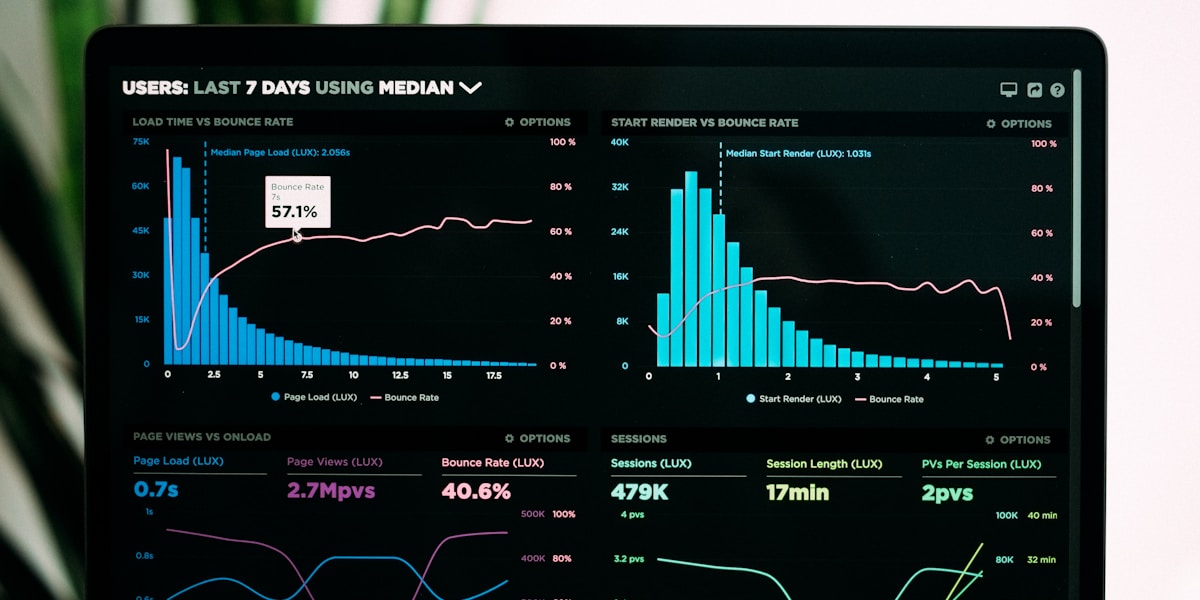
Image Suggestion: Analytics dashboard showing ecommerce metrics for migration planning
Key Questions to Answer
What are your non-negotiable requirements?
List must-have features. Payment gateways, shipping integrations, inventory management, multi-currency—whatever your business specifically requires.
What's your budget including hidden costs?
Platform fees are just the start. Consider migration tools, developer hours, theme redesign, app replacements, and post-launch optimization.
How much technical expertise do you have?
Be honest about in-house capabilities. Some platforms require more technical care than others. Choose accordingly.
What's your timeline?
Set realistic expectations. Rushed migrations cause mistakes. But extended timelines cost money too. Find your balance.
Choosing Your New Platform
Major platforms to consider. Each has strengths and weaknesses—match to your specific needs.
Shopify – Best for most businesses. Excellent balance of power and simplicity. Massive app ecosystem. Great for growth.
BigCommerce – Strong for mid-market. Good openSaaS flexibility without full headless complexity.
WooCommerce – Best for budget-conscious. WordPress integration, but requires more maintenance.
Due Diligence Checklist
- ✓ Test free trial if available
- ✓ Talk to current customers
- ✓ Review support quality
- ✓ Check app ecosystem
- ✓ Research migration support
Step 2
Pre-Migration Preparation
Get everything ready before you touch a single piece of data.
📸 Step 1: Complete Backup
Before anything else, create a complete backup of your current site. Database, files, images, everything. Store it in multiple locations. This is your safety net.
- Database (products, customers, orders)
- Product images and files
- Theme and customization code
- Configuration settings
- Marketing content (emails, promos)
📊 Step 2: Document Current State
Before things change, record what works now. This becomes your reference point and helps identify issues later.
Screenshot key pages
Record analytics
List integrations
Document workflows
🔗 Step 3: Inventory All Integrations
Every app, service, and external connection must be accounted for. Some migrate automatically—others need manual attention.
Common integrations: Payment processors, shipping apps, email marketing, CRM, analytics, reviews, loyalty programs, fulfillment
🏷️ Step 4: SEO Audit
Your search rankings are precious. Document everything before migration so you can protect—and improve—them.
Keyword rankings
Sitemap URLs
Index page count
Backlink inventory
📅 Step 5: Set Migration Window
Choose your migration timing strategically. Low-traffic periods minimize risk and customer impact.
✓ Weekdays 2-4am
✓ Sunday nights
✓ Holiday lows
✗ Black Friday
✗ Cyber Monday
Step 3
Data Migration Essentials
Moving your data is the most critical—and risky—part. Get it right.
Data Types and Migration Methods
Products
Complex data requires careful handling. Products have variants, images, descriptions, metadata, pricing tiers, inventory levels, SEO content.
Migration method: CSV import or automated tool + manual verification
Customers
Customer data is precious but tricky. Different platforms store data differently. Passwords may not transfer directly.
Migration method: Export/import with password reset emails
Orders
Historical orders are valuable but complicated. Different status systems, fulfillment states, payment records.
Migration method: Full history recommended for 12+ months
Content
Pages, blog posts, static content. Often overlooked but critical for SEO and customer experience.
Migration method: Copy/paste or feed with HTML preservation
⚠️ Critical Data Preservation Rules
- Always test with a small data subset first before full migration
- Verify every import against source data before proceeding
- Keep original data backed up until 100% verified
- Document your data mapping decisions
- Assume something will go wrong—it allows you to fix it quickly
Step 4
The Migration Process
Execute your migration with precision and care.
Phase-by-Phase Migration
Phase 1: Setup New Platform (Week 1)
Install new platform, configure basic settings, set up payment gateways, configure shipping options. Get basic store functional.
Time estimate: 1 week for basic setup
Phase 2: Theme & Design (Weeks 2-3)
Install theme, customize appearance to match old site (or improve it), set up navigation and menus.
Time estimate: 1-2 weeks
Phase 3: Data Migration (Week 3-4)
Move all data—products, customers, orders, content. Verify each data type. Fix issues as discovered.
Time estimate: 1-2 weeks with verification
Phase 4: Apps & Integrations (Week 4)
Install and configure required apps. Connect external services. Test each integration thoroughly.
Time estimate: 1 week
Phase 5: Testing (Week 5)
Comprehensive testing of everything. Don't rush this—bugs after launch are costly to fix.
Time estimate: 1 week minimum
Phase 6: Launch (Week 6)
Switch DNS, go live, monitor closely. Have team ready to respond to issues immediately.
Time estimate: 1 day for execution
⏱️ Typical Timeline: 6-10 weeks
Small stores can migrate faster (4-6 weeks). Large catalogs with complex data or custom integrations take longer (8-12 weeks). Plan accordingly and add buffer—it's always slower than expected.
Step 5
Testing & Quality Assurance
Testing isn't optional—it's where you find problems before customers do.
Testing Checklist
✅ Complete Purchase Flow
Test: Add to cart → Checkout → Payment → Confirmation
✅ Product Pages
Every product displays correctly with images, pricing, inventory
✅ Customer Accounts
Login, edit profile, view order history
✅ Search Function
Search returns accurate results
✅ Mobile Experience
Phone and tablet functionality
✅ Payment Processing
Every payment method works
✅ Email Flows
Order confirmations, shipping updates
Testing Tools
🔍 Browser Testing
Test on Chrome, Firefox, Safari, Edge
📱 Device Testing
Test real devices—not just emulators
👥 Beta Testers
Let trusted customers test early
🔄 Automation
Automated regression testing for repeatability
📊 Performance
Page speed testing throughout site
♿ Accessibility
WCAG compliance checking
Step 6
Launch & Monitoring
Going live is just the beginning. Stay vigilant.
Image Suggestion: Monitoring dashboard with real-time analytics
Launch Day Checklist
DNS Update
Switch domain to point to new platform
Visual Verification
Confirm entire site renders correctly
Analytics Verification
Real-time tracking working
Test Purchase
Make a real purchase to verify entire flow
Customer Notification
Announce migration to customers
On-Call Team
Support team ready for issues
Post-Launch Monitoring (72 hours)
Critical Issues
Fix immediately: Payment failures, cart breaks, 500 errors
Traffic Monitoring
Check that traffic flows normally after migration
Support Volume
Watch for support spike—common after migration
Conversion Tracking
Compare to pre-migration baseline
Avoid These
Common Migration Mistakes
Learn from others' failures so you don't repeat them.
Mistake #1: Skipping the Backup
What happens: Migration fails, data is corrupted, you have no recourse.
✅ Always backup before touching anything
Mistake #2: Rushing Testing
What happens: Bugs reach customers, damage trust, cause support flood.
✅ Test comprehensively with checklist AND real-world scenarios
Mistake #3: Ignoring SEO
What happens: Rankings drop immediately, traffic crater, revenue follows.
✅ Preserve URLs, update redirects, monitor rankings post-launch
Mistake #4: No Rollback Plan
What happens: Critical failure, no way to restore, extended downtime.
✅ Have instant rollback capability prepared
Mistake #5: Underestimating Time
What happens: Rushed execution, mistakes, weekend war rooms.
✅ Add 25-50% buffer to timeline estimates
Mistake #6: Forgetting Integrations
What happens: Shipments break, email stops, analytics wrong.
✅ Inventory every integration and test each post-launch
Your Migration Success Checklist
Before going live, verify every item.
Complete backup of current site
New platform fully configured
All products migrated and verified
All customers migrated
All orders history preserved
URL redirects configured
Payment gateways working
Complete purchase flow tested
Rollback plan ready
Monitoring team on standby
Start Planning
Be Prepared
Pre-Launch SEO Checklist
Protect your search rankings during and after migration.
Before Migration
✓ Export URL List
Every page URL currently indexed
✓ Document Meta Data
Title tags, meta descriptions for all pages
✓ Crawl Backlinks
Know who's linking to you
✓ Sitemap Audit
Current sitemap structure
After Migration
✓ Verify Redirects
Every old URL redirects properly
✓ Submit New Sitemap
Google Search Console update
✓ Monitor Rankings
Daily for first 2 weeks
✓ Fix 404 Errors
Immediately address broken links
Comparison
Platform to Platform Migrations
Common migration paths and what to expect.
Magento → Shopify/BigCommerce
One of the most common migrations. Simplifies operations significantly but requires careful data mapping. Lose Magento's flexibility but gain easier management.
Common
6-10 weeks
Complex
Shopify → Shopify (Plus Migration)
Upgrading within Shopify ecosystem. Generally smooth but requires app reassessment and theme rebuild. Less risky than cross-platform.
Common
3-6 weeks
Moderate
WooCommerce → Shopify
Moving to managed platform. Loses WordPress flexibility but gains stability and support. Product migration is straightforward.
Common
4-8 weeks
Moderate
Custom/Headless → SaaS
Moving from custom build to platform. Significantly reduces development costs but may lose flexibility. Evaluate if features are worth trade-off.
Less Common
6-12 weeks
Complex
Shopify → WooCommerce
Going from managed to self-hosted. Gains flexibility but increases maintenance burden. Only recommended if you have strong technical resources.
Rare
8-12 weeks
Complex
After Launch
Post-Migration Optimization
Now that you're live, make improvements.
Week 1-2: Stabilization
Focus on fixing issues as they arise. Monitor analytics constantly. Respond to customer feedback.
Fix bugs daily
Monitor traffic
Track orders
Week 3-4: Optimization
Now that things are stable, start improving. Page speed, conversion rate, user experience enhancements.
Speed improvements
A/B testing
UX improvements
Month 2+: Growth
With infrastructure solid, focus shifts to growth. New features, marketing, expansion strategies.
New products
Marketing campaigns
New channels
Investment
Migration Cost Breakdown
What to budget for a successful migration.
New Platform
$50-500/mo
Monthly subscription
Development
$2-10K
Setup & customization
Data Migration
$500-3K
Tools or services
Design Theme
$0-5K
New theme or custom
💰 Typical Total Investment
Small store: $3,000-8,000 | Mid-market: $8,000-25,000 | Enterprise: $25,000-100,000+
Budget extra for things go wrong—they usually do a little. Add 20% contingency.
Frequently Asked Questions
How long does ecommerce migration take?
Small stores: 4-6 weeks. Medium: 6-10 weeks. Large catalogs or complex setups: 10-16 weeks. Plan for delays.
Will migration hurt my SEO?
Not if done properly. Protect SEO with URL redirects, preserve metadata, update search console. Some ranking fluctuation is normal for 2-4 weeks.
Can I do migration myself?
Small, simple stores can manage with platform tools. Larger stores or those with lots of data should hire help. Mistakes are expensive.
What happens to my customer data?
Customer information migrates but passwords may not transfer. Plan for password reset emails. Order history should migrate completely.
Can I migrate during busy season?
Best to avoid. Holiday seasons are worst times. Plan 1-2 months before Black Friday or during summer slumps.
More useful paths
Use these paths to continue with the closest practical topic, service, or decision guide.
- TopicEcommerce article library
- ArticlePlatform Migration: A Complete Strategy Guide
- ArticleEcommerce Website Development Services Build Stores That Convert & Scale
- ArticleEcommerce Web Design Services That Actually Convert
- ArticleElectronics E-commerce SEO Compete in a Crowded Market
- ServiceCMS Migration Services
Pro Pixel Agency
Want this done for you? Try our your website free.
Send a sample, get the finished result back, and only then decide. Clear prices, no commitment.