The complete story of Photoshop from its origins as a university project in 1987 to becoming the world most powerful and ubiquitous image editing software, covering every major version milestone and industry transformation
?? Quick Navigation: This guide covers the complete history of Adobe Photoshop from its invention by Thomas and John Knoll in 1987, through every major version release, the evolution of features, the impact on digital photography and design, and the future of Adobe flagship creative software.
?? The Birth of Photoshop: 1987 to 1990
The story of Adobe Photoshop begins in 1987 when Thomas Knoll, a PhD student at the University of Michigan, began writing a computer program on his Macintosh Plus to display grayscale images on monochrome displays, creating a simple image processing utility that would eventually evolve into the most famous graphics software in the world. Thomas Knoll initial program called Display caught the attention of his brother John Knoll, who worked at Industrial Light and Magic and recognized the commercial potential of Thomas image processing tools for the emerging desktop publishing and digital imaging markets that were beginning to transform the graphics industry in the late 1980s. The collaboration between the Knoll brothers led to the development of a more sophisticated image editing application that they initially named ImagePro, but later renamed to Photoshop after discovering that the name ImagePro was already trademarked by another software company, with the Photoshop name becoming one of the most recognized brand names in software history. The pivotal moment in Photoshop history came in 1988 when John Knoll demonstrated the software to Adobe executives at their headquarters in San Jose, California, and after a series of negotiations, Adobe agreed to license and distribute the software, with the first official version of Adobe Photoshop 1.0 shipping in February 1990 exclusively for Macintosh computers. The original Photoshop 1.0 featured essential tools that remain core to the software today including selection tools, painting tools, cloning and retouching capabilities, color adjustments, and the ability to work with multiple file formats, establishing the foundation for the layers, masks, and adjustment systems that would be added in later versions. The initial pricing for Photoshop 1.0 was eight hundred ninety-five dollars, which was considered reasonable for professional graphics software at the time and positioned Photoshop as a more accessible alternative to high-end dedicated imaging systems that cost tens of thousands of dollars and required specialized hardware. The Photoshop 1.0 system requirements were modest by modern standards, requiring a Macintosh computer with a 68020 or 68030 processor, at least 2 megabytes of RAM, and a hard drive for installation, yet the software was capable of professional image editing that had previously required expensive dedicated workstations. The industry reception to Photoshop 1.0 was overwhelmingly positive, with the software quickly becoming the standard for desktop image editing and laying the groundwork for Adobe dominance in the creative software market that would continue for decades through continuous innovation and market expansion. The early development team at Adobe expanded rapidly after the Photoshop 1.0 release, with the Knoll brothers continuing as key contributors while Adobe built the engineering, marketing, and support infrastructure needed to transform Photoshop from a promising new application into the industry standard for professional image editing worldwide. The original vision of the Knoll brothers for Photoshop as a tool that would make professional image editing accessible to anyone with a computer was realized beyond their expectations, with Photoshop becoming not just a professional tool but a cultural phenomenon that changed how images are created, edited, and shared across every industry and creative discipline.
?? The Early Years: Photoshop 2.0 Through 4.0
The early development of Photoshop through versions 2.0 to 4.0 established the core features that would define the software for decades to come, with each major release introducing groundbreaking capabilities that expanded the possibilities of digital image editing and cemented Photoshop position as the industry standard. Photoshop 2.0 released in 1991 was a landmark update that introduced the Pen tool for creating precise paths, the first support for CMYK color mode essential for professional print production, and the addition of support for Microsoft Windows computers alongside continued Macintosh development, dramatically expanding the potential user base for the software across different computing platforms. Photoshop 2.5 released in 1992 brought further platform expansion with support for Silicon Graphics workstations, improved color management features, and the introduction of the first third-party plugin architecture through Adobe Photoshop Plugin SDK that would spawn an entire ecosystem of commercial and free extensions extending Photoshop capabilities into virtually every specialized imaging application area. Photoshop 3.0 released in 1994 introduced what many consider the most important feature in Photoshop history, layers, which fundamentally changed how digital images were composed by allowing users to stack and independently edit multiple image elements while maintaining the ability to adjust each layer without affecting others. The introduction of layers in Photoshop 3.0 transformed the software from a powerful image retouching tool into a complete digital composition environment, enabling complex multi-element designs with independent adjustments, effects, and blending modes for each layer that provided creative flexibility previously impossible in digital image editing. Photoshop 4.0 released in 1996 introduced adjustment layers that allowed non-destructive color and tonal adjustments applied through layers that could be edited or removed at any time without permanently altering the underlying image data, representing a major shift toward the non-destructive editing philosophy that would become central to professional image editing workflows. Photoshop 4.0 also introduced the Actions palette and batch processing capabilities that allowed users to record and replay sequences of commands, automating repetitive editing tasks and dramatically improving workflow efficiency for photographers and designers who needed to apply consistent edits across large numbers of images. The user interface evolution through these early versions gradually expanded from the original minimalist tool palette to include floating palettes, customizable toolbars, and the tabbed document interface that provided more efficient access to the growing array of features and tools being added with each major release. The market dominance of Photoshop during this period was challenged by competitors like Corel Photo-Paint and Macromedia xRes, but Adobe consistent innovation with each major release, combined with the expanding third-party plugin ecosystem, created a network effect that made Photoshop increasingly indispensable for professional image editing work. The early version adoption patterns showed Photoshop transitioning from its initial base of graphic designers and desktop publishers to encompass photographers, prepress professionals, and multimedia creators, establishing the broad user base that would support Photoshop continued growth and development through future decades. The historical significance of these early versions extends beyond their technical features to include the establishment of Photoshop as a platform for creative expression rather than merely a utility tool, with artists and designers pushing the boundaries of what was possible with digital image editing and inspiring the continuous innovation that has characterized Photoshop development throughout its history.
?? Photoshop 5.0 Through 7.0: The Digital Photography Revolution
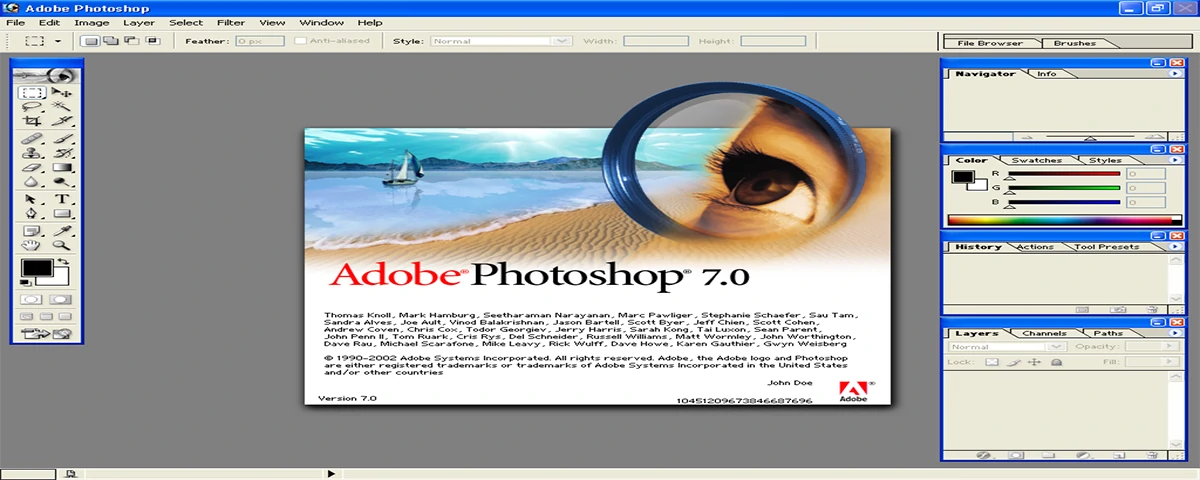
The release cycle from Photoshop 5.0 through 7.0 coincided with the digital photography revolution as affordable digital cameras became widely available to consumers and professionals, and Adobe responded by adding features specifically designed for digital photography workflows that transformed Photoshop from a design-centric tool into an essential component of every photographer digital workflow. Photoshop 5.0 released in 1998 introduced the History palette that allowed users to undo and redo multiple previous actions, the Magnetic Lasso tool for easier selections, and most significantly for photographers, the ability to edit images in 16-bit color depth that preserved the full tonal range captured by professional digital cameras for higher quality editing results. Photoshop 5.5 released in 1999 was the first version to include Adobe ImageReady, a web graphics optimization companion application that provided GIF animation creation, image slicing for web layouts, and advanced web export options that reflected the explosive growth of the internet and the need for tools specifically designed for web graphics production. Photoshop 6.0 released in 2000 introduced a completely redesigned user interface with context-sensitive options bar, vector shape tools that allowed creation of resolution-independent graphics within Photoshop, and significant text engine improvements including paragraph and character palettes that made Photoshop a more capable tool for layout and typography work. Photoshop 7.0 released in 2002 introduced the Healing Brush and Patch Tool, which were revolutionary for photo retouching by intelligently blending repaired areas with surrounding image content, making it possible to remove blemishes, wrinkles, and unwanted objects with unprecedented ease and natural-looking results. The Healing Brush in Photoshop 7.0 represented a major advancement in image processing technology, using sophisticated algorithms to analyze the texture, lighting, and shading of the source area and apply them to the target area in a way that matched the surrounding image content far better than the cloning techniques used in previous versions. Photoshop 7.0 also introduced the File Browser that provided thumbnail previews, metadata viewing, and basic file management within Photoshop, laying the groundwork for the Bridge and Lightroom applications that would later expand Adobe digital asset management capabilities for photographers and designers. The digital camera RAW file support was introduced during this era through the Adobe Camera Raw plugin that allowed Photoshop to directly open and process the RAW files from digital cameras, preserving the maximum image quality and editing flexibility that photographers required for professional digital workflow integration. The growing importance of Photoshop for photographers during this period was reflected in Adobe marketing and development priorities, with photo editing features receiving increasing attention alongside the traditional graphic design and print production capabilities that had defined Photoshop in its earlier years. The professional photography market became a major driver of Photoshop development during this era, with features like lens correction, noise reduction, and advanced color management being added in response to the specific needs of photographers transitioning from film to digital workflows. The plugin ecosystem continued to expand dramatically during this period, with companies like Nik Software, Alien Skin, and onOne Software creating specialized plugins for photographic effects, film simulation, and workflow automation that extended Photoshop capabilities far beyond its built-in features and created a vibrant third-party marketplace around the software.
?? Photoshop CS Through CS6: The Creative Suite Era
The Creative Suite era from 2003 to 2012 represented a period of major technical innovation and market expansion for Photoshop, with the software being integrated into the broader Adobe Creative Suite of applications and benefiting from cross-application integration, significant performance improvements, and features that addressed the needs of an increasingly diverse and sophisticated user base. Photoshop CS, released in 2003 as part of the first Adobe Creative Suite, introduced the improved Camera Raw plugin with batch processing capabilities, the Shadow and Highlight adjustment command that revolutionized recovery of detail from extreme shadows and highlights, and the Filter Gallery that organized filters in a browsable interface for easier discovery and application. Photoshop CS2 released in 2005 introduced the Spot Healing Brush that automated the healing brush process by automatically sampling surrounding image content, the Red Eye tool for quick correction of flash photography red eye, and the Vanishing Point filter that allowed clone stamping and painting in perspective, representing a major advancement in realistic image manipulation. Photoshop CS3 released in 2007 introduced significant performance improvements through native support for Intel Mac processors, the Quick Selection tool that used advanced algorithms to make selections by painting over areas, and the Auto-Align and Auto-Blend layers that could automatically combine multiple images into panoramas or composite images with consistent exposure and focus throughout. Photoshop CS4 released in 2008 redesigned the application interface with a unified tabbed document window, introduced Content-Aware Scaling that could automatically resize images while preserving important content areas, and added the Masks and Adjustments panels that streamlined the creation and management of layers and adjustments. Photoshop CS5 released in 2010 introduced Content-Aware Fill, one of the most celebrated features in Photoshop history, which could intelligently fill selected areas with matching content from surrounding image areas, making object removal and image repair dramatically faster and more effective than previous manual techniques. Photoshop CS6 released in 2012 introduced the Content-Aware Patch and Move tools that extended the content-aware technology to new applications, the redesigned interface with dark theme option, improved video editing capabilities, and significant performance improvements through Mercury Graphics Engine that provided smooth, responsive editing even with large, complex documents. The Creative Suite subscription model was introduced during this period alongside traditional perpetual licensing, foreshadowing Adobe eventual transition to the Creative Cloud subscription model that would fundamentally change how users access and pay for Photoshop and other Adobe applications. The 64-bit support introduced during the CS era allowed Photoshop to access more system memory, enabling work with larger documents and more complex compositions that were increasingly common as digital camera resolutions continued to increase and design projects grew in scale and complexity. The GPU acceleration through the Mercury Graphics Engine in CS6 represented a major technical milestone, leveraging graphics card processing power to deliver smooth real-time editing performance for transformations, effects, and 3D features that had previously required significant processing time and caused application lag during complex operations. The cross-application integration within the Creative Suite allowed seamless workflows between Photoshop and Illustrator, InDesign, After Effects, and other Adobe applications, with features like copy and paste between applications, consistent file format support, and shared color management creating an integrated creative ecosystem that strengthened Adobe market position across the entire creative software industry.
?? Photoshop CC: The Creative Cloud Transformation
The transition to Adobe Creative Cloud in 2013 represented the most significant change in Photoshop history since its original release, shifting from the traditional perpetual license model where users purchased a version and owned it indefinitely to a subscription model where users pay a monthly or annual fee for continuous access to the latest features, updates, and cloud services. The initial Creative Cloud version of Photoshop released in June 2013 represented a major milestone as the first version available exclusively through subscription, eliminating the option to purchase a perpetual license and requiring users to maintain active subscriptions to continue using the software, a change that generated significant controversy in the creative community despite the benefits of continuous updates and lower initial cost of entry. The continuous update model of Creative Cloud transformed Photoshop development from the traditional eighteen to twenty-four month major release cycle to a continuous stream of feature updates delivered throughout the year, with Adobe releasing multiple significant updates annually that added new capabilities, improved performance, and addressed user feedback much faster than the traditional release cycle allowed. The cloud-centric features introduced with Creative Cloud included cloud storage for work files, libraries for sharing assets across Adobe applications and devices, synchronization of preferences and settings across multiple computers, and integration with Adobe mobile apps that extended the Photoshop ecosystem beyond the desktop application. The significant feature additions during the Creative Cloud era include the introduction of Artboards for multi-page and multi-screen design in 2015, the transformative Select and Mask workspace for precise selections, Face-Aware Liquify for portrait retouching, and the dramatic improvement of the Content-Aware capabilities with Content-Aware Crop that could automatically fill areas created by image rotation or expansion. The transformative Neural Filters introduced in 2021 represented Adobe investment in artificial intelligence and machine learning technologies, with AI-powered filters that could automatically colorize black and white photos, apply realistic skin smoothing, change facial expressions, match color grades between images, and perform sophisticated image manipulations that would have required extensive manual effort in previous versions of the software. The iPad version of Photoshop released in 2019 brought genuine Photoshop capabilities to mobile devices for the first time, with a touch-optimized interface that included core Photoshop tools, layers, masks, and integration with the desktop version through Creative Cloud synchronization that allowed seamless movement between desktop and mobile editing workflows. The collaboration and review features added during the Creative Cloud era include co-editing capabilities that allow multiple users to work on the same document simultaneously, cloud document version history, and integration with frame.io for video review workflows that reflect the increasing importance of collaboration in modern creative production environments. The subscription model economic impact on users has been mixed, with the lower initial cost of entry making Photoshop accessible to users who could not afford the traditional upfront purchase, while long-term users who previously owned perpetual licenses now pay ongoing subscription fees that may exceed the cost of previous upgrade cycles over extended periods of use. The Creative Cloud ecosystem expansion through complementary mobile apps including Photoshop Express, Photoshop Camera, Adobe Fresco, and Adobe Capture extended the Photoshop brand and capabilities across multiple platforms and use cases, with features like Photoshop Camera using AI to apply realistic photographic effects in real-time through smartphone cameras. The developer platform and API expansion through Creative Cloud SDKs and integrations allowed third-party developers to create plugins and extensions that integrate deeply with the Photoshop document model and user interface, continuing and extending the plugin ecosystem that has been a cornerstone of Photoshop value proposition throughout its history.
?? Photoshop Impact on Photography and Image Culture
The cultural impact of Photoshop extends far beyond its technical capabilities as a software application, fundamentally changing how society creates, consumes, and thinks about photographic images in ways that have influenced journalism, advertising, fashion, social media, and personal expression across every level of visual culture. The democratization of image editing through Photoshop made professional-quality photo retouching accessible to anyone with a computer, breaking the monopoly of specialized photo labs and professional retouchers and enabling millions of people to edit their own photographs with tools that previously required years of specialized training and expensive equipment. The Photoshop effect on beauty standards and body image has been extensively studied and debated, with the ability to digitally alter body shapes, skin textures, and facial features in advertising and media creating unrealistic beauty standards that have been linked to negative body image and mental health issues, leading to increased calls for transparency about image retouching in advertising and publishing. The journalism and documentary ethics challenges posed by Photoshop capabilities have forced news organizations to develop strict policies about acceptable image editing for news photography, with rules against content manipulation that changes the factual accuracy of news images while allowing standard darkroom-type adjustments for exposure, color, and cropping that do not alter the essential truth of photographic content. The fashion and advertising industry transformation through Photoshop enabled a level of visual perfection in commercial imagery that was previously impossible, with model retouching, composite imagery, and digital background creation becoming standard practice across fashion, beauty, and luxury advertising to create the idealized images that define modern brand communications. The social media and personal photography revolution powered by accessible editing tools including Photoshop and its mobile derivatives has created a culture where edited images are the norm rather than the exception, with filters, adjustments, and retouching being applied to the majority of images shared on social platforms as part of everyday visual communication. The creative and artistic movements enabled by Photoshop include digital art forms like photo manipulation, digital painting, photobashing, and composite photography that exist entirely because of the capabilities Photoshop provides, creating entirely new genres of visual art that did not exist before digital image editing software. The Photoshop vocabulary and concepts have entered the cultural lexicon, with the term photoshopped becoming a generic verb for any digitally altered image, and core Photoshop concepts like layers, masks, filters, and blending modes becoming part of the basic visual literacy for anyone who works with digital images in any capacity. The legal and copyright implications of Photoshop technology have created new areas of intellectual property law around image manipulation, digital rights management, and the ownership of derivative works created through sophisticated editing techniques that combine multiple source images into new creative compositions. The Photoshop impact on traditional photography professions created both disruption and opportunity, with some photography specialties like product and catalog photography being significantly reduced by digital compositing while new specialties like digital retouching, photo manipulation, and visual effects emerged as distinct career paths. The ongoing debate about authenticity in the age of digital editing continues to evolve as AI-powered editing tools become more sophisticated and accessible, raising new questions about the nature of photographic truth and the boundaries between enhancement, manipulation, and creation that Photoshop first brought to public consciousness in the early days of digital image editing.
?? Technical Evolution: From Pixels to AI-Powered Editing
The technical evolution of Photoshop from its original pixel-based editing engine to the AI-powered creative platform of today represents one of the most significant software development achievements in computing history, with each generation of technical infrastructure enabling new capabilities that were previously unimaginable for desktop image editing software. The original Photoshop engine was built around a pixel-based rendering pipeline that directly manipulated the color values of individual image pixels, with the early versions operating entirely in RAM and limiting practical image sizes to the amount of memory available in the computer, typically 2 to 8 megabytes in the early 1990s. The introduction of scratch disk technology allowed Photoshop to use hard drive space as virtual memory when processing images larger than available RAM, enabling work with significantly larger documents by temporarily storing image data on disk and swapping it in and out of memory as needed for different operations. The color management infrastructure developed over multiple versions created a sophisticated color processing pipeline that could accurately convert between different color spaces, maintain color consistency across different devices, and provide soft proofing that simulated how images would appear when printed on specific printers or displayed on particular monitor types. The layer compositing engine evolved from the simple layer stacking in Photoshop 3.0 to support complex blend modes, layer styles, adjustment layers, smart objects, and layer groups that provided sophisticated non-destructive editing capabilities while maintaining the interactive performance that users expected for responsive editing experiences. The brush engine evolution from simple paint tools to complex natural-media simulation systems included support for pressure sensitivity, brush dynamics, dual brushes, and texture blending that enabled digital painting with unprecedented realism, making Photoshop a serious tool for digital artists who previously worked with dedicated painting applications. The selection technology progression from basic geometric shapes and magic wand to sophisticated tools like the Quick Selection tool, Refine Edge, Select and Mask workspace, and AI-powered object selection reflects the increasing sophistication of image analysis algorithms integrated directly into Photoshop over its development history. The Camera Raw processing engine evolved alongside digital camera technology, with each new version adding support for new camera models, improving image quality through better demosaicing algorithms, and adding advanced processing controls like highlight recovery, shadow enhancement, clarity, dehaze, and color grading tools that rivaled dedicated RAW processing applications. The 3D capabilities introduced and later deprecated in Photoshop demonstrated the challenges of extending a primarily 2D image editing application into the third dimension, with 3D features being removed from Photoshop in 2022 as Adobe focused development resources on core 2D editing capabilities and integrated with dedicated 3D applications through the Creative Cloud ecosystem. The GPU acceleration infrastructure through the Mercury Graphics Engine and subsequent improvements transformed Photoshop performance for real-time operations, with modern versions leveraging graphics card processing power for smooth canvas rendering, fast filter application, and responsive transform and warp operations even with enormous multi-layer documents. The machine learning and AI infrastructure represented by Adobe Sensei and the neural processing framework powers features like Neural Filters, automatic subject selection, sky replacement, and pattern generation that leverage deep learning models trained on millions of images to automate complex editing tasks that previously required significant manual skill and time investment.
?? Photoshop Competitors and Market Landscape
Throughout its history, Photoshop has faced competition from numerous image editing applications, with the competitive landscape evolving from early desktop publishing rivals to modern cloud-based and AI-powered alternatives that challenge Adobe dominance in specific market segments through different business models and technical approaches. The early competitors including Corel Photo-Paint, Micrografx Picture Publisher, and Macromedia xRes offered similar capabilities at various price points but could not match Photoshop combination of features, performance, and industry adoption that created network effects through training, third-party plugins, and the vast ecosystem of tutorials and resources built around the Adobe platform. The professional photography competition from applications like Capture One, DxO PhotoLab, and ON1 Photo RAW has focused on providing superior RAW processing quality, specialized photographic workflow tools, and in some cases one-time purchase pricing that appeals to photographers who prefer to avoid subscription costs while getting tools specifically optimized for photographic workflow rather than general design and image editing. The free and open source alternative GIMP, the GNU Image Manipulation Program, has provided a capable free alternative to Photoshop since 1998, with a similar feature set for many common image editing tasks, though GIMP has historically lagged behind Photoshop in professional features, color management, plugin ecosystem, and user interface polish that have limited its adoption in professional creative workflows. The web-based and cloud image editing alternatives including Photopea, Pixlr, and Canva have gained significant market share by providing accessible image editing capabilities directly in web browsers without software installation, with Canva particularly successful in the casual design and social media content creation market through its template-based approach and ease of use that appeals to non-professional users who do not need Photoshop full capabilities. The mobile image editing apps including Adobe Lightroom Mobile, Snapseed, and VSCO have captured the growing mobile photography editing market with touch-optimized interfaces and AI-powered enhancement tools that provide impressive results with minimal user effort, serving a different use case than Photoshop desktop application but extending the overall image editing market. The Affinity Photo from Serif has emerged as the most credible professional Photoshop alternative, offering a one-time purchase pricing model with features and performance that rival Photoshop for most professional image editing tasks, along with iPad support and integration with Affinity Designer and Affinity Publisher for a complete creative suite alternative. The AI-powered editing tools like Luminar Neo from Skylum have differentiated through AI-first approaches that automate complex editing tasks like sky replacement, portrait enhancement, and creative effects through machine learning algorithms that require minimal user input for impressive results, appealing to photographers who prioritize speed and ease of use over complete creative control. The market segmentation has allowed Photoshop to maintain dominance in professional design and complex image editing while competitors capture specific niches through specialization, different pricing models, or platform-specific advantages that address the needs of users who do not require the full breadth of Photoshop capabilities for their work. The Adobe strategy for maintaining market dominance has included continuous innovation, ecosystem integration through Creative Cloud, aggressive pricing for students and educational institutions, and the development of complementary applications like Lightroom and Adobe Camera Raw that address specific user segments within the broader image editing market. The future competition landscape will be shaped by AI technology development, cloud computing advances, and changing user expectations about software ownership and pricing models, with Photoshop needing to continue innovating to maintain its position against increasingly sophisticated competitors and changing market dynamics in the creative software industry.
?? Key People in Photoshop Development History
The development of Photoshop over more than three decades has been shaped by numerous talented engineers, designers, product managers, and executives whose contributions have defined the software capabilities, direction, and culture across different eras of its evolution from a university project to a global creative platform. Thomas Knoll, the original creator of Photoshop, continued as a key developer and technical leader throughout the software evolution, contributing to core imaging algorithms, Camera Raw development, and maintaining the technical foundation that has supported Photoshop continuous growth through every major version and technical transition. John Knoll, who recognized the commercial potential of his brother program and negotiated the Adobe partnership, went on to a distinguished career at Industrial Light and Magic where he contributed to visual effects for major films while continuing to consult on Photoshop development and serving as a bridge between the software development and professional creative communities. The original Adobe Photoshop engineering team including Mark Hamburg, Kevin Johnston, and Russell Brown built the professional infrastructure, marketing strategy, and community relationships that transformed Photoshop from a promising technology into the industry standard, with Russell Brown becoming a legendary figure in the Photoshop community through his training, presentations, and advocacy for the software. The product management leadership including Bryan O'Neil Hughes, Stephen Nielson, and John Loiacono guided Photoshop strategic direction through the Creative Suite era and the transition to Creative Cloud, making decisions about feature priorities, platform support, and business model evolution that shaped the modern Photoshop product. The engineering teams across Adobe worldwide have contributed thousands of features, optimizations, and innovations across every area of the software, with contributions from developers in San Jose, Seattle, Noida, and other Adobe offices collaborating on the complex codebase that has grown from thousands to millions of lines of code over Photoshop development history. The design and user experience teams have shaped the Photoshop interface evolution from the original tool palette through the modern adaptive workspace, with each generation of interface design reflecting contemporary design trends while maintaining the efficiency and discoverability that professional users require for productive daily work. The community educators and influencers including Scott Kelby, Deke McClelland, Julieanne Kost, and Colin Smith have created the educational infrastructure that has trained millions of users through books, tutorials, training videos, and live events, building the global Photoshop knowledge base that has been essential to the software widespread adoption across every industry. The third-party developer ecosystem built by companies like Wacom for tablet support, Nik Software for creative filters, Flaming Pear for specialized effects, and hundreds of other plugin developers extended Photoshop capabilities into every conceivable niche of digital imaging, creating the rich plugin ecosystem that has been a key competitive advantage for the platform. The Adobe executives including John Warnock and Charles Geschke as Adobe founders, and Bruce Chizen and Shantanu Narayen as CEOs during Photoshop growth years, made strategic decisions about acquisition, investment, and business model evolution that shaped Photoshop trajectory within Adobe broader corporate strategy. The open source and community developers who created plugins, scripts, extensions, and educational resources demonstrated the power of the Photoshop platform ecosystem to attract and enable creative contributions from users worldwide, building the community that has sustained Photoshop cultural relevance and continuous improvement through collaborative knowledge sharing and creative innovation.
?? The Future of Photoshop: AI, Cloud, and Beyond
The future of Photoshop is being shaped by several transformative technologies and market trends that will determine how the software evolves in the coming years, with artificial intelligence, cloud computing, collaboration features, and changing user expectations driving development priorities and platform direction for the next generation of creative tools. The generative AI integration using technologies like Adobe Firefly represents the most significant transformation in Photoshop capabilities since the introduction of layers, with AI-powered tools that can generate new image content from text descriptions, intelligently expand images beyond their original boundaries, remove or replace objects with simple text prompts, and create variations of existing images that maintain consistent style and quality for rapid creative exploration. The cloud-native computing evolution for Photoshop will likely deepen the integration between desktop, mobile, and web versions of the software, with cloud processing capabilities enabling complex operations on any device regardless of local computing power, seamless synchronization of work across all devices, and collaborative editing features that allow multiple creators to work on the same document simultaneously in real time. The web-based Photoshop version that Adobe has been developing represents a strategic expansion of the platform to users who cannot or prefer not to install desktop software, with a browser-based Photoshop experience that includes core editing capabilities accessible from any computer with an internet connection, lowering barriers to entry and expanding the addressable market for Adobe creative tools. The video and motion graphics capabilities in Photoshop have been gradually expanding and are likely to continue evolving, with Photoshop serving as a bridge between static image editing and video production that allows designers to work with both media types within the same application environment for integrated creative workflows. The 3D and spatial computing capabilities will become more important as augmented reality, virtual reality, and spatial computing platforms like Apple Vision Pro create demand for 3D content creation tools, with Photoshop likely to evolve capabilities for creating and editing textures, materials, and assets for 3D and spatial content alongside traditional 2D image editing. The collaboration and workflow integration features will continue to be a major development focus, with deeper integration with Adobe Frame.io for review workflows, enhanced version management for team projects, and improved APIs that connect Photoshop with enterprise content management and digital asset management systems used by large organizations. The personalization and adaptive learning features using AI will create a Photoshop experience that adapts to individual user workflows, preferences, and skill levels, with the interface automatically presenting the most relevant tools and features for each user editing context and providing contextual guidance that helps users discover and learn new capabilities as they work. The sustainability and efficiency improvements in Photoshop development will focus on reducing the energy consumption of AI processing, optimizing performance for battery-powered mobile devices, and enabling efficient cloud processing that minimizes environmental impact while maintaining the performance and capabilities that professional users require for productive creative work. The pricing and access model evolution will likely include more flexible subscription options, potentially including per-feature or per-use pricing for occasional users who do not need full-time access to the complete Photoshop application, making the software accessible to a broader range of users while maintaining revenue from professional users who depend on Photoshop for their daily work. The open platform strategy that has been a cornerstone of Photoshop success through plugins and extensibility will continue with expanded APIs, improved SDKs, and potentially more open integration with non-Adobe technologies that create new opportunities for third-party developers to extend Photoshop capabilities and connect it with the broader creative technology ecosystem.
?? Photoshop Version History: Release Timeline
The complete version history of Photoshop spans over thirty years of continuous development, with each major release identified by version number during the early years, then transitioning to the Creative Suite numbering system from 2003 to 2012, and finally the Creative Cloud continuous update model that began in 2013 and continues to the present day with regular feature updates throughout each year. The early version releases from 1990 to 2002 included Photoshop 1.0 in 1990, 2.0 in 1991, 2.5 in 1992, 3.0 in 1994 with the groundbreaking layers feature, 4.0 in 1996 with adjustment layers and actions, 5.0 in 1998 with the History palette and magnetic lasso, 5.5 in 1999 with ImageReady web integration, 6.0 in 2000 with vector shapes and redesigned interface, and 7.0 in 2002 with the revolutionary Healing Brush that transformed photo retouching capabilities. The Creative Suite era from 2003 to 2012 included Photoshop CS in 2003 with the Shadow and Highlight command, CS2 in 2005 with the Spot Healing Brush and Vanishing Point, CS3 in 2007 with the Quick Selection tool and improved performance, CS4 in 2008 with Content-Aware Scaling and redesigned tabbed interface, CS5 in 2010 with the transformative Content-Aware Fill, and CS6 in 2012 with Content-Aware Patch and Move tools along with the Mercury Graphics Engine for GPU-accelerated performance. The Creative Cloud versions from 2013 onward have seen continuous feature additions including the CC 2014 release with focus on performance and cloud integration, the 2015 release with Artboards for multi-page design, the 2017 release with improved selection and masking tools, the 2018 release with enhanced brush management and learning resources, the 2019 release with the iPad version launch, the 2020 release with Neural Filters and improved object selection, the 2021 release with AI-powered sky replacement and pattern preview, the 2022 release with improved collaboration features and filter improvements, the 2023 release with generative AI capabilities through Adobe Firefly, and the 2024 release continuing the integration of advanced AI features across the Photoshop platform. The industry-specific editions of Photoshop including Photoshop Extended for 3D and video, Photoshop Elements for consumer users, and specialized versions for specific industries have provided tailored versions of the software for different market segments with appropriate feature sets and pricing for each target audience. The language and localization expansion of Photoshop has made the software available in over twenty languages with region-specific features like East Asian typography support, right-to-left text capabilities, and culturally appropriate template and content libraries that serve users worldwide. The architecture and platform transitions including the move from 32-bit to 64-bit processing, the transition from PowerPC to Intel to Apple Silicon processors on Mac, and the evolution from single-threaded to multi-threaded and GPU-accelerated processing have required major engineering efforts to maintain performance and compatibility while taking advantage of advancing hardware capabilities across different platforms. The plugin and extension API evolution from the original plugin SDK through the modern UXP extensibility platform has allowed third-party developers to create increasingly sophisticated extensions that integrate deeply with Photoshop interface and document model, maintaining the vibrant third-party ecosystem that has been essential to Photoshop market leadership throughout its history. The cloud service integration timeline shows the progression from basic online file storage through Adobe Creative Cloud to the current integrated ecosystem of cloud services including cloud documents, libraries, fonts, stock photography, team projects, and AI processing that extend Photoshop capabilities beyond what can be achieved with local computing alone. The security update and bug fix release cycle has become increasingly important as Photoshop has become critical infrastructure for creative businesses, with Adobe maintaining regular security patches and stability updates alongside feature releases to protect users from vulnerabilities and ensure reliable operation in professional production environments.
?? Photoshop in Education and Professional Training
The role of Photoshop in education and professional training has been instrumental in establishing the software as the industry standard for image editing, with educational institutions, certification programs, and training resources creating a global infrastructure for Photoshop learning that has trained millions of users across every creative industry and skill level. The academic adoption of Photoshop in design schools, photography programs, and media arts curricula has made the software the default teaching platform for digital image editing, with students learning foundational concepts like layers, masks, color theory, and compositing through Photoshop exercises that prepare them for professional work across creative industries. The Adobe Certified Professional certification program provides structured validation of Photoshop skills through industry-recognized exams that test proficiency across core competencies, with certification being valued by employers as evidence of practical skills and by professionals as a credential that supports career advancement and client confidence. The educational licensing program for schools and institutions provides discounted access to the entire Creative Cloud suite for educational use, enabling institutions to teach with professional-grade tools while students develop skills directly transferable to professional work without the barrier of full commercial software pricing. The online learning ecosystem for Photoshop has grown to include tens of thousands of tutorials, courses, and learning resources on platforms like LinkedIn Learning, Skillshare, Udemy, Coursera, and YouTube, with content ranging from beginner introductions to advanced professional techniques that serve learners at every skill level and learning preference. The official Adobe training resources including Adobe Help Center documentation, Adobe Learn tutorials, and Adobe Live streaming events provide authoritative learning content directly from the software developers, covering new features, best practices, and expert techniques that help users get the most value from their Photoshop subscription. The community learning resources including Photoshop forums, Facebook groups, Reddit communities, and user groups provide peer support and knowledge sharing that complements formal training, with experienced users helping beginners troubleshoot problems and discover techniques that may not be covered in structured educational content. The books and printed training materials including the Adobe Photoshop Classroom in a Book series, the Photoshop Bible by Deke McClelland, and numerous specialized guides continue to provide comprehensive reference material for users who prefer structured, in-depth learning through traditional publishing formats alongside digital training resources. The corporate and enterprise training programs for organizations deploying Photoshop across their creative teams include customized training sessions, workflow documentation, and ongoing support that ensures teams can use the software effectively and consistently according to organizational standards and workflow requirements. The accessibility of Photoshop training in multiple languages through translated documentation, localized training materials, and international instructor networks has made Photoshop education available to users worldwide regardless of their native language or geographic location, supporting the global adoption that has made Photoshop the universal standard for image editing across all markets and cultures. The continuous learning requirement for Photoshop users reflects the rapid pace of feature development in the Creative Cloud era, with professionals needing to regularly update their skills through ongoing education that keeps pace with new features, updated workflows, and evolving best practices that change as the software continues to evolve through continuous feature releases.
?? Photoshop Industry Applications Across Different Fields
The application of Photoshop across different industries extends far beyond its traditional graphic design and photography markets, with specialized use cases in fields ranging from medical imaging and scientific research to fashion design and forensic analysis demonstrating the versatility and power of Photoshop core image processing capabilities across diverse professional domains. The graphic design and branding industry remains the largest Photoshop user segment, with designers using the software for logo creation, brand identity development, marketing materials, social media graphics, presentation design, and comprehensive visual communication across print and digital media requiring the full range of Photoshop creative capabilities. The photography industry relies on Photoshop for RAW image processing, color correction, retouching, compositing, and output preparation across portrait, wedding, commercial, fashion, architectural, wildlife, and fine art photography specialties, with dedicated features and workflows optimized for each photography genre and professional requirement. The web and UI design industry uses Photoshop for website mockups, user interface designs, app screenshots, icon creation, and web graphics optimization, with features like Artboards, layer comps, and integration with Adobe XD and Figma supporting modern responsive design workflows that span multiple screen sizes and devices. The fashion and textile design industry uses Photoshop for fabric pattern design, color separation, garment visualization, mood board creation, catalog production, and e-commerce image preparation, with specialized tools for pattern repetition, color palette management, and textile-specific effects that support the unique requirements of fashion industry image production. The medical and scientific imaging fields use Photoshop for image analysis, measurement, annotation, and visualization enhancement across radiology, microscopy, astronomy, and research documentation, with features like histogram analysis, measurement tools, and precise color calibration supporting accurate scientific image interpretation and documentation. The architectural and interior design visualization industry uses Photoshop for architectural rendering enhancement, material and texture application, lighting and atmosphere creation, client presentations, and photorealistic scene compositing that transforms basic 3D renders into compelling visualizations of unbuilt spaces. The forensic and law enforcement applications of Photoshop include image enhancement for evidence analysis, surveillance footage improvement, fingerprint visualization, accident scene reconstruction, and courtroom presentation preparation, with specialized plugins and workflows developed specifically for forensic image processing requirements. The publishing and editorial industry relies on Photoshop for cover design, image preparation for print and digital publications, photo editing for editorial content, infographic creation, and advertisement layout that meets the exacting quality and color accuracy standards of professional publishing across magazines, newspapers, books, and digital publications. The entertainment and visual effects industry uses Photoshop for concept art, texture creation, digital matte painting, compositing reference, and production asset preparation for film, television, and game development, with Photoshop serving as a critical tool in the visual development pipeline that supports larger 3D and compositing workflows. The e-commerce and retail industry depends on Photoshop for product photography enhancement, background removal, color correction across product variants, catalog image production at scale, and marketplace-specific image optimization that meets the strict requirements of platforms like Amazon, Walmart, and eBay for product listing images that drive online sales.
?? Photoshop File Format Evolution and Compatibility
The evolution of Photoshop file formats including PSD, PSB, PDF, and TIFF has been essential to the software functionality as a professional image editing platform, with each format supporting different use cases, feature sets, and compatibility requirements that enable Photoshop to serve as a central hub in cross-application creative workflows across the entire creative industry. The PSD format has been the native Photoshop file format since the beginning, supporting layers, masks, adjustment layers, layer styles, smart objects, paths, channels, and virtually every Photoshop feature in a single file that preserves complete editability for future revision while maintaining compatibility with other Adobe applications that can import PSD files with layer information intact. The PSB large document format was introduced to support files larger than 2 gigabytes that the original PSD format could not handle, with PSB supporting documents up to 4 exabytes in size and maintaining compatibility with the PSD feature set while providing the capacity needed for enormous print documents, complex composites, and high-resolution panoramas that exceed standard PSD file size limits. The PDF compatibility in Photoshop allows direct creation and editing of PDF files while maintaining layers and editability, with Photoshop PDF files being compatible with Acrobat and other PDF viewers while preserving Photoshop-specific features that enable future editing when the files are reopened in Photoshop. The TIFF format support in Photoshop provides high-quality output for print production with support for layers, transparency, and multiple color modes, making TIFF the preferred format for professional print workflows where maximum quality and broad compatibility across different applications and operating systems are required. The RAW file format support through Adobe Camera Raw has evolved to support virtually every digital camera RAW format, with DNG being Adobe open RAW format that provides a standardized raw file format designed to ensure long-term access to digital camera raw files regardless of camera manufacturer format changes or software compatibility issues. The cloud document format introduced in the Creative Cloud era saves Photoshop files directly to Adobe cloud storage with automatic version history, collaboration features, and access from desktop, web, and iPad versions of Photoshop, representing a shift from traditional file-based storage to cloud-native document management for seamless cross-device workflows. The legacy format compatibility challenges have increased as Photoshop has evolved, with older versions unable to open files created in newer versions that use features not available in the legacy software, while newer versions maintain backward compatibility for opening files created in any previous version through automatic feature conversion when appropriate. The file format interoperability with non-Adobe applications varies by format and application, with PSD support being available in many competing applications but often with limited layer and feature support that cannot reproduce the complete Photoshop document structure in third-party software environments. The file compression options within Photoshop formats have evolved to balance file size with performance, with compression being essential for managing the enormous file sizes generated by high-resolution documents with multiple layers that can easily reach hundreds of megabytes or gigabytes without proper compression. The format best practices for different workflows include using PSD for active projects requiring full editability, PDF for client proofs and final delivery where broad compatibility is needed, TIFF for print production requiring maximum quality, and JPEG for web and social media distribution where file size efficiency is prioritized over maximum quality and editability.
?? Photoshop Community, Events, and Culture
The global Photoshop community of users, educators, developers, and enthusiasts has created a rich culture around the software through events, competitions, online communities, and shared creative practices that extend far beyond the software itself to encompass a worldwide creative community united by their use of Photoshop as a tool for visual expression and professional communication. The Adobe MAX conference, held annually since 2002, is the premier event for the Photoshop community, bringing together thousands of creative professionals, educators, and enthusiasts for keynote presentations, hands-on training sessions, networking events, and the announcement of major new features that shape the future of Photoshop development direction. The Photoshop World conference organized by the National Association of Photoshop Professionals was for many years the largest dedicated Photoshop training event, creating a community of practice among professional users and establishing training standards and community connections that influenced Photoshop education worldwide through its decades-long run. The online Photoshop communities on platforms like Behance, DeviantArt, and Dribbble provide platforms for users to share their work, discover techniques from other artists, and build professional portfolios that showcase their Photoshop skills to potential clients and employers through curated galleries and community feedback systems. The Photoshop competitions and challenges including design contests, photo manipulation competitions, and retouching challenges on various platforms encourage creative skill development and community engagement, with participants pushing the boundaries of what is possible with Photoshop and inspiring others through their creative achievements and technical innovations. The social media Photoshop communities on Instagram, YouTube, Twitter, and TikTok have created a new generation of Photoshop influencers and educators who share techniques through short-form video content, live streams, and tutorial series that reach millions of users through algorithm-driven content distribution that has democratized Photoshop education and inspiration. The Photoshop plugin and resource marketplaces including Adobe Exchange, Envato Market, Creative Market, and individual developer sites have created a commercial ecosystem around Photoshop where developers sell plugins, brushes, actions, templates, and other resources that extend Photoshop capabilities and provide ready-made solutions for common creative tasks and professional workflows. The local Photoshop user groups and meetups that organize in cities worldwide provide in-person community connections, hands-on learning opportunities, and professional networking that complement online community interactions and create local support networks for Photoshop users at all skill levels. The Photoshop cultural references in movies, television, and media that mention or feature Photoshop as a cultural touchstone reflect the software deep integration into popular culture and public consciousness, with Photoshop having become synonymous with digital image editing in the same way that Google represents web search and Kleenex represents facial tissues in everyday language. The Photoshop meme culture including the Photoshop battles subreddit, intentional bad Photoshop humor, and the widespread sharing of creative and humorous image manipulations demonstrate the playful side of the Photoshop community and the software role in creating shared visual culture and internet humor traditions that extend Photoshop influence beyond professional applications into everyday digital communication. The philanthropic and social impact initiatives within the Photoshop community include design for good movements, nonprofit creative services, and educational outreach programs that use Photoshop skills to support charitable causes, amplify social messages, and provide creative education access to underserved communities worldwide.
?? Frequently Asked Questions About Photoshop History
?? When exactly was Photoshop invented?
Photoshop was first created as a program called Display in 1987 by Thomas Knoll, with the first commercial version Adobe Photoshop 1.0 being released on February 19, 1990, making the software over 35 years old and one of the longest continuously developed creative applications in software history.
?? Who invented Photoshop and why?
Photoshop was invented by brothers Thomas and John Knoll, with Thomas writing the original image processing code for his PhD research at the University of Michigan and John recognizing its commercial potential for the emerging desktop publishing and digital imaging market that was beginning to transform the graphics industry in the late 1980s.
?? What was the first version of Photoshop?
The first commercial version was Adobe Photoshop 1.0 released in February 1990 exclusively for Macintosh computers, featuring essential tools including selection, painting, cloning, color adjustments, and support for multiple file formats, priced at $895 and requiring a Mac with 2MB of RAM and a hard drive.
?? How has Photoshop changed over the years?
Photoshop has evolved from a simple grayscale image display program into an AI-powered creative platform through decades of innovation including the introduction of layers in 1994, adjustment layers in 1996, the Healing Brush in 2002, Content-Aware Fill in 2010, Neural Filters in 2021, and generative AI capabilities in 2023, each representing major milestones in the software evolution.
?? What was Photoshop original name?
Photoshop was originally called ImagePro during early development, but the name was changed before commercial release because ImagePro was already trademarked by another software company, with the name Photoshop being chosen as a combination of photo and shop that clearly communicated the software purpose of image editing.
?? Is Photoshop still relevant in 2025?
Photoshop remains the industry standard for professional image editing in 2025 with continuous innovation through AI-powered features, cloud integration, and expanding platform support including iPad and web versions, maintaining its position as the most comprehensive and widely used image editing application despite increasing competition from specialized and free alternatives.
?? What will Photoshop look like in the future?
The future of Photoshop will be shaped by generative AI integration through Adobe Firefly, deeper cloud computing capabilities for cross-device workflows, enhanced collaboration tools for team creativity, expanded mobile and web platform support, and potentially new pricing models that make the software more accessible while maintaining professional-grade capabilities for creative industry users.
?? Conclusion: The Legacy and Future of Photoshop
The history of Adobe Photoshop from its invention by Thomas Knoll in 1987 to its current position as the world most powerful and widely used image editing software represents one of the most remarkable success stories in software history, with the application fundamentally transforming how images are created, edited, and shared across every industry and creative discipline. The key milestones in Photoshop evolution including the introduction of layers in version 3.0, the Healing Brush in version 7.0, Content-Aware Fill in CS5, and the AI-powered Neural Filters in the Creative Cloud era each represented paradigm shifts in what was possible with digital image editing, expanding the creative possibilities for millions of users worldwide. The cultural impact of Photoshop extends far beyond its technical capabilities, having changed societal expectations about photographic truth, beauty standards, visual communication, and creative expression in ways that continue to evolve as the technology becomes more sophisticated and accessible to broader populations. The business evolution from perpetual licensing to Creative Cloud subscription model transformed Adobe financial performance and software development approach, enabling continuous feature delivery that has accelerated innovation while generating controversy among users who preferred traditional ownership models for their software tools. The future of Photoshop will be defined by generative AI, cloud computing, cross-platform accessibility, and deeper collaboration features that will make the software more powerful and accessible while raising new questions about creativity, authorship, and the role of human skill in an age of increasingly automated creative tools. The enduring relevance of Photoshop after more than three decades reflects the fundamental value of its mission to enable creative expression through powerful, accessible image editing tools, a mission that continues to guide development as Photoshop enters its fourth decade as the world standard for digital image editing. The final perspective on Photoshop history is that the software greatest achievement is not any specific feature or technical capability but the millions of creative projects, professional careers, and personal expressions that it has enabled, making visual communication more accessible and creative potential more achievable for people around the world regardless of their training, budget, or professional status.
?? Explore the Complete Photoshop History
From Thomas Knoll 1987 display program to today AI-powered creative platform, Photoshop journey continues to shape how the world creates and interacts with visual content across every medium and industry.
?? Learn More About Photoshop
?? 2025 Complete History of Adobe Photoshop | All Rights Reserved
This guide provides educational information about the history of Adobe Photoshop. Product names, trademarks, and copyrights are the property of their respective owners. Adobe and Photoshop are registered trademarks of Adobe Inc. in the United States and other countries.
Pro Pixel Agency
Want this done for you? Try our image editing free.
Send a sample, get the finished result back, and only then decide. Clear prices, no commitment.