AI Tools Revolutionizing Productivity and Creativity
In today's fast-paced digital world, artificial intelligence (AI) has become an indispensable ally for professionals, creatives, and everyday users alike.
 Pro Pixel Agency

Table of contents
- Introduction
- What are AI Tools?
- Categories of AI Tools
- 1. Writing Assistants: Revolutionizing Content Creation
- 2. Image Generators: Visual Creativity Unleashed
- 3. Coding Helpers: Accelerating Software Development
- 4. Chatbots and Conversational AI: Interactive Communication
- 5. Data Analysis and Business Intelligence Tools
- 6. Voice and Audio Processing Tools
- 7. Specialized and Emerging Categories
- Benefits of Using AI Tools
- 1. Dramatically Increased Efficiency and Time Savings
- 2. Enhanced Accuracy and Consistency
- 3. Cost-Effectiveness and Scalability
- 4. Boosting Creativity and Innovation
- 5. Accessibility and Democratization of Technology
- 6. Continuous Learning and Personalization
- 7. Improved Work-Life Balance
- 8. Environmental Impact
- Use Cases of AI Tools
- How to Choose AI Tools
- 1. Assess Your Specific Needs and Use Cases
- 2. Evaluate Ease of Use and Learning Curve
- 3. Check Integration Capabilities
- 4. Analyze Cost and Pricing Models
- 5. Prioritize Privacy and Security
- 6. Research Performance and Reliability
- 7. Consider Scalability and Future-Proofing
- 8. Seek Community and Support Resources
- 9. Trial and Compare Multiple Options
- 10. Consider Ethical and Responsible AI Features
- How to Use AI Tools Effectively
- 1. Start with Clear, Specific Prompts
- 2. Understand Tool Limitations and Strengths
- 3. Iterate and Refine Outputs
- 4. Combine Multiple Tools for Comprehensive Solutions
- 5. Maintain Human Oversight and Accountability
- 6. Learn Prompt Engineering Techniques
- 7. Customize and Train Tools When Possible
- 8. Monitor Performance and Adapt
- 9. Balance Speed with Quality
- 10. Build Ethical Usage Habits
- 11. Start Small and Scale Up
- 12. Collaborate and Share Knowledge
- Ethical Considerations in Using AI Tools
- Future Trends in AI Tools
- 1. Multimodal AI Integration
- 2. Increased Personalization and Adaptability
- 3. Edge Computing and Offline Capabilities
- 4. Explainable AI and Transparency
- 5. AI-Human Collaboration Models
- 6. Sustainable and Energy-Efficient AI
- 7. Open-Source AI Ecosystems
- 8. Integration with Augmented and Virtual Reality
- 9. AI for Social Good
- 10. Quantum Computing Acceleration
- 11. Ethical AI by Design
- Practical Tips for Using AI Tools
- Real User Stories: How AI Tools Changed Lives
- Common Myths About AI Tools Debunked
- Conclusion
Introduction
In today's fast-paced digital world, artificial intelligence (AI) has become an indispensable ally for professionals, creatives, and everyday users alike. AI tools are transforming how we work, create, and innovate, offering unprecedented efficiency and capabilities. This comprehensive guide explores the world of AI tools, from their fundamental nature to practical applications, helping you harness their power to enhance your productivity and creativity.
Whether you're a writer struggling with writer's block, a designer seeking inspiration, or a developer automating repetitive tasks, AI tools can provide the edge you need. But with so many options available, it's crucial to understand what they are, how they work, and how to use them effectively.
This article will delve deep into AI tools, covering everything from basic definitions to advanced strategies. We'll explore different categories, benefits, real-world use cases, selection criteria, ethical considerations, and future trends. By the end, you'll have a clear roadmap for integrating AI tools into your workflow.

What are AI Tools?
AI tools are sophisticated software applications that harness the power of artificial intelligence to perform tasks traditionally requiring human intelligence. These tools employ advanced algorithms, including machine learning, natural language processing (NLP), computer vision, and deep learning, to analyze data, generate content, automate processes, and provide intelligent insights.
At their foundation, AI tools are built on neural networks and large language models that have been trained on vast amounts of data. This training allows them to recognize patterns, make predictions, and generate responses that mimic human-like understanding and creativity. For instance, a writing assistant might analyze thousands of articles to learn grammar rules, style preferences, and content structures.
The key characteristic of AI tools is their ability to learn and improve over time. Unlike traditional software that follows rigid programmed instructions, AI tools adapt based on new data and user interactions. This continuous learning capability makes them increasingly accurate and useful with prolonged use.
AI tools can be broadly classified into two categories: narrow AI and general AI. Narrow AI, which is what most current tools fall into, excels at specific tasks like image recognition or text generation. General AI, which remains largely theoretical, would possess human-like intelligence across multiple domains.
The accessibility of AI tools has democratized advanced technology. What was once available only to large corporations with massive computing resources is now accessible to individuals through cloud-based platforms and user-friendly interfaces. This shift has opened up possibilities for entrepreneurs, students, artists, and professionals across various fields.
However, it's important to understand that AI tools are not infallible. They can produce errors, exhibit biases from their training data, and sometimes generate content that lacks the nuance of human creativity. Therefore, while they are powerful aids, they work best when used in conjunction with human oversight and expertise.
In summary, AI tools represent a convergence of cutting-edge technology and practical utility, designed to augment human capabilities and streamline workflows across diverse applications.
Categories of AI Tools
The landscape of AI tools is diverse, with applications spanning nearly every industry and creative pursuit. To help you navigate this ecosystem, let's explore the major categories of AI tools, their key features, and how they can benefit different user types.
1. Writing Assistants: Revolutionizing Content Creation
Writing assistants represent one of the most accessible and widely used categories of AI tools. These applications leverage natural language processing to help users craft, refine, and optimize written content. Leading examples include Grammarly, Jasper, Copy.ai, and Writesonic.
Key features of writing assistants include:
- Grammar and style checking with contextual suggestions
- Tone analysis and adjustment recommendations
- SEO optimization for web content
- Plagiarism detection
- Content generation from prompts or outlines
For bloggers and content marketers, these tools can generate article ideas, create social media posts, and even draft entire blog posts based on keywords. Business professionals use them to polish emails, reports, and presentations. Students benefit from improved essay writing and research paper assistance.
The impact on productivity is significant. A marketing team might spend hours brainstorming ad copy, but with AI assistance, they can generate multiple variations in minutes, then refine the best ones. However, users should remember that while these tools excel at structure and grammar, they may lack the nuanced understanding of human writers for complex topics.

2. Image Generators: Visual Creativity Unleashed
Image generation tools have democratized visual content creation, allowing anyone to produce professional-quality graphics without design skills. Powered by advanced machine learning models like GANs and diffusion models, tools such as DALL-E 3, Midjourney, and Stable Diffusion create images from text descriptions.
These tools offer:
- Text-to-image generation
- Style transfer and customization
- High-resolution output
- Batch processing capabilities
Designers use image generators for concept visualization, mood boards, and rapid prototyping. Marketers create custom graphics for campaigns, social media, and advertisements. Hobbyists develop visual aids for presentations and tutorials.
The versatility extends beyond static images. Some tools now generate videos, animations, and even 3D models. For instance, an architect could describe "a modern sustainable house with solar panels and green roof" and receive multiple visual interpretations to share with clients.
Ethical considerations arise with image generators, particularly regarding copyright and the potential for creating misleading or harmful content. Users should be mindful of these issues and use tools responsibly.

3. Coding Helpers: Accelerating Software Development
AI-powered coding assistants are transforming the software development landscape. Tools like GitHub Copilot, Tabnine, and Kite provide intelligent code suggestions, debugging assistance, and documentation generation.
Their capabilities include:
- Autocomplete for code snippets
- Bug detection and fixes
- Code refactoring suggestions
- Documentation generation
- Multi-language support
Developers, especially those learning new languages or frameworks, find these tools invaluable for reducing boilerplate code and catching syntax errors. Experienced programmers use them to accelerate complex projects and maintain code quality.
For example, a web developer working on a React application might receive suggestions for component structures, API integrations, and best practices. This not only speeds up development but also helps maintain consistency across large codebases.
However, over-reliance on these tools can hinder learning. Developers should use them as aids rather than crutches, understanding the underlying logic behind suggestions.

4. Chatbots and Conversational AI: Interactive Communication
Conversational AI tools enable natural language interactions for various applications. ChatGPT, Google's Bard, and specialized chatbots power customer service, tutoring, and interactive experiences.
Features typically include:
- Natural language understanding
- Contextual responses
- Multi-turn conversations
- Integration with external data sources
Businesses deploy chatbots for 24/7 customer support, providing instant responses and freeing human agents for complex issues. Educational institutions use them for student Q&A, homework help, and language practice. Content creators leverage them for brainstorming and idea generation.
The evolution of conversational AI has led to more sophisticated applications, such as virtual assistants that can schedule appointments, provide product recommendations, and even conduct initial job interviews.

5. Data Analysis and Business Intelligence Tools
AI-enhanced data tools help users extract insights from complex datasets. Platforms like Tableau, Power BI with AI features, and specialized tools like Obviously.ai automate analysis and visualization.
They offer:
- Automated data cleaning
- Predictive analytics
- Interactive dashboards
- Natural language queries
Business analysts use these tools to identify trends, forecast sales, and optimize operations. Marketing teams analyze campaign performance and customer behavior. Researchers process large datasets for scientific discoveries.
For instance, a retail company might use AI data tools to predict inventory needs based on historical sales data, weather patterns, and market trends, significantly reducing waste and improving efficiency.

6. Voice and Audio Processing Tools
Voice synthesis and audio editing tools use AI to manipulate sound. Google's Text-to-Speech, Amazon Polly, and tools like Descript for audio editing fall into this category.
Capabilities include:
- Natural voice synthesis
- Audio enhancement and noise reduction
- Transcription services
- Voice cloning
Podcasters and content creators use these for voiceovers, audio editing, and accessibility features. Businesses implement them in IVR systems and virtual assistants. The entertainment industry employs voice AI for dubbing and character voices in animations.

7. Specialized and Emerging Categories
Beyond the main categories, AI tools exist for niche applications:
- Translation tools like DeepL for accurate multilingual communication
- Legal AI for contract analysis and case prediction
- Medical AI for diagnostic assistance and drug discovery
- Creative tools for music composition and architectural design
As AI technology advances, new categories emerge, such as multimodal tools that combine capabilities, such as generating images from text descriptions while incorporating audio elements.
The proliferation of AI tool categories reflects the technology's versatility. However, this diversity also means users must carefully evaluate tools based on their specific needs, ensuring they choose solutions that integrate well with existing workflows and provide the best return on investment.
Benefits of Using AI Tools
Incorporating AI tools into your workflow can yield transformative advantages, enhancing productivity, creativity, and overall efficiency. Let's explore the key benefits that make these tools indispensable in today's fast-paced world.
1. Dramatically Increased Efficiency and Time Savings
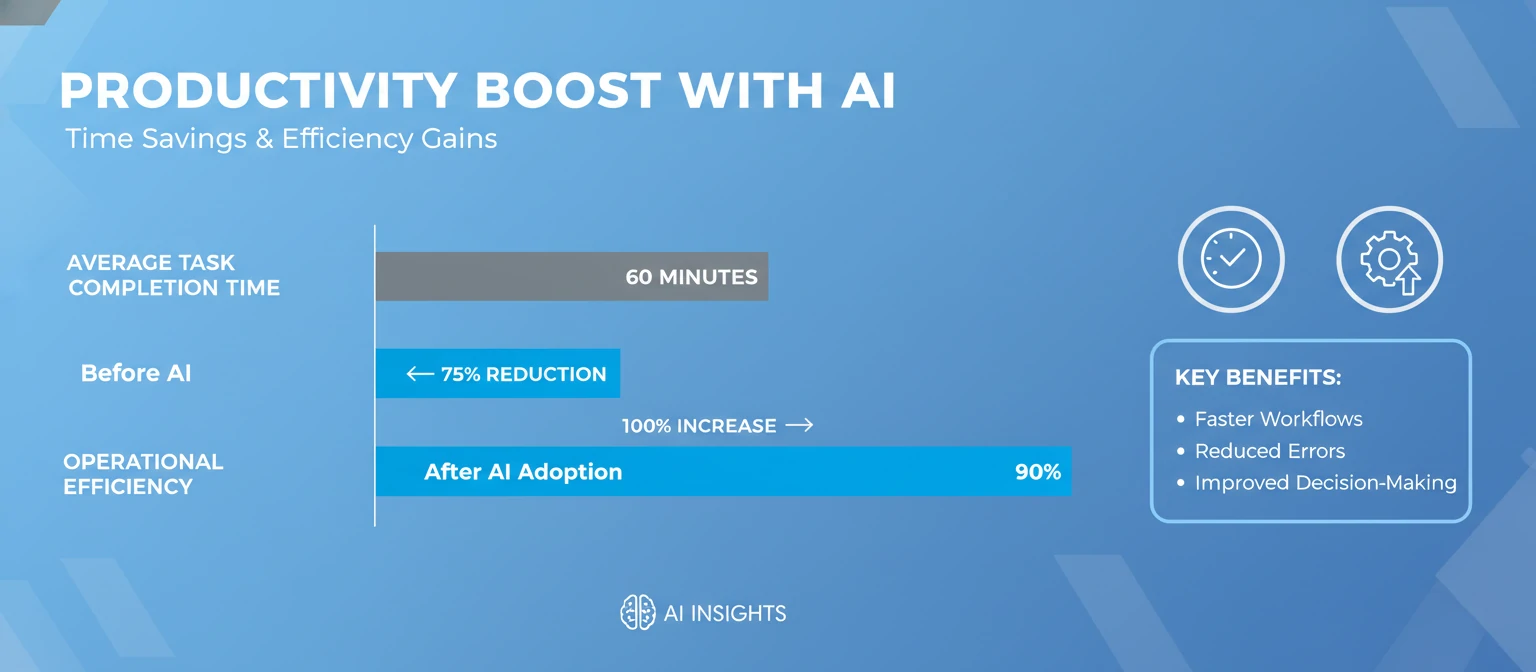
AI tools excel at automating repetitive and time-consuming tasks, freeing up human workers for more strategic and creative endeavors. For example, a content writer might spend hours researching and drafting an article, but with AI writing assistants, they can generate outlines, draft sections, and refine content in a fraction of the time.
This efficiency extends to various fields. Data analysts can process massive datasets in minutes rather than days, while designers can iterate through multiple concepts rapidly. The cumulative effect is significant: professionals report saving 20-50% of their time on routine tasks, allowing them to focus on high-value activities.
2. Enhanced Accuracy and Consistency
AI algorithms operate with mathematical precision, reducing human error in calculations, data analysis, and content generation. Writing tools ensure consistent grammar, style, and tone across documents, while data tools provide reliable insights without subjective bias.
In fields like finance and healthcare, this accuracy can be critical. AI-powered diagnostic tools assist doctors in identifying patterns that might be missed by human observation alone, potentially saving lives through early detection.
3. Cost-Effectiveness and Scalability
AI tools offer scalable solutions that grow with your needs. Small businesses can access capabilities previously reserved for large corporations with extensive IT departments. Subscription models make advanced AI affordable, often costing less than hiring specialized personnel.
For instance, a startup can use AI marketing tools to compete with established brands in content creation and customer analysis, leveling the playing field without exorbitant costs.
4. Boosting Creativity and Innovation
Contrary to fears that AI might stifle creativity, these tools often enhance it by providing inspiration and overcoming creative blocks. Image generators can produce unexpected visual concepts, while writing assistants suggest novel approaches to topics.
Artists and designers use AI as a collaborative partner, exploring ideas they might not have considered. This symbiotic relationship between human intuition and AI's computational power leads to more innovative outcomes.
5. Accessibility and Democratization of Technology
AI tools make advanced technology accessible to non-experts. A small business owner without a data science background can use AI analytics tools to make informed decisions. Students in remote areas can access personalized tutoring through AI educational platforms.
This democratization fosters inclusivity, allowing diverse voices and perspectives to contribute to various fields without requiring extensive training or resources.
6. Continuous Learning and Personalization
Many AI tools improve with use, learning from user interactions to provide more personalized and accurate results. A writing assistant might adapt to your preferred style, while a recommendation engine learns your tastes over time.
This adaptive nature ensures that the tools become more valuable as you use them, creating a positive feedback loop of improvement.
7. Improved Work-Life Balance
By handling mundane tasks, AI tools allow professionals to achieve more in less time, potentially reducing overtime and stress. Remote workers can maintain productivity without being tethered to their desks for extended periods.
However, it's important to use this benefit wisely, ensuring that time savings translate to personal well-being rather than just more work.
8. Environmental Impact
Some AI applications contribute to sustainability efforts. For example, AI-optimized logistics reduce fuel consumption in transportation, while smart energy management systems minimize waste.
In summary, the benefits of AI tools extend far beyond mere convenience. They represent a fundamental shift in how we work, create, and solve problems, offering opportunities for individuals and organizations to achieve more with less. As these tools continue to evolve, their positive impact on productivity and innovation is likely to grow even more significant.
Use Cases of AI Tools
AI tools have permeated virtually every industry, offering practical solutions to real-world challenges. Let's explore how these tools are being applied across different sectors, with concrete examples of their impact.
1. Marketing and Content Creation
In the marketing world, AI tools have revolutionized content production and campaign management. Writing assistants help create personalized email campaigns, social media posts, and blog articles at scale. For instance, a digital marketing agency might use AI to generate 50 variations of ad copy for A/B testing, significantly improving conversion rates.
Image generators enable rapid creation of custom graphics for social media, banners, and product mockups. A fashion brand could describe "a young woman wearing a summer dress in a urban setting" and receive multiple high-quality images for their Instagram campaign.
Chatbots handle customer inquiries 24/7, providing instant responses and freeing human agents for complex issues. This not only improves customer satisfaction but also reduces operational costs.
2. Education and Learning
AI tools are transforming education by providing personalized learning experiences. Tutoring chatbots offer round-the-clock homework help, explaining concepts in multiple ways until students understand. Language learning apps use AI to adapt lessons based on individual progress and learning styles.
Content creation tools assist educators in developing materials. A teacher might use AI to generate quiz questions, lesson plans, or even animated explanations of complex topics. In higher education, AI helps with grading assignments and providing feedback, allowing professors to focus on mentoring students.
During the COVID-19 pandemic, AI-powered platforms enabled remote learning at unprecedented scales, demonstrating their value in crisis situations.
3. Healthcare and Medical Applications
In healthcare, AI tools assist with diagnosis, treatment planning, and patient care. Image analysis tools help radiologists detect anomalies in X-rays and MRIs with high accuracy. For example, AI can identify early signs of diabetic retinopathy in eye scans, enabling timely intervention.
Drug discovery has been accelerated by AI, which can analyze molecular structures and predict drug interactions. Companies like Insilico Medicine have used AI to design new molecules for diseases like fibrosis.
Voice AI powers virtual assistants for elderly patients, reminding them to take medications and monitoring their health. Wearable devices with AI analyze vital signs and alert healthcare providers to potential issues.
4. Finance and Banking
Financial institutions use AI for fraud detection, risk assessment, and customer service. Algorithms analyze transaction patterns to identify suspicious activities in real-time, preventing millions in losses annually.
AI-powered robo-advisors provide personalized investment advice, democratizing access to financial planning. Chatbots handle routine inquiries about account balances and loan applications, improving customer experience.
In algorithmic trading, AI analyzes market data to make split-second decisions, capitalizing on opportunities that humans might miss.
5. Creative Industries
Artists, designers, and musicians leverage AI for inspiration and production. Image generators create concept art for films, games, and advertisements. Musicians use AI tools to compose melodies, arrange tracks, or even generate lyrics.
In architecture, AI assists with design optimization, considering factors like energy efficiency and structural integrity. Film editors use AI for color grading, sound design, and even script analysis.
The collaboration between human creativity and AI capabilities often leads to innovative works that blend traditional artistry with technological precision.
6. Manufacturing and Supply Chain
AI optimizes manufacturing processes by predicting equipment failures, reducing downtime. In supply chain management, AI analyzes demand patterns, weather data, and geopolitical factors to optimize inventory and logistics.
Quality control systems use computer vision to detect defects in products at high speeds, ensuring consistent quality while reducing waste.
7. Environmental and Sustainability Efforts
AI tools contribute to environmental protection by analyzing satellite imagery to monitor deforestation, track wildlife, and predict natural disasters. In agriculture, AI-powered systems optimize irrigation and predict crop yields, reducing water usage and increasing efficiency.
Smart city applications use AI to manage traffic flow, reduce emissions, and optimize energy consumption in buildings.
8. Legal and Professional Services
In the legal field, AI tools assist with contract analysis, legal research, and case prediction. They can review thousands of documents in minutes, identifying relevant clauses or precedents.
Professional services firms use AI for data analysis, client insights, and process automation, allowing experts to focus on high-value strategic work.
These use cases demonstrate the versatility of AI tools across industries. From enhancing creativity to solving complex problems, AI is becoming an integral part of modern workflows. As technology advances, we can expect even more innovative applications that address societal challenges and improve quality of life.

How to Choose AI Tools
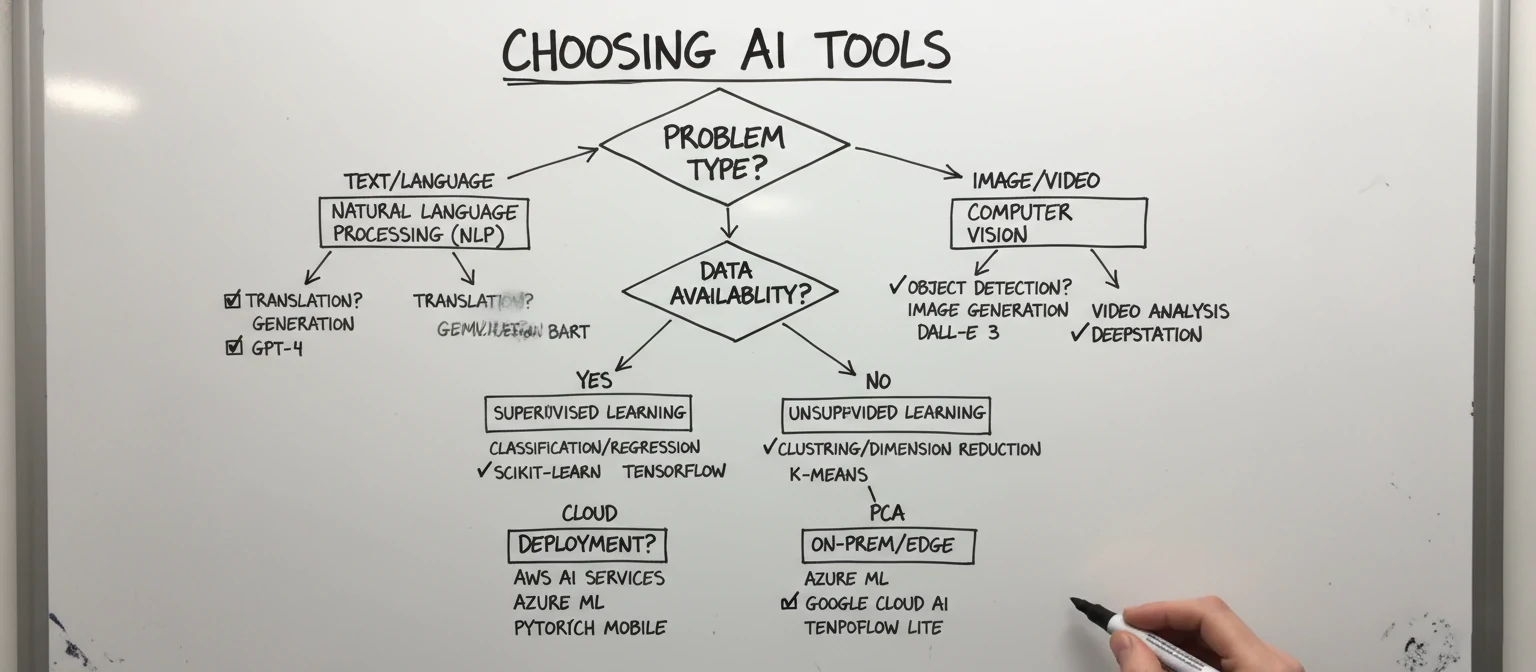
Selecting the right AI tools requires careful consideration of your specific needs, budget, and long-term goals. With hundreds of options available, a systematic approach ensures you invest in solutions that deliver real value. Here's a comprehensive guide to choosing AI tools effectively.
1. Assess Your Specific Needs and Use Cases
Start by clearly defining what you want to achieve. Are you looking to improve writing productivity, generate images, analyze data, or automate customer service? Different tools excel in different areas, so understanding your primary pain points is crucial.
Consider your workflow: How will the AI tool integrate with your existing processes? For example, if you're a content creator, you might need tools that work seamlessly with platforms like WordPress or Canva.
2. Evaluate Ease of Use and Learning Curve
AI tools should enhance your productivity, not complicate it. Look for intuitive interfaces with clear documentation and tutorials. Free trials or demos are invaluable for testing usability.
Consider your technical expertise and that of your team. Some tools require coding knowledge, while others are designed for non-technical users. If you're new to AI, start with user-friendly options that offer guided experiences.
3. Check Integration Capabilities
Modern workflows often involve multiple tools working together. Ensure the AI tool integrates with your existing software ecosystem. APIs, Zapier connections, or native integrations with popular platforms like Slack, Google Workspace, or Microsoft Office can significantly boost efficiency.
For businesses, consider enterprise features like single sign-on (SSO), data export options, and compliance with industry standards.
4. Analyze Cost and Pricing Models
AI tools range from free to enterprise-level subscriptions. Compare pricing structures:
- Freemium models with limited features
- Monthly/annual subscriptions
- Pay-per-use or token-based systems
- One-time purchases for offline tools
Calculate the return on investment (ROI) by estimating time savings and productivity gains. A tool that costs $20/month but saves you 10 hours weekly might be worth it, while a $200/month tool that only saves 2 hours might not.
5. Prioritize Privacy and Security
AI tools often process sensitive data, so review their privacy policies carefully. Look for:
- Data encryption in transit and at rest
- Compliance with regulations like GDPR or CCPA
- Clear data retention policies
- Options for data deletion
Avoid tools that require unnecessary permissions or share data with third parties without your consent.
6. Research Performance and Reliability
Check user reviews, case studies, and performance benchmarks. Look for uptime guarantees and customer support quality. Tools with active development and regular updates are preferable, as AI technology evolves rapidly.
Test the tool's accuracy and consistency. For writing assistants, try generating content on topics you know well to assess quality.
7. Consider Scalability and Future-Proofing
Choose tools that can grow with your needs. If you're a freelancer, a basic plan might suffice initially, but if you plan to scale, ensure upgrade paths exist.
Stay informed about the tool's roadmap. Companies that invest in R&D and adapt to new AI advancements will likely offer better long-term value.
8. Seek Community and Support Resources
Active user communities provide valuable insights and troubleshooting help. Check forums, Reddit threads, and official support channels. Tools with comprehensive documentation, video tutorials, and responsive support teams are ideal.
9. Trial and Compare Multiple Options
Don't commit to the first tool you find. Use free trials to test 3-5 options that meet your criteria. Compare them based on your predefined requirements.
10. Consider Ethical and Responsible AI Features
Look for tools that address bias, provide transparency in their algorithms, and offer ways to customize outputs for fairness.
By following this systematic approach, you'll be well-equipped to select AI tools that truly enhance your capabilities. Remember that the "best" tool is the one that best fits your unique needs and circumstances. As you gain experience, you may find yourself using multiple tools for different purposes, creating a personalized AI toolkit.
How to Use AI Tools Effectively
While AI tools are powerful, their effectiveness depends on how you use them. Adopting best practices ensures you maximize benefits while minimizing frustrations. Here's a comprehensive guide to using AI tools effectively.
1. Start with Clear, Specific Prompts
The quality of AI output heavily depends on input quality. Craft detailed, specific prompts that provide context and desired outcomes. Instead of "Write a blog post," try "Write a 800-word blog post about sustainable gardening tips for urban dwellers, including sections on container gardening, composting, and water conservation."
Break complex tasks into smaller, manageable prompts. For image generation, specify style, composition, lighting, and mood.
2. Understand Tool Limitations and Strengths
Each AI tool has its strengths and weaknesses. Learn what your chosen tools excel at and where they fall short. For example, writing assistants are great for drafting but may lack deep subject expertise. Use tools as assistants, not replacements for human judgment.
Regularly test outputs against your standards. If a tool consistently produces subpar results for certain tasks, consider alternatives or adjust your approach.
3. Iterate and Refine Outputs
Treat AI-generated content as a starting point, not a final product. Review, edit, and refine outputs to align with your voice, brand, or requirements. For writing tools, fact-check information and add personal insights.
In creative tasks, use AI to generate multiple variations, then combine the best elements. This iterative process often leads to superior results.
4. Combine Multiple Tools for Comprehensive Solutions
Don't rely on a single tool. Use complementary AI tools to cover different aspects of a project. For content creation, you might use a writing assistant for drafting, an image generator for visuals, and a data analysis tool for research.
Workflow automation platforms like Zapier can connect different AI tools, creating seamless pipelines.
5. Maintain Human Oversight and Accountability
Always review AI outputs before using or publishing them. Ensure accuracy, appropriateness, and alignment with ethical standards. For business applications, establish guidelines for AI use and human review processes.
Develop a habit of questioning AI recommendations. Understand the reasoning behind suggestions to build your own expertise.
6. Learn Prompt Engineering Techniques
Master the art of crafting effective prompts. Techniques include:
- Providing examples (few-shot learning)
- Specifying output format
- Using system prompts to set context
- Breaking down complex requests into steps
Experiment with different phrasings to see what yields better results.
7. Customize and Train Tools When Possible
Many AI tools allow customization. Train writing assistants on your preferred style by providing examples of your work. Set up custom prompts or templates for recurring tasks.
For data tools, fine-tune models with your specific datasets when available.
8. Monitor Performance and Adapt
Track how AI tools perform over time. Note improvements in output quality, time savings, and ROI. Be prepared to switch tools if they no longer meet your needs or if better alternatives emerge.
Stay updated with tool updates and new features, as AI technology evolves rapidly.
9. Balance Speed with Quality
While AI can accelerate workflows, don't sacrifice quality for speed. Allocate appropriate time for review and refinement. In creative fields, rushing the process might lead to generic outputs.
10. Build Ethical Usage Habits
Use AI responsibly by avoiding biased prompts, respecting intellectual property, and being transparent about AI assistance when appropriate.
11. Start Small and Scale Up
Begin with simple applications to build confidence and understanding. As you become more proficient, tackle complex projects. This gradual approach helps you learn tool capabilities and limitations.
12. Collaborate and Share Knowledge
Discuss AI tool usage with colleagues or online communities. Sharing experiences and tips can lead to new insights and innovative uses.
By following these strategies, you'll harness the full potential of AI tools, turning them into valuable assets that enhance your productivity and creativity. Remember, effective AI use is as much about human skill and judgment as it is about the technology itself.

Ethical Considerations in Using AI Tools
As AI tools become more prevalent, it's crucial to address the ethical implications of their use. While these tools offer tremendous benefits, they also raise important questions about responsibility, fairness, and societal impact. Understanding these ethical considerations helps users make informed decisions and contribute to responsible AI development.
1. Privacy and Data Protection
AI tools often require access to personal or sensitive data to function effectively. Users must be aware of how their data is collected, stored, and used. Concerns include:
- Unauthorized data sharing with third parties
- Lack of transparency in data usage policies
- Potential for data breaches compromising user privacy
When choosing tools, prioritize those with strong privacy protections and clear data handling practices. Be cautious about uploading sensitive information to AI services.
2. Bias and Fairness
AI tools learn from vast datasets that may contain historical biases. This can lead to discriminatory outputs in areas like hiring, lending, or content generation. For example, image generators might perpetuate stereotypes if trained on biased image datasets.
Users should:
- Be aware of potential biases in outputs
- Test tools for fairness across different demographics
- Avoid using AI for decisions affecting human rights without human oversight
3. Intellectual Property and Copyright Issues
The ownership of AI-generated content is often unclear. Who owns the copyright to an image created by AI based on your prompt? Can AI-generated content infringe on existing copyrights?
Key considerations:
- Understand licensing terms for AI-generated content
- Respect intellectual property rights when using AI for commercial purposes
- Be transparent about AI assistance in creative works
4. Job Displacement and Economic Impact
AI tools can automate tasks traditionally performed by humans, potentially leading to job losses in certain sectors. While they create new opportunities, the transition can be disruptive.
Users should consider:
- The broader economic implications of widespread AI adoption
- Supporting policies that address workforce transitions
- Using AI to augment rather than replace human workers
5. Misinformation and Content Authenticity
AI can generate convincing fake content, from deepfake videos to fabricated news articles. This raises concerns about:
- Spread of misinformation
- Erosion of trust in media
- Difficulty in distinguishing authentic from AI-generated content
Responsible use involves fact-checking AI outputs and being transparent about their origins.
6. Environmental Impact
Training and running AI models requires significant computational resources, contributing to energy consumption and carbon emissions. Users should consider the environmental footprint of the tools they choose.
7. Transparency and Accountability
Many AI tools operate as "black boxes," making it difficult to understand how they arrive at conclusions. This lack of transparency can be problematic in critical applications.
To address ethical concerns:
- Advocate for more transparent AI systems
- Support regulations promoting ethical AI development
- Choose tools from companies committed to ethical practices
8. Accessibility and Digital Divide
While AI democratizes access to advanced tools, it may widen the digital divide if only those with internet access and technical skills can benefit.
By being mindful of these ethical considerations, users can help ensure that AI tools are developed and used in ways that benefit society as a whole. As AI continues to evolve, ongoing dialogue about ethics will be essential for responsible innovation.

Future Trends in AI Tools
The AI landscape is evolving rapidly, with new developments promising to transform how we interact with technology. Understanding these trends can help users prepare for upcoming changes and make informed decisions about tool adoption.
1. Multimodal AI Integration
Current AI tools often specialize in one modality, like text or images. Future tools will seamlessly combine multiple modalities, allowing users to generate images from text descriptions while incorporating audio elements or even video.
This integration will enable more natural interactions, such as describing a scene verbally while the AI generates corresponding visuals and narrates the story.
2. Increased Personalization and Adaptability
AI tools will become more personalized, learning from individual users' preferences, work styles, and goals. Instead of generic outputs, tools will adapt to provide highly tailored assistance.
We might see AI assistants that remember your creative preferences, communication style, and even predict your needs based on patterns in your work.
3. Edge Computing and Offline Capabilities
As concerns about data privacy grow, more AI tools will move to edge computing, processing data locally on devices rather than in the cloud. This will enable offline functionality and reduce latency.
Mobile devices and IoT gadgets will host more powerful AI capabilities, allowing for real-time processing without internet connectivity.
4. Explainable AI and Transparency
Regulatory pressures and user demands will drive the development of explainable AI systems. Tools will provide clear reasoning for their outputs, making it easier to understand and trust AI decisions.
This transparency will be crucial for applications in healthcare, finance, and legal fields where accountability is paramount.
5. AI-Human Collaboration Models
Rather than replacing humans, future AI tools will focus on collaboration. We can expect hybrid systems where AI handles routine tasks while humans provide creative input and oversight.
This trend will lead to new job roles that combine human expertise with AI capabilities, such as "AI-augmented designers" or "machine learning ethicists."
6. Sustainable and Energy-Efficient AI
As environmental concerns grow, AI development will prioritize energy efficiency. New algorithms and hardware designs will reduce the computational resources required for AI tasks.
Tools will incorporate carbon footprint tracking, allowing users to choose environmentally friendly options.
7. Open-Source AI Ecosystems
The proliferation of open-source AI models will democratize access to advanced capabilities. Users will be able to fine-tune models for specific needs without relying on proprietary platforms.
This will foster innovation and allow for more customized solutions, though it may raise concerns about quality control and security.
8. Integration with Augmented and Virtual Reality
AI tools will increasingly integrate with AR and VR technologies, creating immersive experiences. For example, AI could generate virtual environments based on user descriptions or assist in real-time translation during AR interactions.
9. AI for Social Good
We'll see more tools focused on addressing global challenges, such as climate modeling, disease prediction, and educational equity.
10. Quantum Computing Acceleration
As quantum computing becomes more accessible, it will dramatically accelerate AI training and processing, enabling more complex models and real-time applications.
11. Ethical AI by Design
Future tools will incorporate ethical considerations from the ground up, with built-in bias detection, fairness checks, and responsible use features.
These trends suggest a future where AI tools are more intuitive, ethical, and integrated into daily life. Users who stay informed and adaptable will be best positioned to leverage these advancements. As the field evolves, continuous learning and ethical awareness will be key to maximizing the benefits of AI tools.

Practical Tips for Using AI Tools
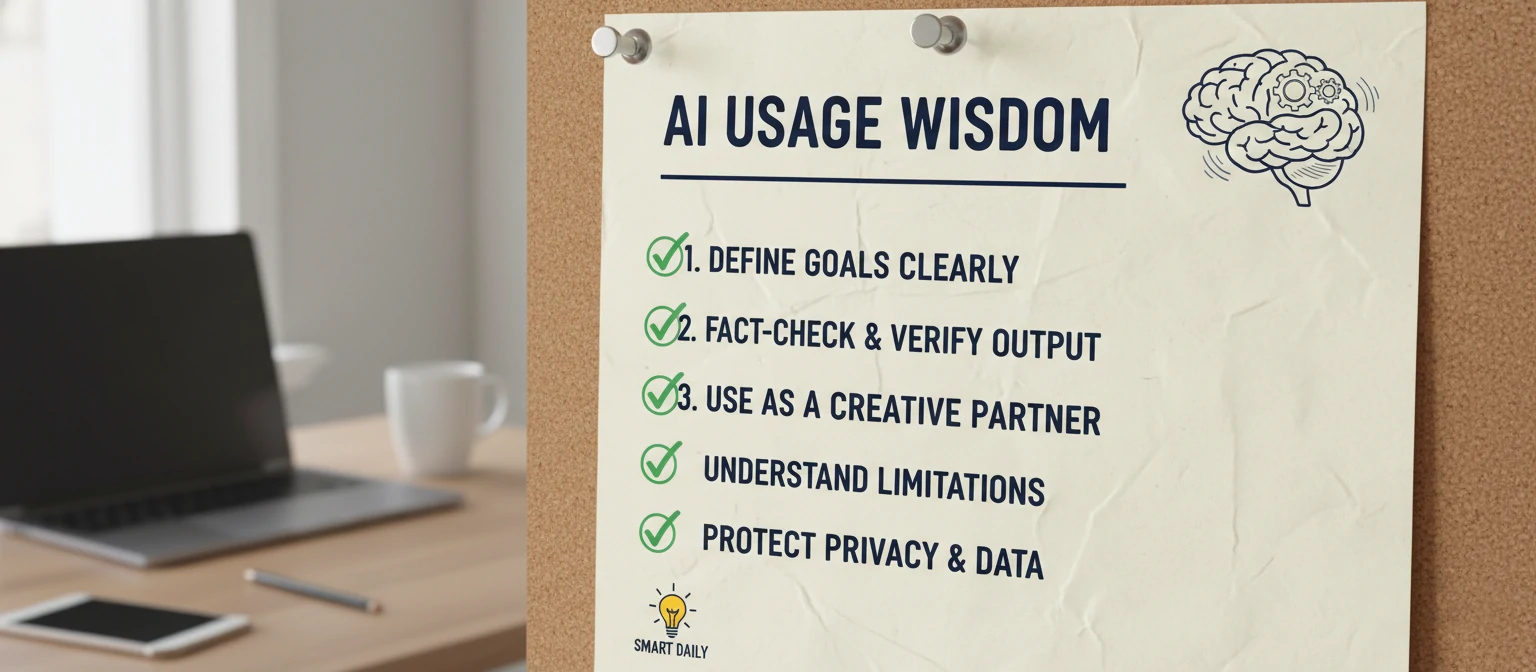
To make the most of AI tools, incorporate these practical tips into your workflow. These actionable strategies will help you avoid common pitfalls and maximize productivity.
- Start Small and Experiment: Begin with simple tasks to familiarize yourself with tool capabilities. Try generating a short social media post or creating a basic image before tackling complex projects. This builds confidence and helps you understand tool limitations.
- Keep Learning and Stay Updated: AI technology evolves rapidly. Follow industry blogs, join online communities, and participate in webinars to stay current with new features and tools. Subscribe to newsletters from AI companies to receive updates.
- Backup Your Work: Always save original versions of your work. AI tools can make mistakes or change outputs unexpectedly. Maintain backups to avoid losing important content.
- Combine Human Creativity with AI: Use AI as a starting point, not an endpoint. Add your unique insights, personal experiences, and creative flair to AI-generated content. This hybrid approach often produces the best results.
- Test Multiple Tools: Don't settle for the first tool you find. Try free versions or trials of several options to compare performance, ease of use, and suitability for your needs.
- Be Specific in Your Prompts: The more detailed your instructions, the better the AI output. Include context, tone, length, and specific requirements in your prompts.
- Fact-Check and Verify: AI can generate plausible-sounding information that's incorrect. Always verify facts, especially for important or sensitive content.
- Respect Copyright and Ethics: Avoid using AI to copy existing works or generate harmful content. Be transparent about AI assistance when appropriate.
- Monitor Your Usage and Costs: Keep track of how much you use paid tools to avoid unexpected bills. Set budgets and usage limits.
- Build a Personal AI Toolkit: Curate a collection of complementary tools for different tasks. For example, pair a writing assistant with an image generator for comprehensive content creation.
- Take Breaks and Maintain Balance: AI can accelerate work, but don't let it lead to burnout. Schedule breaks and ensure you're not over-relying on technology at the expense of human skills.
- Network and Share Experiences: Connect with other AI users through forums, social media, or local meetups. Sharing tips and experiences can lead to new insights and applications.
- Start with Free or Low-Cost Options: Many powerful AI tools offer free tiers. Use these to test capabilities before investing in premium features.
- Customize When Possible: Personalize tools to your preferences. Set up templates, custom prompts, or style guides to improve consistency and efficiency.
- Be Patient and Persistent: AI tools aren't perfect. If initial results aren't satisfactory, refine your approach and try again. Persistence often leads to better outcomes.
By following these tips, you'll develop a more effective and sustainable approach to using AI tools, enhancing your productivity while maintaining quality and ethical standards.
Real User Stories: How AI Tools Changed Lives
As someone who's seen AI transform my own workflow, I love hearing how others have benefited. Here are some relatable stories from everyday users who've embraced AI tools.
Sarah's Freelance Writing Breakthrough
Sarah, a freelance writer, was struggling to meet deadlines. "I used to spend hours staring at a blank screen," she says. "Now, with AI writing assistants, I get outlines and drafts in minutes. It gives me a starting point to build on, and my creativity flows from there. I've doubled my output and even won a client award!"
Mike's Small Business Boost
Mike runs a local bakery. "Marketing was my weakness," he admits. "AI image generators helped me create stunning social media posts without hiring a designer. Chatbots handle customer inquiries 24/7, and data tools analyze sales trends. My business grew 30% in six months!"
Emma's Learning Journey
Emma, a college student, uses AI for studying. "I have dyslexia, so reading is tough," she shares. "Voice AI reads textbooks aloud, and writing tools help me organize my thoughts. It's like having a patient tutor available anytime. My grades improved, and I feel more confident."
These stories show that AI tools aren't just for tech giants—they're for real people solving real problems. If you're hesitant, start small and see how AI can fit into your life.
Common Myths About AI Tools Debunked
AI tools come with their share of misconceptions. Let's clear up some common myths that might be holding you back.
Myth 1: AI Will Replace Human Creativity
Truth: AI enhances creativity, it doesn't replace it. Think of it as a collaborative partner. Artists use AI for inspiration, writers for drafts, and designers for rapid prototyping. Your unique perspective is irreplaceable.
Myth 2: AI Tools Are Too Expensive
Truth: Many powerful AI tools have free tiers or low-cost options. The time savings often pay for themselves. For example, a $20/month writing tool that saves you 10 hours weekly is a bargain.
Myth 3: AI Is Too Complicated for Beginners
Truth: Modern AI tools are designed with user-friendliness in mind. Most have intuitive interfaces and tutorials. Start with simple tasks and build up your skills gradually.
Myth 4: AI Always Gets It Right
Truth: AI can make mistakes. Always review and fact-check outputs. Use AI as a tool, not a crutch—your judgment is still crucial.
Myth 5: AI Is Only for Tech-Savvy People
Truth: AI democratizes technology. No coding skills required for most tools. If you can use a smartphone, you can use AI tools.
Don't let myths stop you from exploring AI. The reality is often more accessible and beneficial than you think.
Conclusion
AI tools have emerged as transformative allies in our increasingly digital world, offering unprecedented opportunities to enhance productivity, creativity, and problem-solving across diverse fields. From writing assistants that streamline content creation to image generators that democratize visual design, these tools are reshaping how we work and create.
However, their power comes with responsibility. As we've explored, successful integration requires understanding tool capabilities, selecting appropriate solutions, and using them ethically. The key lies in viewing AI as a collaborative partner rather than a replacement for human ingenuity.
Looking ahead, the future promises even more sophisticated and integrated AI systems. By staying informed, adaptable, and committed to ethical practices, users can harness these advancements to achieve remarkable outcomes.
Whether you're a seasoned professional or just beginning your AI journey, remember that the most effective use of these tools combines technological assistance with human insight, creativity, and judgment. Embrace AI tools wisely, and you'll unlock new levels of efficiency and innovation in your endeavors.
The AI revolution is here, and it's up to us to shape its trajectory. Let's use these powerful tools to build a more productive, creative, and equitable future for all.

Where to go next
- Make Your Videos Impossible To Ignore
- Bring Your VideosBack To Life
- Stop resizing videos Let AI do it for you
More useful paths
Use these paths to continue with the closest practical topic, service, or decision guide.
Spotted something wrong? Report an error on this page. We correct on the page and say what changed.