
Keyboard & Screen Reader Optimization
Ensure your website is fully accessible to keyboard-only users and screen reader users. Comprehensive accessibility optimization for inclusive web experiences.
Understanding Keyboard & Screen Reader Accessibility
Learn why keyboard navigation and screen reader compatibility are essential for creating truly accessible websites.
What is Keyboard Accessibility?
Keyboard accessibility refers to the ability to navigate and interact with a website using only the keyboard, without requiring a mouse or touchpad. This is essential for users with motor disabilities who cannot use pointing devices, including people with conditions like cerebral palsy, multiple sclerosis, spinal cord injuries, and repetitive strain injuries. Additionally, many power users prefer keyboard navigation for its efficiency.
A keyboard-accessible website allows users to tab through all interactive elements in a logical order, access all functionality using keyboard shortcuts, navigate menus and dropdowns, fill out forms, and activate buttons and links. Every action that can be performed with a mouse must also be possible using only the keyboard.
The Tab key is the primary navigation tool for keyboard users. Pressing Tab moves focus to the next interactive element, while Shift+Tab moves to the previous. The Enter and Space keys activate buttons and links, arrow keys navigate within menus and form controls, and Escape closes modals and dropdowns. Proper keyboard accessibility ensures all these interactions work seamlessly.
Focus indicators are crucial for keyboard users. When an element receives focus, it must have a visible indicator so users know where they are on the page. Without clear focus indicators, keyboard users lose their place and cannot navigate effectively. This is one of the most common accessibility failures found on websites today.

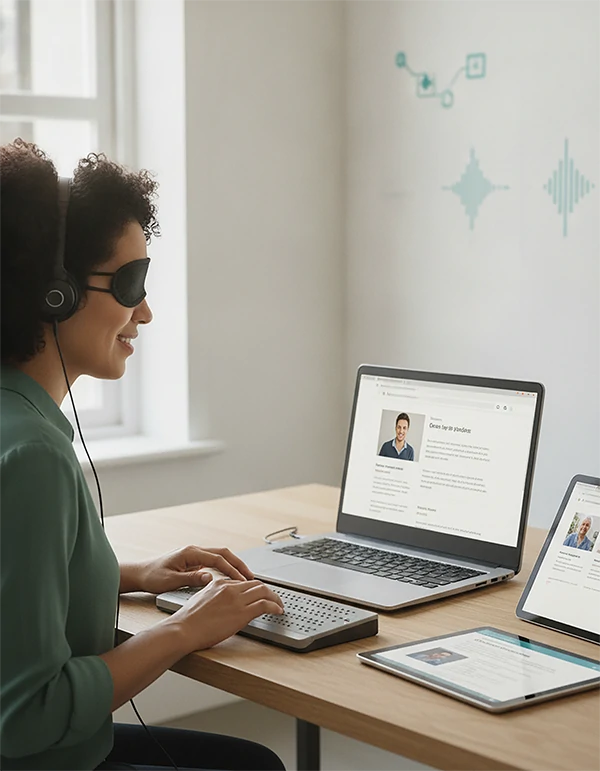
What is Screen Reader Compatibility?
A screen reader is assistive technology that reads aloud the content on a computer or mobile screen for users who are blind or visually impaired. Popular screen readers include JAWS, NVDA, VoiceOver, and TalkBack. These software applications use text-to-speech to convey information, allowing blind users to navigate and interact with digital content.
Screen readers interpret the underlying HTML code of a webpage, including text, headings, links, form labels, image alternative text, and table structures. They provide audio feedback through synthesized speech or Braille display. Users navigate by jumping between headings, links, form fields, and landmarks, or by scanning the entire page linearly.
Proper screen reader compatibility requires semantic HTML, descriptive link text, form labels, alternative text for images, proper heading hierarchy, ARIA attributes for dynamic content, and accessible tables. Without these elements, screen reader users cannot understand or navigate your website effectively. Many websites appear visually accessible but are completely unusable with screen readers.
Testing with actual screen readers is essential because automated tools cannot detect all issues. Our experts conduct manual testing with multiple screen readers to ensure your website works for all users, regardless of which assistive technology they prefer.
The Importance of Accessibility Optimization
Why investing in keyboard and screen reader optimization protects your users and your business.
Legal Compliance
ADA website lawsuits have increased dramatically, with keyboard and screen reader accessibility being primary targets. Courts consistently rule that websites must be fully accessible. Optimization demonstrates good faith compliance efforts and reduces legal liability.
Expanded Audience
Over 285 million people worldwide are blind, and millions more have motor disabilities affecting mouse use. Optimization opens your website to this significant underserved market segment with substantial purchasing power.
SEO Benefits
Many accessibility best practices, like semantic HTML, proper heading structure, and descriptive links, also improve search engine optimization. Accessible websites often rank higher in search results.
Brand Reputation
Demonstrating commitment to accessibility builds positive brand perception. Users increasingly choose businesses that show social responsibility and inclusivity.
Better Usability
Accessibility improvements benefit all users. Clear navigation, logical structure, and descriptive labels create a better experience for everyone, not just users with disabilities.
Device Compatibility
Accessible websites work better across different devices, browsers, and assistive technologies. This improves compatibility and reaches users in all situations.
Our Optimization Services
Comprehensive solutions to make your website fully accessible for keyboard and screen reader users.
Why Keyboard & Screen Reader Optimization is Essential
Understanding the critical role of assistive technology accessibility in modern web development.
Common Accessibility Issues
The most frequent problems we discover and fix during accessibility optimization.
Missing Focus Indicators
One of the most common issues. When keyboard users tab to an element, they cannot see where they are if focus indicators are missing or invisible. This makes navigation impossible without a mouse.
Keyboard Traps
Certain page elements trap keyboard focus, preventing users from escaping. Common in modals, embedded iframes, and JavaScript widgets. This is a critical WCAG failure.
Missing Form Labels
Form fields without associated labels are unusable by screen readers. Users cannot understand what information is expected in each field.
Generic Link Text
Links saying "click here" or "read more" provide no context. Screen reader users navigating by links hear only this generic text without knowing the destination.
Missing Alt Text
Images without alternative text are invisible to screen reader users. Every meaningful image needs descriptive alt text conveying its meaning or purpose.
Poor Heading Structure
Screen reader users navigate primarily by headings. Improper heading hierarchy or skipped heading levels makes understanding page structure impossible.
Inaccessible Modals
Modal dialogs often trap keyboard focus without proper management. When closed, focus should return to the triggering element, which rarely happens correctly.
Dynamic Content Issues
Content that updates without page refresh is often invisible to screen readers. Live regions and notifications require proper ARIA implementation.
Our Optimization Process
A systematic approach to achieving full keyboard and screen reader accessibility.
Discovery
We learn about your website, target users, business goals, and specific accessibility concerns to tailor our approach.
Automated Testing
We run your website through accessibility testing tools to identify technical issues detectable programmatically.
Keyboard Testing
Our experts navigate your entire website using only the keyboard to identify every barrier and issue.
Screen Reader Testing
We test with multiple screen readers to ensure all content is accessible and understandable.
Detailed Reporting
We compile comprehensive reports with severity ratings, code examples, and prioritized recommendations.
Implementation
We implement all fixes and provide ongoing maintenance to ensure continued accessibility.
Screen Readers We Test With
Comprehensive testing across all major assistive technologies.
JAWS
Job Access With Speech is the most widely used screen reader on Windows. Particularly popular in professional environments and required by many organizations.
NVDA
NonVisual Desktop Access is a free, open-source screen reader for Windows. Widely used due to its accessibility and features.
VoiceOver
Apple's built-in screen reader for macOS, iOS, and tvOS. Essential for testing on Apple platforms and required for iOS accessibility.
TalkBack
Android's built-in screen reader. Essential for testing mobile accessibility on Android devices, which have significant market share.
What Users Say
Hear from users who benefit from keyboard and screen reader accessibility.
"As a blind user, I can tell you there's nothing more frustrating than encountering a website I cannot use. When Pro Pixel Agency optimized our website, I could finally navigate independently and complete purchases without assistance."
Alex Kim
Screen Reader User
"I have limited mobility and cannot use a mouse. Before keyboard optimization, your website was unusable. Now I can navigate, research products, and place orders independently using just my keyboard. This changes my daily life."
Mary Johnson
Keyboard User
"I use voice control software that essentially provides keyboard input. Your optimized website works perfectly with my setup. It's rare to find such an accessible e-commerce experience. I'll be a loyal customer."
Carlos Rodriguez
Voice Control User
Optimization Packages
Choose the package that fits your accessibility needs.
Basic Optimization
- Up to 10 pages audited
- Keyboard navigation analysis
- Basic screen reader test
- Focus indicator fixes
- Issue report
Full Optimization
- Up to 50 pages audited
- Complete keyboard testing
- Multi screen reader testing
- Full structural optimization
- Form accessibility fixes
- Dynamic content fixes
- 90-day support
Enterprise
- Unlimited pages
- Full accessibility suite
- Custom testing scenarios
- Team training
- Ongoing maintenance
Frequently Asked Questions
Common questions about keyboard and screen reader optimization.
Why is keyboard accessibility important?
Many users cannot use a mouse due to motor disabilities, repetitive strain injuries, or preference for keyboard efficiency. Without keyboard accessibility, these users cannot access your website. Additionally, keyboard accessibility is required by WCAG and ADA compliance.
What screen readers should I test with?
Test with JAWS and NVDA for Windows, VoiceOver for Apple, and TalkBack for Android. Each has different behaviors and quirks. Testing with multiple ensures broader compatibility.
How long does optimization take?
Timeline depends on website size and current accessibility level. A basic audit takes 5-7 days, full optimization 2-3 weeks. We provide specific timelines during consultation.
Can automated tools detect all issues?
No. Automated tools detect only about 30% of accessibility issues, mainly technical problems. Manual testing with actual assistive technologies is essential for the remaining issues.
Do you implement fixes too?
Yes. We provide full remediation services, implementing all fixes identified during the audit. Our development team handles everything from simple HTML fixes to complex interactive element redesigns.
How often should I audit?
We recommend annual audits or whenever significant changes are made. New content and features can introduce barriers, so regular checking is important.
Still have questions? Contact us!
Optimize Your Website Today
Ensure your website is accessible to all users regardless of ability.
Related guides and services
Use these paths to continue with the closest practical topic, service, or decision guide.
- TopicConversion Optimization article library
- ArticleGreen Screen Studio: The Complete Guide for Professional Video Production
- ArticleHow to Fix Discord Stream Black Screen
- ArticleHow Long Can You Screen Record on iPhone?
- ArticleExpert Green Screen Rotoscoping Services
- ServiceGreen Screen Removal Services
- ServiceGreen Screen Object Removal Services
- ServiceLaravel Development Services
Why clients trust Pro Pixel
Try the work on your own files before you commit, and know what you'll pay before anything starts.
-
Free trial first
Send a sample and see the result on your own material before you pay for anything.
-
Quote within 24 hours
A personalized estimate for your project within a day, with the price agreed up front.
-
Satisfaction guarantee
Every plan includes revision rounds, and our work is backed by a satisfaction guarantee.
-
Confidential by default
Your files stay on secure systems, and we sign confidentiality agreements on request.