
Use strong built-in controls to build a store that ranks. Learn how the platform works, URLs and duplicate content, product and category optimization, speed, structured data, indexing, and measuring results.
Quick Answer
What is BigCommerce SEO, and how do you optimize it?
BigCommerce SEO is the practice of optimizing a BigCommerce store—a fully hosted, SaaS ecommerce platform—so it can be crawled, indexed, and ranked well, covering the platform's URL and SEO settings, product and category optimization, site speed, structured data, indexing control, and measurement. Like other hosted platforms, BigCommerce handles much of the technical infrastructure for you—hosting, security, a CDN, sitemaps, and generally SEO-friendly defaults—and it's known for relatively strong built-in SEO controls, including customizable URLs.
You optimize it by using those built-in controls well: setting clean, customizable, keyword-relevant URLs and verifying the platform's canonical tags; writing unique product descriptions and category content and setting custom titles and meta descriptions in BigCommerce's SEO fields; improving speed through a fast theme, optimized images, and app and script discipline (the platform handles hosting and CDN); adding or verifying structured data via your theme (or an app) and validating it; controlling indexing with the sitemap, visibility settings, and canonicals (keeping cart, checkout, and account pages out); and measuring rankings, traffic, conversions, and technical health.
This guide covers the whole subject: what BigCommerce SEO is, URLs and duplicate content, product and category optimization, site speed, structured data, indexing control, measuring results, common mistakes, and a practical workflow. The aim is to take advantage of BigCommerce's solid built-in SEO features and handled infrastructure to build a well-optimized store—focusing your effort on the content and settings you control rather than the technical plumbing the platform manages—so its products and content can rank and sell. Use the platform's strong controls well, and BigCommerce SEO rewards you with rankings.

Follow the guide from setup to ranking store
Table of contents
- What is BigCommerce SEO, and how do you optimize it?
- Follow the guide from setup to ranking store
- Strong built-in controls, handled infrastructure
- BigCommerce URLs and duplicate content
- Content marketing and the BigCommerce blog
- Choosing apps without hurting performance
- Multi-channel selling and headless options
- Mobile experience and checkout usability
- Common BigCommerce SEO mistakes to avoid
- Step 1: Optimize product and category pages
- Step 2: Improve BigCommerce site speed
- Step 3: Add and validate structured data
- Step 4: Control indexing
- Measure your BigCommerce SEO results
- A practical workflow for BigCommerce SEO
- BigCommerce SEO checklist
- Want specialists on your BigCommerce store?
- Practical answers about BigCommerce SEO
- Use strong controls to build a store that ranks
- Verify with primary guidance

Strong built-in controls, handled infrastructure
BigCommerce SEO is the practice of optimizing a BigCommerce store—a fully hosted, SaaS ecommerce platform—so it can be crawled, indexed, and ranked well, covering the platform's URL and SEO settings, product and category optimization, site speed, structured data, indexing control, and measurement. It's ecommerce SEO on a hosted platform with notably strong built-in controls.
Like other hosted platforms, BigCommerce handles much of the technical infrastructure for you—hosting, security, a CDN, sitemaps, and generally SEO-friendly defaults—which is convenient, and it's known for offering relatively strong built-in SEO controls, including customizable URLs. That combination—handled plumbing plus flexible controls—means BigCommerce SEO focuses your effort on content and settings rather than infrastructure.
Every hosted platform hands you a set of decisions already made and a set left open, and knowing which is which saves months of wasted effort. BigCommerce settles the hosting, the certificate, the sitemap generation, and much of the page structure, so there is little point auditing them. What it leaves to you is the URL structure, the handling of faceted navigation, the theme weight, and how the catalogue is organised — and those are where the results come from. Directing effort at the open decisions is what makes an ecommerce SEO strategy efficient on a hosted platform.

BigCommerce URLs and duplicate content
BigCommerce offers customizable, clean URLs for products, categories, and pages—more flexible than some hosted platforms—and sets canonical tags to help manage duplication, but you should still configure URLs sensibly and manage duplication from faceted filtering, sorting, and any product-in-category paths. The URL flexibility is a real BigCommerce advantage worth using well.
BigCommerce is more permissive about URLs than several competitors, which is an advantage and a trap. The advantage is that you can shape clean product and category paths rather than accepting an imposed prefix. The trap is that changing a URL after the page has ranked discards its accumulated value unless a redirect is created, and the platform will let you do it without warning. Decide the structure once at the start, keep it shallow, and treat any later change as a migration event requiring the usual technical SEO care.

Content marketing and the BigCommerce blog
BigCommerce includes a built-in blog and content pages, which many stores underuse, yet content marketing is the natural way to capture research-stage shoppers with informational and buying-guide content that supports your product and category pages—so using BigCommerce's content tools well adds a layer that reaches shoppers before they're ready to buy. Product and category pages serve buy-ready searches; content reaches those still learning.
The built-in blog and page tools are adequate rather than sophisticated, and the limitation that matters is that they make bulk work awkward. That shapes the sensible approach: use them for a smaller number of substantial pages rather than attempting high-volume publishing. For product descriptions across a large catalogue, the platform bulk-edit and import facilities are the practical route, since writing them one at a time in the admin interface does not scale. Planning around that constraint is what makes broader content work feasible here.

Choosing apps without hurting performance
BigCommerce's app marketplace offers many apps, including SEO ones, but each app can add scripts and complexity that slow your store or duplicate what your theme already does, so choosing apps carefully—installing only those that add genuine value you can't get otherwise, and auditing them regularly—keeps the trade-off in your favor. The right app saves real work; the wrong ones quietly tax every page load.
Apps are where a hosted store quietly becomes slow, because each one injects scripts that load on every page whether the feature is used there or not. Review the installed list annually and remove what is not earning its place, including apps left behind from trials. Before installing anything, check what it adds to the page weight rather than only what it does. Reviews, chat, popups, and analytics tags are the usual accumulation. Auditing that list is one of the highest-return technical SEO tasks on any hosted platform.

Multi-channel selling and headless options
BigCommerce is known for multi-channel selling and flexible (including headless) architectures, letting you sell across marketplaces, social channels, and custom front ends, but these raise SEO considerations—which storefront search engines see and index, and how a headless build handles technical SEO—so understanding them keeps your searchable storefront optimized however you sell elsewhere. Selling in many places is great for reach, but only your indexable web storefront is what SEO ranks.
The storefront a crawler sees is not always the one a shopper sees, and on a themed platform the gap opens in specific places: content loaded after the initial render, product options that change the page without changing the markup, and template blocks that render only on interaction. Fetch a few of your own pages as a crawler would and read what actually comes back. Anything important that is missing from that response is invisible to search regardless of how it looks in a browser — which is the first thing a technical SEO review should establish.

Mobile experience and checkout usability
Most shoppers browse and increasingly buy on mobile, and search engines evaluate the mobile experience, so ensuring your BigCommerce store—its product pages, category browsing, and especially checkout—works fast and smoothly on mobile is both an SEO factor and a direct driver of conversions. A store that ranks but frustrates mobile shoppers loses sales at the last step.
Mobile performance on a hosted store is mostly determined by the theme and the apps rather than by anything you write. Themes ship with sliders, hero videos, and multiple font weights that are easy to leave enabled and expensive to keep. Strip what the store does not use, and test the whole journey on a mid-range handset over mobile data — not just the homepage, but the category page, the product page, and the checkout, since the weight accumulates differently on each. Testing the full path is what a useful technical SEO check covers.

Common BigCommerce SEO mistakes to avoid
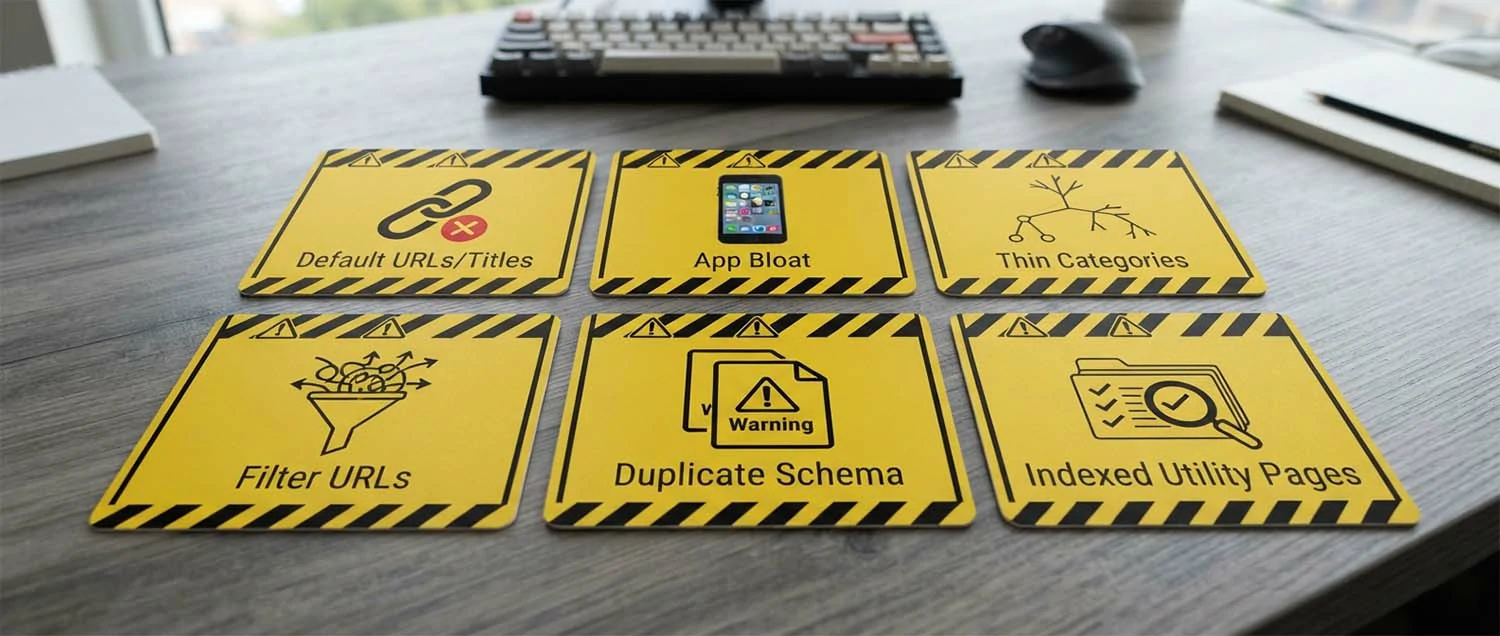
Leaving default URLs/titles
Wasted controls
Customize URLs and SEO fields; don't rely on defaults.
App bloat
Slow store
Unused apps inject scripts that slow pages.
Thin category pages
Won't rank
Categories need unique content, not just grids.
Ignoring filter URLs
Duplicate bloat
Unmanaged filters spawn thin duplicate pages.
Duplicate schema
Conflicts
Theme plus app can output double markup.
Indexing cart/checkout
Index clutter
Keep utility pages out of the index.
Most BigCommerce SEO mistakes come from leaving default URLs and titles, app bloat, thin category pages, ignoring filter URLs, duplicate schema, or indexing utility pages. Use the platform's controls, keep apps lean, enrich categories, manage filters, use one schema source, and keep cart/checkout out of the index.
Step 1: Optimize product and category pages
You optimize BigCommerce product and category pages by writing unique product descriptions and category content, setting custom page titles and meta descriptions through the platform's SEO fields, using clean keyword-relevant URLs, adding descriptive image alt text, organizing a logical category structure with breadcrumbs and internal linking, and targeting the right keywords—so these pages rank and serve shoppers. This is where much of the store's ranking potential lives.
The per-page fields the platform provides are only useful if they are actually filled, and on a large catalogue they usually are not — leaving titles auto-generated from the product name and descriptions empty. Fill them where it matters most rather than everywhere: the products that sell, the categories that rank. A product page needs a title that includes how people search for the item rather than only its internal name, and a category page needs genuine descriptive copy rather than a bare grid of products.

Step 2: Improve BigCommerce site speed
You improve BigCommerce site speed by choosing a fast, well-built theme, optimizing and properly sizing images, limiting apps and scripts that add overhead, minimizing heavy customizations and third-party tags, and using the platform's built-in performance features and CDN—since BigCommerce hosts the infrastructure and CDN, but the theme, images, apps, and scripts you add largely determine real-world speed. The controllable factors are where BigCommerce speed is won.
Speed work on a hosted platform has four levers and no more, which is clarifying. The theme determines the baseline. Images are almost always the largest payload, and the platform will serve whatever you upload, so uploading camera-resolution files is a self-inflicted cost. Apps add scripts. The remainder is what you have added yourself in the way of tags and embeds. Work through them in that order rather than chasing server-level optimisations you do not control, since that is where hosted-platform technical SEO effort actually pays.
Step 3: Add and validate structured data
You add structured data on BigCommerce primarily through your theme (many themes include product and other schema by default) or by editing theme code or using an app, then validating it with testing tools—so your products are eligible for rich results like price, availability, and review stars. Rich results improve visibility and click-through, so structured data is worth getting right.
Check the theme first, use one source, and validate. Structured data helps search engines understand your products and can enable rich results that improve visibility and click-through, so it's worth implementing. On BigCommerce, many themes output product structured data by default, so first check what your theme already provides, since you may be largely covered and shouldn't duplicate it. Where it's missing or incomplete, you can edit your theme's code (BigCommerce uses the Stencil theme framework) to add or correct schema like Product, Offer, and review markup, or use an app that adds structured data. Avoid duplicate schema from multiple sources—theme plus app—which can cause conflicts and errors, so use one authoritative source and disable the others. Ensure the structured data accurately reflects the page—real prices, real availability, and genuine reviews—since inaccurate or fake markup violates guidelines. Validate your structured data with testing and rich-results tools to confirm it's correct and eligible, and re-check after theme changes that can alter output. Adding structured data on BigCommerce—via theme, code, or an app, then validating it and avoiding duplicates—makes products eligible for rich results and helps search engines understand them, an important part of BigCommerce SEO. Use one accurate schema source and validate it. Accurate markup earns rich results; duplicates cause conflicts. Optimize the pages it marks up with your product page work.

Step 4: Control indexing
You control indexing on BigCommerce using the automatically generated XML sitemap, the platform's SEO and visibility settings (which let you control search-engine visibility for pages and products), robots.txt customization where available, and canonicals for duplicates—guiding search engines to index valuable pages and skip low-value ones like cart, checkout, and account. Indexing control keeps the store's search presence clean.
Filters are the largest crawl problem on any store platform, because every combination of colour, size, price band, and brand can generate its own crawlable address. On a catalogue of any size that produces hundreds of thousands of near-identical pages, consuming crawl budget that should be spent on products. Decide which filtered views are genuinely worth indexing — usually very few — and prevent the rest from being crawled. That decision is the whole of faceted navigation work and it is worth getting right once.

Measure your BigCommerce SEO results
You measure BigCommerce SEO results through organic traffic and rankings for products and categories, the conversions and revenue organic search drives, technical health (indexing, crawl issues, speed, structured-data validity), and BigCommerce's analytics alongside search engine tools—so you can see whether your optimization is helping the store rank and sell. Both the sales numbers and technical health matter.
The platform analytics tell you what happened in the store and Search Console tells you what happened before people arrived, and neither is sufficient alone. Join them on the landing page: that is how you find the category that gets impressions but no clicks, or the product that ranks well and converts badly. Verify the store revenue figures against what was actually banked before drawing conclusions, since hosted analytics and the search side count differently. Building that join is the useful part of performance measurement here.

A practical workflow for BigCommerce SEO
Phase 1
Set URLs and structure
Set clean custom URLs, verify canonicals, and organize a logical category structure.
Phase 2
Optimize and control
Fill SEO fields with unique content, improve speed, add schema, and control indexing.
Phase 3
Measure and maintain
Track rankings, sales, and technical health, and maintain content and settings over time.
Start by setting URLs and structure. Everything else—optimizing pages, controlling indexing, and measuring—builds on clean URLs, verified canonicals, and a logical category structure.

BigCommerce SEO checklist
✅ Clean, custom URLs set for products/categories
✅ Canonical tags verified
✅ SEO fields filled (titles, meta) per page
✅ Unique product descriptions written
✅ Category pages have unique content
✅ Images optimized with alt text
✅ A fast, lightweight theme in use
✅ Apps and scripts limited and vetted
✅ Breadcrumbs and internal links in place
✅ One accurate schema source, validated
✅ Sitemap submitted to search engines
✅ Cart/checkout/account kept out of index
✅ Filter/sort URLs managed
✅ Indexing monitored in Search Console
✅ Rankings, sales, and health tracked
Work through this for your BigCommerce store. It comes down to clean custom URLs and canonicals, filled SEO fields, unique content, a fast store, valid schema, clean indexing, and measurement.

How We Can Help
Want specialists on your BigCommerce store?
BigCommerce gives you strong controls, but using them well—clean setup, fast pages, sharp visuals, and ongoing optimization—takes time and expertise. If you'd rather have specialists handle any part of building, speeding up, or optimizing your store and its content, our team offers end-to-end services for online stores, so you can focus on selling while the technical and creative work is in good hands.
💻
Web Design and Development
Fast, well-built BigCommerce and ecommerce stores with clean, SEO-friendly foundations.
🎬
Video Editing
Product videos and demos that help shoppers understand and choose.
🖼️
Image Editing
Clean, optimized product photography and graphics that load fast.
🎧
Audio Editing
Polished audio for product videos, ads, and store content.
🧊
3D Design and Rendering
Photorealistic 3D product renders and visuals for richer product pages.
📈
SEO Services
Full BigCommerce SEO setup, optimization, and ongoing growth work.

Frequently Asked Questions
Practical answers about BigCommerce SEO
What is BigCommerce SEO?
Optimizing a BigCommerce store—a fully hosted SaaS platform—so it's crawled, indexed, and ranked well: the platform's URL and SEO settings, product and category optimization, speed, structured data, indexing, and measurement, using its relatively strong built-in controls.
How does BigCommerce handle URLs and duplicates?
It offers customizable, clean URLs (a real advantage) and sets canonical tags to manage duplication—so set clean structures, verify canonicals, link consistently, and manage duplication from filtering, sorting, and search URLs.
How do you optimize product and category pages?
Write unique content, set titles and meta in BigCommerce's per-page SEO fields, use clean URLs, add image alt text, organize a logical category structure with breadcrumbs and internal linking, and target the right keywords—so pages rank and serve shoppers.
How do you improve BigCommerce speed?
Choose a fast theme, optimize and size images, limit apps and scripts, minimize heavy customizations, and use the platform's performance features and CDN—since BigCommerce hosts the infrastructure but theme, images, apps, and scripts shape real-world speed.
How do you add structured data?
Through your theme (many Stencil themes include product schema), theme code, or an app—then validate it. Use one accurate source to avoid duplicate-schema conflicts, and keep prices, availability, and reviews genuine.
How do you control indexing?
Use the auto-generated sitemap, the platform's visibility settings to keep cart/checkout/account and thin pages out, careful robots.txt customization, and canonicals for duplicates—monitoring indexing in Search Console.
How do you measure results?
Through rankings and organic traffic for products and categories, conversions and revenue from organic search, and technical health (indexing, speed, schema validity)—combining Search Console with BigCommerce's analytics and web analytics.

Use strong controls to build a store that ranks
BigCommerce SEO is optimizing a BigCommerce store—a fully hosted SaaS platform—so it's crawled, indexed, and ranked well, covering the platform's URL and SEO settings, product and category optimization, speed, structured data, indexing, and measurement. BigCommerce handles the infrastructure (hosting, security, CDN, sitemaps) and offers relatively strong built-in SEO controls, including customizable URLs, so your effort goes to content and settings, not plumbing.
Optimize it by using the URL flexibility to set clean, keyword-relevant URLs and verifying canonicals; writing unique product and category content and filling BigCommerce's SEO fields with custom titles and meta descriptions; improving speed through a lean theme, optimized images, and app and script discipline; adding and validating structured data from one accurate source; controlling indexing with the sitemap, visibility settings, and canonicals while keeping cart, checkout, and account pages out; and measuring rankings, traffic, conversions, and technical health. Do this, and you take advantage of BigCommerce's solid built-in features and handled infrastructure to build a well-optimized store that ranks and sells—focusing your effort where it counts rather than on the plumbing the platform manages. Use the platform's strong controls well, keep it fast and clean, and BigCommerce SEO rewards you with rankings and sales.

Verify with primary guidance
BigCommerce and search-engine practices have authoritative references. Confirm current guidance as you optimize, since platform features change.