A comprehensive guide to migrating your website without losing SEO rankings
Table of contents
Website migration is one of the most critical and potentially risky undertakings in digital marketing. When executed properly, it can breathe new life into your online presence, improve user experience, and boost your search engine rankings. However, when done incorrectly, it can devastate your SEO performance, causing significant drops in organic traffic and search visibility that can take months or even years to recover from.
What is Website Migration?
Website migration refers to the process of making substantial changes to your website that could significantly impact search engine visibility. This includes changing domains, redesigning the site structure, switching hosting providers, moving from HTTP to HTTPS, or implementing a new content management system.
The significance of proper SEO planning during website migration cannot be overstated. Search engines like Google have already indexed your current website, established trust signals, and understand your site's architecture. Any major changes can disrupt these established patterns, potentially causing:
- Significant drops in organic search traffic
- Loss of search engine rankings for important keywords
- Decreased domain authority and trust signals
- Broken internal and external links
- Poor user experience due to technical issues
What This Checklist Covers
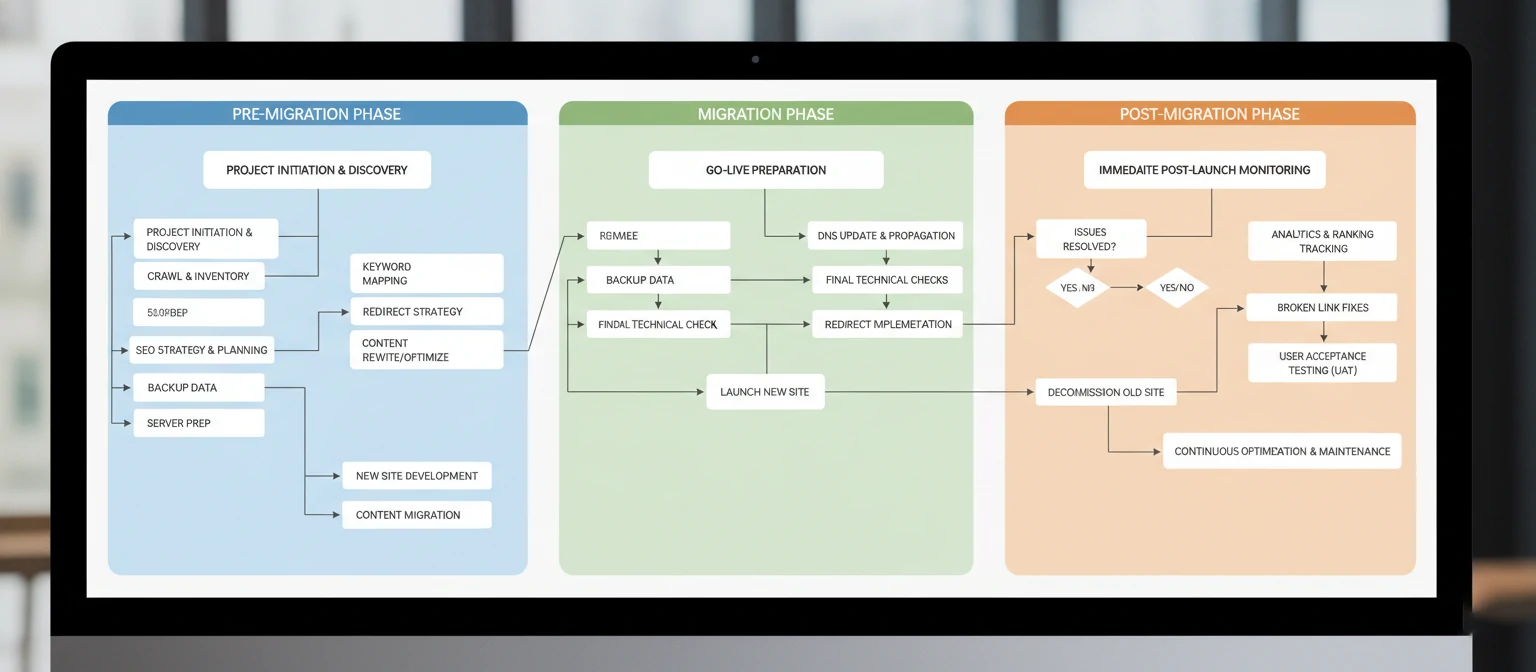
This comprehensive checklist is designed to guide you through every aspect of a successful SEO-friendly website migration. Whether you're a seasoned digital marketer, a business owner planning a site redesign, or a developer tasked with maintaining SEO performance during a migration, this guide provides actionable steps and best practices.
Our checklist covers the entire migration lifecycle, from initial planning and strategy development to post-migration monitoring and optimization. Each section includes practical tips, common pitfalls to avoid, and specific tools and techniques to ensure your migration preserves and potentially improves your SEO performance.
The foundation of any successful website migration lies in thorough pre-migration planning. This phase is where you set the stage for success by establishing clear objectives, understanding your current position, and creating a roadmap for the migration process. Rushing through this phase is one of the most common reasons why website migrations fail to meet their SEO objectives.
Why Planning Matters
Studies show that websites with comprehensive pre-migration planning experience 60% fewer SEO issues post-migration compared to those that skip this crucial phase. Proper planning helps identify potential problems before they occur and ensures all stakeholders understand their roles and responsibilities.
Setting Migration Goals
Before diving into the technical aspects of migration, it's essential to establish clear, measurable goals. These goals will guide your decision-making throughout the process and provide benchmarks for measuring success. Common migration goals include:
Improve Site Performance
Enhance page load speeds, mobile responsiveness, and overall user experience
Modernize Technology Stack
Upgrade to newer CMS, frameworks, or hosting solutions
Enhance Security
Implement HTTPS, improve security protocols, and ensure compliance
Rebrand or Restructure
Align website with new brand identity or business structure
Identifying Migration Scope
Understanding the full scope of your migration is crucial for proper resource allocation and timeline planning. Different types of migrations carry varying levels of SEO risk:
🔴 High-Risk Migrations
- Domain changes (example.com to newdomain.com)
- Complete site redesign with new URL structure
- Platform migrations (WordPress to Shopify)
- Subdomain to main domain moves
🟡 Medium-Risk Migrations
- HTTP to HTTPS migration
- Hosting provider changes
- CMS updates or theme changes
- URL structure modifications
🟢 Low-Risk Migrations
- Minor design updates
- Content updates without URL changes
- Plugin or module updates
- Performance optimizations
Analyzing Current Performance
Before making any changes, you need a comprehensive understanding of your current SEO performance. This baseline data will help you measure the success of your migration and quickly identify any issues that arise. Key metrics to document include:
Traffic Metrics
- Organic search traffic
- Top landing pages
- Traffic sources
- Conversion rates
Ranking Data
- Keyword rankings
- SERP features
- Local rankings
- Competitor positions
Technical Health
- Page load speeds
- Mobile usability
- Crawl errors
- Index coverage

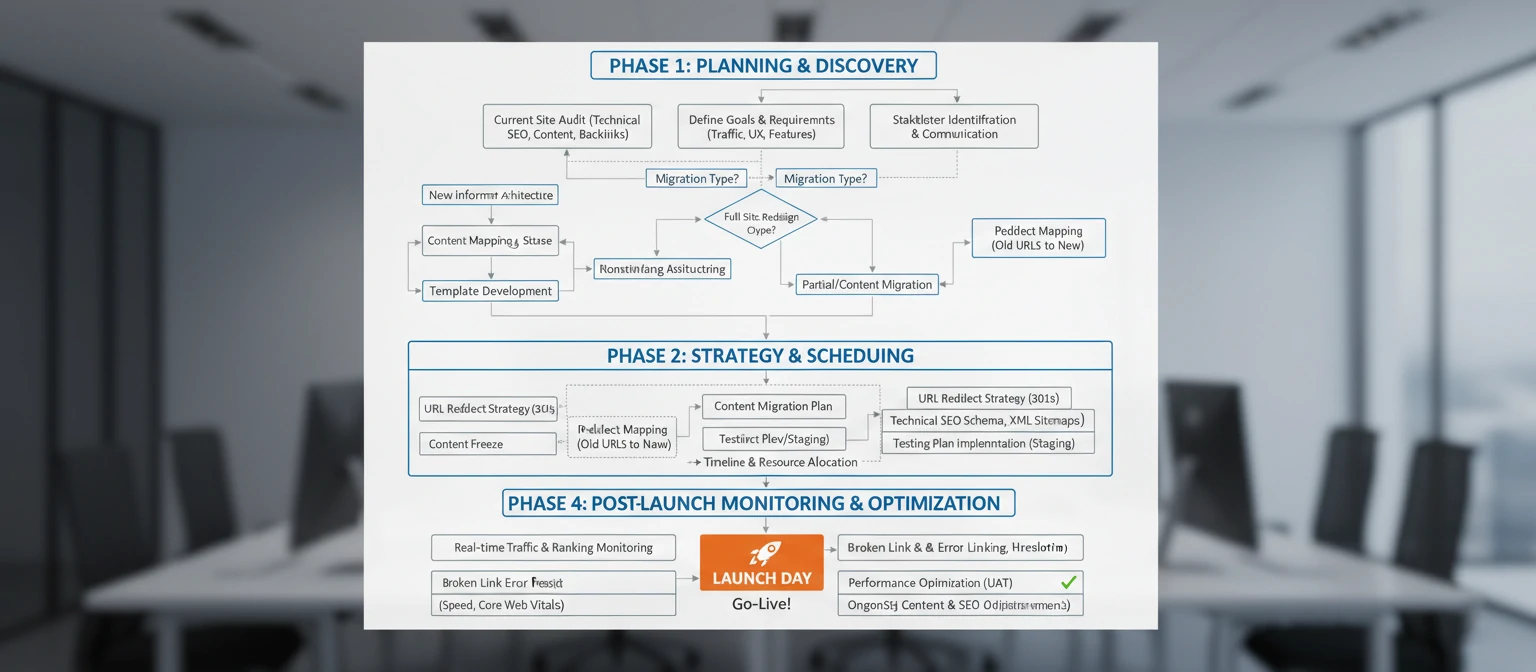
A well-crafted migration strategy serves as your roadmap throughout the entire process. This strategy should address every aspect of the migration, from technical implementation to content preservation, ensuring that no critical element is overlooked. The strategy phase is where you transform your migration goals into actionable plans with specific timelines, responsibilities, and success metrics.
Developing Your Migration Timeline
Creating a realistic timeline is crucial for migration success. Most website migrations require 4-12 weeks depending on complexity, with larger enterprise sites potentially requiring several months. Your timeline should account for:
Planning & Audit Phase (1-2 weeks)
Complete SEO audit, stakeholder alignment, and strategy development
Development & Testing (2-6 weeks)
Build new site, implement redirects, and conduct thorough testing
Migration Execution (1-2 days)
Go-live process, DNS changes, and immediate post-launch checks
Monitoring & Optimization (4-8 weeks)
Performance monitoring, issue resolution, and ongoing optimization
URL Structure Considerations
Your URL structure is one of the most critical elements affecting SEO during migration. Changes to URL structure can impact how search engines understand and rank your content. Key considerations include:
Best Practices for URL Structure
- Keep URLs as similar to the original structure as possible
- Use descriptive, keyword-rich URLs that reflect content hierarchy
- Avoid unnecessary parameters and dynamic URLs when possible
- Implement consistent URL patterns across the site
- Consider the impact on internal linking and site architecture
Example URL Mapping Strategy:
Old Structure:
example.com/products/category1/product-name.html

New Structure:
example.com/products/category1/product-name/

Redirect Rule:
RewriteRule ^products/([^/]+)/([^/]+).html$ /products/$1/$2/ [R=301,L]
Content Preservation Strategy
Content is the foundation of your SEO performance. During migration, it's essential to preserve not just the text content, but also the semantic structure, internal linking, and metadata that contribute to search engine understanding. Your content preservation strategy should include:
Content Audit Checklist
Migration Priorities
Site Architecture Planning
Your site architecture affects both user experience and search engine crawling efficiency. During migration, you have the opportunity to improve your site's information architecture, but changes must be carefully planned to maintain SEO value. Consider factors such as navigation depth, internal linking patterns, and logical content grouping to create an architecture that serves both users and search engines effectively.
Conducting a comprehensive SEO audit of your existing website is perhaps the most critical step in the pre-migration process. This audit serves as your baseline measurement and helps identify the specific elements that contribute to your current search performance. Without this detailed understanding, you risk losing valuable SEO assets during the migration process.
Essential SEO Audit Components
A thorough SEO audit should examine every aspect of your website that impacts search engine visibility. The audit process typically takes 1-2 weeks for medium-sized websites and should be completed well before any migration work begins.
Technical SEO Analysis
Content & On-Page SEO
Essential SEO Audit Tools
Using the right combination of tools ensures you capture all critical SEO data. Each tool provides unique insights that contribute to a complete picture of your website's SEO health:
Google Search Console
Essential for understanding how Google sees your website
- Index coverage reports
- Search performance data
- Core Web Vitals metrics
- Manual actions and security issues
Screaming Frog SEO Spider
Comprehensive website crawling and technical analysis
- Complete site crawl data
- Broken links and redirects
- Duplicate content identification
- Page titles and meta data analysis
SEMrush or Ahrefs
Keyword rankings and competitive analysis
- Keyword ranking positions
- Backlink profile analysis
- Competitor comparison
- Technical SEO issues

Key Metrics to Document
During your audit, focus on documenting metrics that will serve as benchmarks for measuring migration success. These baseline measurements are crucial for identifying any negative impacts and demonstrating the value of your migration efforts:
Traffic Metrics
- Organic sessions (last 3-6 months)
- Top 20 landing pages by traffic
- Conversion rates by page
- Bounce rates and engagement
- Geographic traffic distribution
Ranking Data
- Top 50 keyword positions
- Featured snippet ownership
- Local search rankings
- SERP feature appearances
- Branded vs. non-branded rankings
Technical Health
- Page load speed scores
- Core Web Vitals metrics
- Mobile usability issues
- Index coverage status
- Crawl error counts
Pro Tip: Create a Migration Dashboard
Set up a dedicated dashboard in Google Analytics and Google Search Console to track your key metrics before, during, and after migration. This makes it easier to spot trends and quickly identify any issues that need immediate attention.
Creating comprehensive backups and maintaining detailed documentation throughout your migration process is your safety net against potential disasters. These preparations ensure you can quickly recover from any issues and provide a clear record of all changes made during the migration. Many successful migrations have been saved by thorough backup and documentation practices.
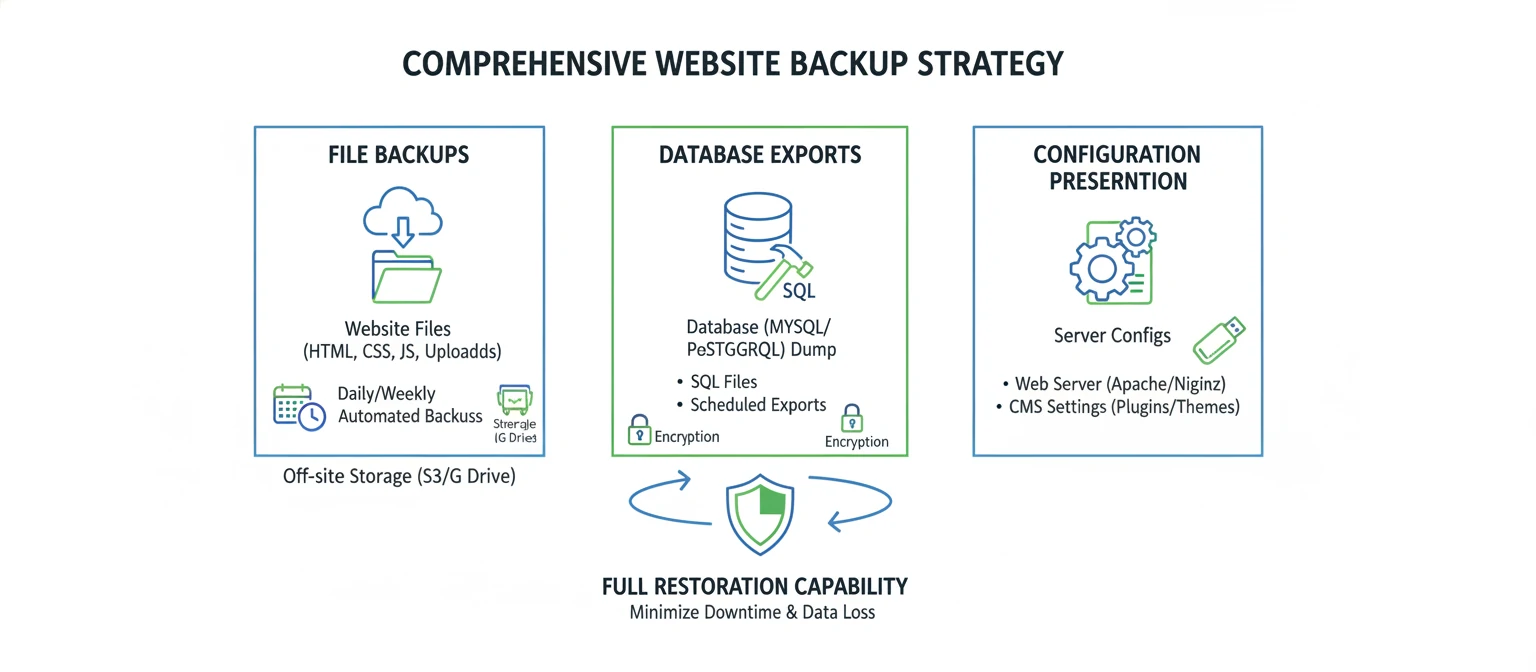
Complete Website Backup Strategy
Your backup strategy should encompass every aspect of your website, from files and databases to configurations and third-party integrations. A comprehensive backup allows you to restore your site to its pre-migration state if critical issues arise.
Critical Backup Components
SEO-Specific Backups
Sample Backup Script (Linux/cPanel):
#!/bin/bash
# Website Migration Backup Script
DATE=$(date +%Y%m%d_%H%M%S)
BACKUP_DIR="/backups/migration_$DATE"

# Create backup directory
mkdir -p $BACKUP_DIR

# Backup files
tar -czf $BACKUP_DIR/website_files.tar.gz /public_html/

# Backup database
mysqldump -u username -p database_name > $BACKUP_DIR/database_backup.sql

# Backup configuration files
cp /etc/apache2/sites-available/example.com.conf $BACKUP_DIR/
cp /public_html/.htaccess $BACKUP_DIR/
cp /public_html/robots.txt $BACKUP_DIR/

echo "Backup completed: $BACKUP_DIR"
Documentation Best Practices
Comprehensive documentation serves multiple purposes: it helps team members understand the migration process, provides a reference for troubleshooting, and creates a knowledge base for future migrations. Your documentation should be detailed enough that someone else could understand and continue the work if needed.
📋 Migration Plan Document
Central document outlining the entire migration strategy
- Migration objectives and success criteria
- Detailed timeline with milestones
- Team roles and responsibilities
- Risk assessment and mitigation strategies
🔗 URL Mapping Spreadsheet
Complete mapping of old URLs to new URLs
- Old URL, New URL, Redirect Type
- Page importance and traffic data
- Special handling requirements
- Testing status and notes
⚙️ Technical Configuration Log
Record of all technical changes and configurations
- Server settings and environment variables
- Plugin/module configurations
- Third-party integrations setup
- Performance optimization settings
Version Control and Change Tracking
Implementing proper version control during migration helps track changes, collaborate effectively, and maintain a history of modifications. This is especially important for larger migrations involving multiple team members.
Essential Documentation Checklist
Your redirect strategy is arguably the most critical component of maintaining SEO value during a website migration. Properly implemented redirects ensure that search engines and users can find your content at its new location, preserving link equity and preventing the dreaded 404 errors that can devastate your search rankings. A well-planned redirect strategy can actually improve your SEO performance by consolidating link authority and eliminating duplicate content issues.
Understanding Redirect Types
Different types of redirects serve different purposes in SEO. Understanding when to use each type is crucial for maintaining search engine trust and preserving ranking signals:
301 Redirects
Permanent redirects - Use for most migrations
- Passes 90-99% of link equity
- Tells search engines the move is permanent
- Best for URL structure changes
- Consolidates duplicate content
302 Redirects
Temporary redirects - Use sparingly
- Passes less link equity
- Indicates temporary move
- Use for A/B testing
- Maintenance pages
Meta Refresh
Client-side redirects - Avoid for SEO
- Slower than server-side redirects
- May not pass link equity
- Poor user experience
- Use only when necessary
Creating Your URL Mapping
URL mapping is the process of documenting exactly how each old URL should redirect to its new counterpart. This mapping serves as the blueprint for your redirect implementation and should be completed before any technical work begins.
URL Mapping Spreadsheet Template
| Old URL | New URL | Redirect Type | Priority | Monthly Traffic |
|---|---|---|---|---|
| /old-product-page.html | /products/new-product-page/ | 301 | High | 2,500 |
| /blog/category/old-post/ | /blog/new-post/ | 301 | Medium | 850 |
| /services.php | /services/ | 301 | High | 1,200 |

Implementation Methods
The method you choose for implementing redirects depends on your server configuration, technical capabilities, and the scale of your migration. Here are the most common approaches:
Apache .htaccess Method
Most common method for Apache servers, using .htaccess file
# Individual page redirects
Redirect 301 /old-page.html /new-page/

# Pattern-based redirects
RedirectMatch 301 ^/blog/([0-9]+)/([0-9]+)/([0-9]+)/(.*)$ /blog/$4/

# Category redirects
Redirect 301 /old-category/ /new-category/

# Remove file extensions
RewriteRule ^([^.]+).html$ /$1/ [R=301,L]
Nginx Configuration
For Nginx servers, redirects are configured in the server block
# Individual redirects
location = /old-page.html {
    return 301 /new-page/;
}

# Pattern matching
location ~ ^/blog/([0-9]+)/([0-9]+)/([0-9]+)/(.*)$ {
    return 301 /blog/$4/;
}

# Wildcard redirects
location /old-category/ {
    return 301 /new-category/;
}
CMS-Based Redirects
Using plugins or built-in redirect functionality
- WordPress: Redirection plugin, Yoast SEO Premium
- Drupal: Redirect module, Path Auto
- Shopify: Built-in URL redirects, third-party apps
- Magento: URL Rewrite Management, extensions
Redirect Chain Prevention
Redirect chains occur when a URL redirects to another URL that also redirects, creating a chain of redirects. These chains slow down page loading, waste crawl budget, and can dilute link equity. Always redirect directly to the final destination URL.
Redirect Best Practices
- One-to-One Mapping: Each old URL should redirect to one specific new URL
- Relevant Content: Redirect to the most relevant new page, not just the homepage
- Test Thoroughly: Verify every redirect works correctly before going live
- Monitor Performance: Check redirect response times and server load
- Update Internal Links: Change internal links to point directly to new URLs
Special Redirect Scenarios
Some migration scenarios require special consideration for redirects. Understanding these edge cases helps ensure comprehensive coverage of your redirect strategy and prevents common oversights that can impact SEO performance.
Content is the cornerstone of your SEO success, and how you handle content during migration can make or break your search engine performance. Content migration involves more than simply copying text from one location to another—it requires careful preservation of semantic structure, metadata, internal linking patterns, and the contextual relationships that search engines use to understand and rank your pages.
Content Audit and Prioritization
Before migrating any content, conduct a comprehensive audit to understand what you have, what performs well, and what might need improvement. This audit helps you make informed decisions about which content to migrate, consolidate, or retire.
High-Priority Content
Content for Review
Preserving SEO Elements
During content migration, it's crucial to preserve all the SEO elements that contribute to your current search performance. These elements work together to help search engines understand your content's context, relevance, and authority.
📝 On-Page SEO Elements
- Title tags (preserve keyword targeting)
- Meta descriptions (maintain compelling copy)
- Header tags (H1-H6 structure)
- Image alt text and file names
- Internal linking anchor text
- Schema markup and structured data
- Canonical tags
- Open Graph and Twitter Card tags
🔗 Content Relationships
- Internal link structure and flow
- Related content connections
- Category and tag relationships
- Breadcrumb navigation paths
- Content hierarchy and parent-child relationships
- Cross-references and citations
- User-generated content (comments, reviews)
- Social sharing and engagement data

Content Consolidation Strategies
Migration presents an excellent opportunity to consolidate duplicate or similar content, which can improve your site's overall SEO performance by eliminating keyword cannibalization and concentrating link authority.
Content Consolidation Decision Matrix
Consolidate When:
- Multiple pages target the same keywords
- Content covers similar topics with overlap
- Pages have low individual traffic but related themes
- Duplicate content exists across different URLs
Keep Separate When:
- Each page serves distinct user intents
- Content targets different audience segments
- Pages have strong individual performance
- Topics require separate detailed treatment
Technical Content Migration
The technical aspects of content migration involve ensuring that all content elements are properly transferred and that the new site maintains the same level of search engine accessibility and user experience as the original.
Content Migration Checklist Script:
# Content Migration Verification
# Check for missing images
find /new-site -name "*.html" -exec grep -l "img.*src.*404" {} ;

# Verify internal links
grep -r "href.*old-domain.com" /new-site/

# Check for missing meta descriptions
grep -L "meta name="description"" /new-site/*.html

# Validate schema markup
# Use Google's Structured Data Testing Tool for each migrated page
Quality Assurance for Content
Implementing a systematic quality assurance process ensures that migrated content maintains its SEO value and provides an excellent user experience. This process should include both automated checks and manual review of critical pages to catch issues that automated tools might miss.
Technical SEO forms the foundation that enables search engines to effectively crawl, understand, and index your website. During migration, technical elements require careful attention to ensure that search engines can continue to access and interpret your content correctly. Poor technical implementation can negate even the best content and redirect strategies.
XML Sitemap Management
XML sitemaps serve as a roadmap for search engines, helping them discover and understand your site's structure. During migration, updating and optimizing your sitemaps is crucial for ensuring search engines can efficiently crawl your new site structure.
Sitemap Best Practices
Sitemap Types to Consider
- Main Sitemap: Primary pages and content
- Image Sitemap: Important images and galleries
- Video Sitemap: Video content and metadata
- News Sitemap: Recent news articles (if applicable)
- Mobile Sitemap: Mobile-specific content
Sample XML Sitemap Structure:
<?xml version="1.0" encoding="UTF-8"?>
<urlset xmlns="http://www.sitemaps.org/schemas/sitemap/0.9">
  <url>
    <loc>https://example.com/</loc>
    <lastmod>2024-01-15</lastmod>
    <changefreq>weekly</changefreq>
    <priority>1.0</priority>
  </url>
  <url>
    <loc>https://example.com/products/</loc>
    <lastmod>2024-01-14</lastmod>
    <changefreq>daily</changefreq>
    <priority>0.8</priority>
  </url>
</urlset>
Robots.txt Optimization
The robots.txt file controls how search engines crawl your website. During migration, updating this file correctly is essential for ensuring search engines can access your new content while blocking access to development or sensitive areas.
🤖 Essential Robots.txt Elements
User-agent: *
Allow: /

# Block development and admin areas
Disallow: /admin/
Disallow: /wp-admin/
Disallow: /dev/
Disallow: /staging/

# Block duplicate content
Disallow: /search?
Disallow: /*?sort=
Disallow: /*?filter=

# Allow important resources
Allow: /wp-content/uploads/
Allow: /*.css
Allow: /*.js

# Sitemap location
Sitemap: https://example.com/sitemap.xml
Canonical Tag Implementation
Canonical tags help prevent duplicate content issues by indicating the preferred version of a page. During migration, proper canonical implementation is crucial for maintaining search engine understanding of your content hierarchy.
Canonical Tag Best Practices
- Self-Referencing: Every page should have a canonical tag pointing to itself
- Absolute URLs: Always use complete URLs including protocol and domain
- Consistent Implementation: Ensure canonical tags match your preferred URL structure
- Parameter Handling: Use canonicals to handle URL parameters and tracking codes
- Cross-Domain: Use for syndicated content or legitimate duplicate content

Schema Markup and Structured Data
Schema markup helps search engines understand your content's context and can enhance your search listings with rich snippets. During migration, preserving and optimizing structured data is essential for maintaining enhanced search visibility.
Organization Schema
- Company information
- Contact details
- Social media profiles
- Logo and branding
Content Schema
- Article markup
- Product information
- Review and rating data
- FAQ and How-to content
Local Business Schema
- Business hours
- Location and address
- Services offered
- Customer reviews
Core Web Vitals and Performance
Core Web Vitals are now ranking factors, making performance optimization crucial during migration. Use this opportunity to improve your site's loading speed, interactivity, and visual stability to enhance both user experience and search rankings.
Comprehensive testing is your final safeguard against migration disasters. A systematic testing approach helps identify and resolve issues before they impact your live site, ensuring that your migration preserves SEO value while delivering an excellent user experience. Testing should cover functionality, performance, SEO elements, and user experience across different devices and browsers.
Pre-Launch Testing Checklist
Your testing phase should be methodical and comprehensive, covering every aspect of your website that could impact SEO or user experience. Create a staging environment that mirrors your production setup as closely as possible.
Critical SEO Tests
Technical Performance Tests
Essential Testing Tools
Using the right combination of testing tools ensures comprehensive coverage of all potential issues. Each tool provides unique insights that contribute to a thorough testing process:
Google PageSpeed Insights
Test Core Web Vitals and overall performance
- Largest Contentful Paint (LCP)
- First Input Delay (FID)
- Cumulative Layout Shift (CLS)
- Performance optimization suggestions
Google Mobile-Friendly Test
Verify mobile usability and responsiveness
- Mobile rendering preview
- Usability issues identification
- Mobile SEO recommendations
- Touch element sizing validation
Screaming Frog SEO Spider
Comprehensive crawl testing and issue identification
- Broken links and redirect chains
- Missing meta descriptions and titles
- Duplicate content detection
- Image optimization issues

Cross-Browser and Device Testing
Your website needs to function correctly across different browsers, devices, and screen sizes. Cross-browser testing ensures that all users have a consistent experience regardless of their technology choices.
Desktop Browsers
- Chrome (latest + 1 previous)
- Firefox (latest + 1 previous)
- Safari (latest + 1 previous)
- Edge (latest version)
Mobile Devices
- iOS Safari (iPhone/iPad)
- Android Chrome
- Samsung Internet
- Various screen sizes
Testing Priorities
- Navigation functionality
- Form submissions
- Interactive elements
- Media playback
Automated Testing Implementation
Implementing automated testing helps catch issues quickly and ensures consistent quality throughout the migration process. Automated tests can run continuously and provide immediate feedback on any problems.
Sample Automated Testing Script:
#!/bin/bash
# Website Migration Testing Script

echo "Starting comprehensive website testing..."

# Test redirect functionality
echo "Testing redirects..."
curl -I -s -o /dev/null -w "%{http_code}" http://old-domain.com/old-page
# Should return 301

# Test sitemap accessibility
echo "Testing XML sitemap..."
curl -I -s -o /dev/null -w "%{http_code}" https://new-domain.com/sitemap.xml
# Should return 200

# Test robots.txt
echo "Testing robots.txt..."
curl -I -s -o /dev/null -w "%{http_code}" https://new-domain.com/robots.txt
# Should return 200

# Test Core Web Vitals using Lighthouse CI
echo "Running Lighthouse tests..."
lhci autorun

echo "Testing completed. Check results for any issues."
Testing Phase Timeline
The work doesn't end when your new website goes live—in many ways, it's just beginning. Post-migration monitoring is crucial for identifying issues quickly, measuring the success of your migration, and making necessary adjustments to optimize performance. A proactive monitoring strategy can mean the difference between a successful migration and a costly SEO disaster.
Immediate Post-Launch Monitoring
The first 48-72 hours after migration are critical. During this period, you should monitor your website closely for any immediate issues that could impact user experience or search engine crawling. Quick identification and resolution of problems can prevent long-term SEO damage.
Critical 24-Hour Checks
Week 1 Monitoring Tasks
Key Metrics to Track
Establishing a comprehensive monitoring dashboard helps you track the success of your migration and quickly identify any issues. Focus on metrics that directly relate to your migration goals and SEO performance.
Traffic Metrics
- Organic search sessions
- Page views and unique visitors
- Bounce rate and session duration
- Conversion rates by channel
- Geographic traffic distribution
Search Performance
- Keyword ranking positions
- Click-through rates (CTR)
- Search impressions
- Featured snippet ownership
- Local search visibility
Technical Health
- Crawl errors and 404s
- Page load speeds
- Core Web Vitals scores
- Mobile usability issues
- Index coverage status

Long-term SEO Optimization
Migration provides an excellent opportunity to implement ongoing SEO improvements. Use the insights gained during the migration process to establish a long-term SEO strategy that builds upon your migration success.
📈 Month 1-3: Stabilization Phase
Focus on monitoring and quick issue resolution
- Daily monitoring of critical metrics
- Weekly SEO performance reports
- Immediate resolution of technical issues
- User feedback collection and analysis
🚀 Month 3-6: Optimization Phase
Implement improvements based on migration learnings
- Content optimization based on performance data
- Technical SEO enhancements
- Link building and authority development
- User experience improvements
🎯 Month 6+: Growth Phase
Scale successful strategies and explore new opportunities
- Advanced SEO strategy implementation
- Content expansion and topic authority building
- International SEO considerations
- Competitive analysis and market expansion
Common Post-Migration Issues to Watch For
Technical Issues:
- Redirect loops or chains
- Broken internal links
- Missing or incorrect canonical tags
- Slow page load times
SEO Issues:
- Ranking drops for key terms
- Decreased organic traffic
- Index coverage problems
- Lost featured snippets
Website migration is one of the most challenging yet rewarding undertakings in digital marketing. When executed properly using this comprehensive checklist, migration can not only preserve your existing SEO value but actually improve your search engine performance through better site architecture, improved user experience, and enhanced technical implementation.
Key Takeaways
Throughout this guide, we've covered the essential elements that contribute to a successful SEO-friendly website migration. The most important lessons to remember are:
Planning is Everything
Thorough pre-migration planning prevents most issues. Take time to audit your current site, understand your goals, and create detailed documentation before making any changes.
Redirects Are Critical
Proper 301 redirects preserve link equity and ensure users and search engines can find your content. Map every important URL and test all redirects thoroughly.
Content Preservation Matters
Your content is your SEO foundation. Preserve not just the text, but also the semantic structure, metadata, and internal linking that search engines rely on.
Testing Prevents Disasters
Comprehensive testing in a staging environment helps identify issues before they impact your live site. Test functionality, performance, and SEO elements thoroughly.
Your Migration Success Checklist
Use this final checklist to ensure you've covered all the essential elements for a successful migration: