

Instantly Add Professional Subtitles to Any Video with AI
Table of contents
- What Is an Auto Caption Generator?
- Why Auto Captions Matter for Your Content
- How Auto Caption Technology Works
- 12 Best Auto Caption Generators in 2026
- Head-to-Head Comparison
- Choosing the Right Tool for Your Needs
- Pro Tips for Better Auto Captions
- Frequently Asked Questions
- Start Captioning Smarter, Not Harder
Let me paint a familiar picture: You've just recorded a 15-minute video. The content is solid, the visuals are on point, and you're ready to share it with the world. But then reality hits—you need captions. And the thought of manually transcribing 15 minutes of audio makes you want to abandon the project entirely.
Sound familiar? You're not alone. Before AI-powered auto caption generators became mainstream, adding subtitles to videos was a time-consuming nightmare. A 10-minute video could easily take 2-3 hours to caption manually. Professional services charged $1-3 per minute, making it expensive for regular content creators.
But here's the good news: In 2026, auto caption technology has reached a remarkable level of sophistication. AI can now transcribe speech with up to 99% accuracy, support over 100 languages, identify multiple speakers, and even add punctuation and formatting automatically. What once took hours now takes minutes.
This guide explores everything you need to know about auto caption generators—how they work, which tools deliver the best results, and how to choose the right one for your specific needs. Whether you're a content creator, marketer, educator, or business professional, you'll find your perfect captioning solution here.
What Is an Auto Caption Generator?
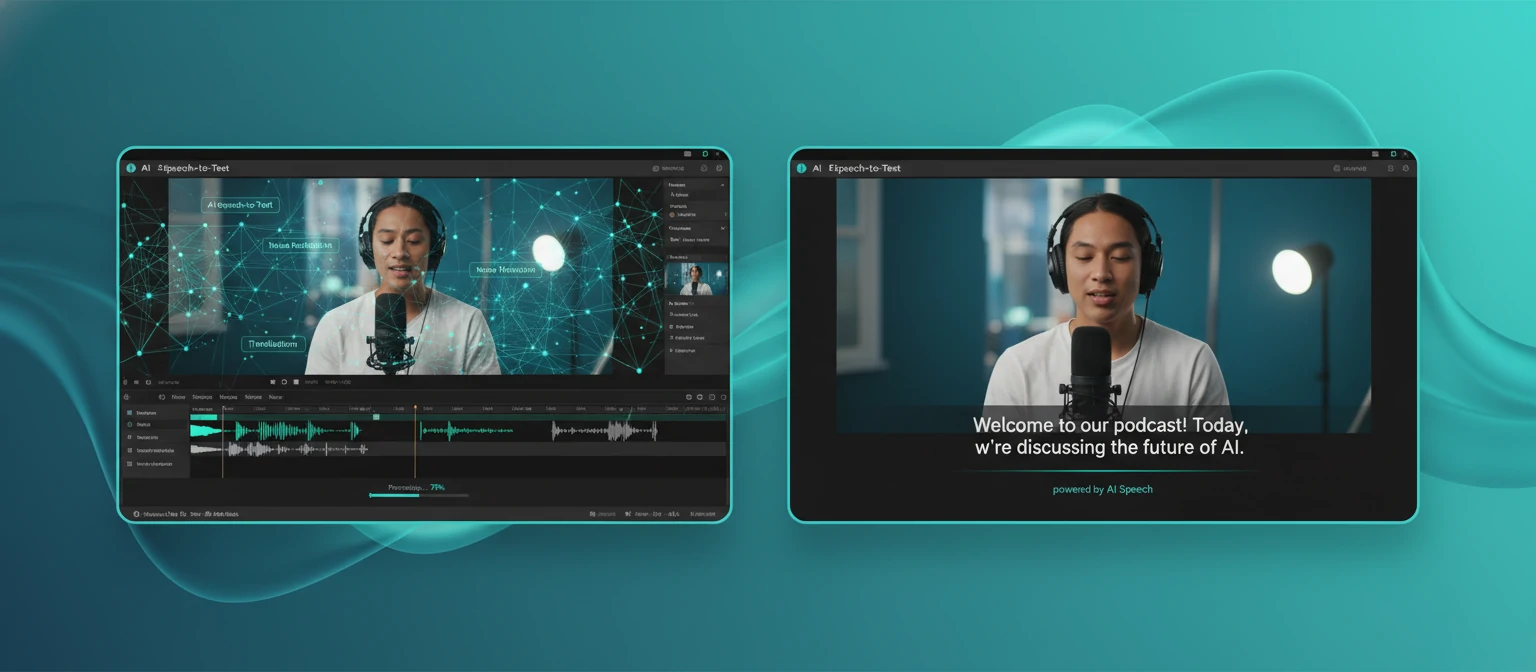
An auto caption generator is a software tool that uses artificial intelligence to automatically convert spoken audio in videos into written text captions. Instead of manually transcribing every word and timing each caption to appear at the right moment, the AI handles everything—from speech recognition to timestamp synchronization.
Think of it as having a highly skilled transcriptionist who works at superhuman speed. Upload your video, wait a few minutes (or sometimes seconds), and receive a complete set of synchronized captions ready to overlay on your video or export as a separate subtitle file.
Auto Captions vs. Manual Captions: The Difference
⚡ Auto Captions
- Generated in minutes
- 95-99% accuracy with good audio
- Handles multiple languages
- Automatic timing sync
- Cost: Free to low-cost
✍️ Manual Captions
- Takes hours per video
- 100% accuracy possible
- Limited by transcriber skills
- Manual timing required
- Cost: $1-3+ per minute
What Auto Caption Generators Can Do
Speech-to-Text
Convert spoken words into accurate written text automatically
Time Sync
Align each caption perfectly with the corresponding audio
Multi-Language
Support for 100+ languages and auto-translation
Speaker ID
Identify and label different speakers automatically
Custom Styles
Apply fonts, colors, animations, and positioning
Multiple Exports
Export as SRT, VTT, TXT, or burned into video
Why Auto Captions Matter for Your Content
Adding captions to your videos isn't just about accessibility (though that's important). It's a strategic decision that impacts engagement, reach, SEO, and ultimately your bottom line. Here's why auto captions have become essential:
Dramatically Higher Engagement
Videos with captions see 40% more views and 80% higher completion rates. Viewers stay engaged longer when they can read along with the audio, especially in sound-off environments.
Significant SEO Benefits
Search engines can't watch videos, but they can read caption text. This makes your content searchable and indexable, improving rankings on Google and within video platforms like YouTube.
Global Audience Reach
Auto-translation features let you reach audiences who don't speak your language. A single video can now serve viewers across dozens of countries with localized captions.
Sound-Off Social Media
85% of Facebook videos are watched without sound. On LinkedIn, it's even higher. Captions ensure your message gets through regardless of whether viewers can or choose to turn on audio.
💡 The Business Case
A study by Verizon Media found that 80% of consumers are more likely to watch an entire video when captions are available. For businesses, this translates directly to longer view times, better message retention, and higher conversion rates.
How Auto Caption Technology Works
Understanding the technology behind auto captions helps you set realistic expectations and choose the right tool. Here's a peek under the hood of modern speech recognition AI:
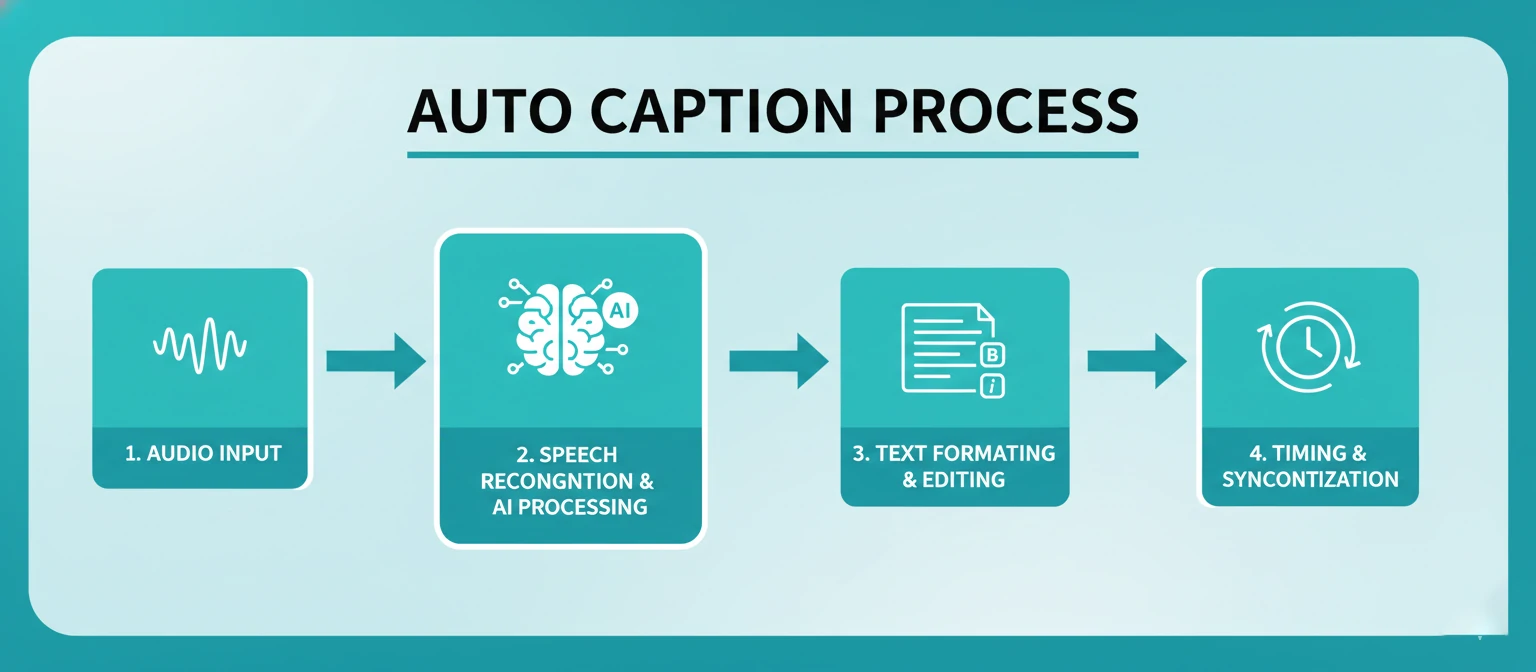
The Four-Stage Process
Audio Extraction & Preprocessing
The system first extracts the audio track from your video file. Advanced preprocessing removes background noise, normalizes volume levels, and isolates speech frequencies for optimal recognition.
Speech Recognition (ASR)
Automatic Speech Recognition models—trained on millions of hours of speech—analyze the audio and convert it to text. Leading engines like Whisper, Google Speech, and DeepSpeech power most modern tools.
Natural Language Processing
NLP algorithms add punctuation, capitalize proper nouns, format numbers, and break text into readable caption segments. This transforms raw transcription into polished, readable captions.
Timestamp Synchronization
Each word or phrase is precisely aligned with its corresponding moment in the audio, ensuring captions appear and disappear at exactly the right times for comfortable reading.
Factors That Influence Accuracy
✅ Improves Accuracy
- Clear, high-quality audio
- Single speaker at a time
- Standard accents
- Moderate speaking pace
- Minimal background noise
- Common vocabulary
❌ Reduces Accuracy
- Background music/noise
- Multiple overlapping speakers
- Heavy accents or dialects
- Very fast speech
- Technical jargon/names
- Poor microphone quality
12 Best Auto Caption Generators in 2026
We've extensively tested the leading auto caption tools to bring you this curated list. Each has been evaluated for accuracy, speed, features, ease of use, and value.
CapCut Auto Captions
CapCut has emerged as the gold standard for free auto captions. Their AI achieves impressive accuracy across multiple languages, and you get unlimited usage at absolutely no cost. The animated caption templates—with word-by-word highlighting, bounce effects, and trendy styles—have made it the go-to choice for TikTok and Instagram creators.
Beyond basic captioning, CapCut offers one-click caption styling, automatic translation to 50+ languages, and seamless integration with their full video editor. Whether you're using the desktop app, mobile app, or browser version, the experience is consistently excellent.
Accuracy
95%+
Languages
50+
Price
Free
Caption Styles
50+
VEED.io
VEED consistently delivers the highest transcription accuracy in the industry—regularly achieving 98%+ on clear audio. Their AI handles technical vocabulary, proper nouns, and accented speech better than most competitors. The caption editor is robust, letting you fix any errors inline with easy-to-use tools.
The free tier includes 10 minutes per month with watermark-free exports. Paid plans unlock unlimited usage, higher resolution exports, and additional features like background removal and screen recording.
Descript
Descript revolutionizes captioning with its transcript-based editing approach. Edit your video by editing the text—delete a sentence from the transcript, and the corresponding video is automatically removed. This makes correcting auto-caption errors incredibly fast and intuitive.
The AI automatically identifies speakers, removes filler words ("um,""uh,""like") with one click, and generates a studio-quality transcript. Perfect for interviews, podcasts, and dialogue-heavy content.
YouTube Auto-Captions
If YouTube is your primary platform, their built-in auto-captions are a natural choice. Completely free, automatically generated after upload, and now supporting auto-translation to 100+ languages. The accuracy has improved dramatically in recent years.
YouTube's caption editor makes it easy to review and correct any errors directly in YouTube Studio. Captions also improve your video's discoverability—they're searchable within YouTube's search results.
Kapwing
Kapwing combines excellent auto-captioning (powered by OpenAI's Whisper model) with powerful team collaboration features. Multiple people can work on the same project simultaneously, leave comments, and track changes—perfect for agencies and content teams.
The free tier offers watermark-free exports up to 4 minutes. The interface is clean and beginner-friendly while offering advanced customization for experienced users.
More Excellent Options (#6-12)
Happy Scribe
99% accuracy with human verification option. 120+ languages. Enterprise-ready.
Rev
AI + human transcription options. Guaranteed 99% accuracy on human-reviewed captions.
Clipchamp
Microsoft's free video editor with built-in auto captions. Integrated into Windows 11.
Subly
Excellent auto-translation to 70+ languages. Great for international content.
Otter.ai
Specializes in meeting transcription. Integrates with Zoom, Teams, Google Meet.
Sonix
Enterprise-grade with API access. Excellent for bulk processing and automation.
Adobe Premiere Pro
Built-in Speech to Text. Seamless integration if you already use Premiere.
Head-to-Head Comparison
| Tool | Accuracy | Languages | Free Tier | Caption Styles | Best For |
|---|---|---|---|---|---|
| CapCut | 95% | 50+ | Unlimited | ⭐⭐⭐⭐⭐ | Social Media |
| VEED.io | 98% | 100+ | 10 min/mo | ⭐⭐⭐⭐⭐ | All-around |
| Descript | 96% | 22 | 1 hr/mo | ⭐⭐⭐⭐ | Podcasts |
| YouTube | 90% | 100+ | Unlimited | ⭐⭐ | YouTube |
| Kapwing | 97% | 70+ | 4 min/video | ⭐⭐⭐⭐ | Teams |
Choosing the Right Tool for Your Needs
With so many excellent options, here's how to narrow down your choice based on your specific situation:
For Social Media Creators
You need trendy animated styles, fast turnaround, and mobile-friendly tools. Stylish captions matter as much as accuracy for engagement.
For YouTube Creators
SEO benefits and accuracy are priorities. Native integration or SRT export for easy upload matters.
For Podcasters & Interviewers
Speaker identification, filler word removal, and transcript-based editing save massive amounts of time.
For Business & Enterprise
Maximum accuracy, human review options, API access, and compliance features are essential.
On a Tight Budget
Need quality auto captions without spending money? These completely free options deliver.
Pro Tips for Better Auto Captions
Get the most out of your auto caption generator with these expert tips:
Record Clean Audio
The single biggest factor in caption accuracy is audio quality. Use a decent microphone, record in a quiet space, and minimize background noise. This alone can boost accuracy from 85% to 95%+.
Always Proofread
Even 98% accuracy means errors. Always review auto-generated captions before publishing, especially for names, technical terms, and homophones (their/there/they're). A single embarrassing error can undermine your credibility.
Ensure Readability
Use high contrast (white text with black outline works universally), keep lines short (32-42 characters), and ensure captions stay on screen long enough to read (minimum 1 second per caption).
Burn-In vs. Sidecar
For social media (Instagram, TikTok, LinkedIn feed), burn captions into the video—viewers can't enable them otherwise. For YouTube and websites, use separate SRT/VTT files for flexibility and translation options.
Stay Consistent
Use the same caption style across all your videos—consistent fonts, colors, and positioning build brand recognition and create a cohesive, professional look for your content library.
Frequently Asked Questions
How accurate are auto caption generators in 2026?
Top tools achieve 95-99% accuracy under ideal conditions (clear audio, single speaker, standard accent). Real-world accuracy typically ranges from 85-95%. Always review and edit before publishing important content.
Are free auto caption tools any good?
Yes! CapCut offers unlimited free captioning with excellent accuracy and styling. YouTube's built-in captions are also free and improving constantly. Clipchamp provides free auto-captions as part of Windows 11.
Can AI caption multiple speakers?
Yes, advanced tools like Descript and Otter.ai can identify and label different speakers automatically. This is particularly useful for interviews, podcasts, and meeting recordings.
What's the best format to export captions?
SRT is the most universally compatible format, accepted by YouTube, Vimeo, Facebook, and most video players. VTT offers more styling options for web use. Check your platform's requirements before exporting.
Do captions help with video SEO?
Absolutely. Search engines can read caption text but not watch videos. Captions make your content indexable and searchable. YouTube specifically uses captions to understand video content for ranking and recommendations.
How can I improve auto caption accuracy?
Record in quiet environments, speak clearly at moderate pace, use quality microphones, and avoid overlapping dialogue. Some tools let you upload custom vocabularies for technical terms that often get misrecognized.
Start Captioning Smarter, Not Harder
Auto caption generators have transformed video production. What once required hours of tedious work now takes minutes. What cost hundreds of dollars is now free or nearly free. And the accuracy has reached a point where AI captions rival human transcription in many scenarios.
Whether you choose CapCut for its unlimited free features, VEED for its accuracy, Descript for its innovative editing, or any other tool from our list—you're equipped to make your videos accessible, searchable, and engaging.
The barrier to accessible, engaging video content has never been lower. Stop letting the captioning step hold you back. Your content deserves to be seen—and understood—by everyone.
About the Author
Daniel Kim — AI & Video Technology Specialist
Daniel spent 8 years at Google working on speech recognition and AI before becoming a full-time creator. He now helps thousands of content creators leverage AI tools to work smarter. When not nerding out over the latest AI developments, he's probably making artisanal coffee or hiking in the Pacific Northwest.