From text prompts to Hollywood-quality videos in minutes. Discover how AI is transforming video production and which tools lead the revolution.
Table of contents
- What is AI Video Generation?
- How AI Video Generation Works
- What AI Video Generators Can (and Can't) Do in 2026
- 15 Best AI Video Generators in 2026
- Feature Comparison Table
- Best Use Cases for AI Video Generation
- Prompt Engineering for Better Results
- Frequently Asked Questions
- Can AI-generated videos be used commercially?
- How long does AI video generation take?
- Will AI video generators replace human filmmakers?
- Can I generate videos of real people?
- What hardware do I need for AI video generation?
- Which AI video generator is best for beginners?
- Are AI-generated videos detectable?
- How will AI video generation evolve in the next year?
- The Future is Being Written Now
We're living through a creative revolution. Just two years ago, the idea of typing a sentence and watching it transform into a photorealistic video seemed like science fiction. Today, AI video generators are producing content that blurs the line between human-created and machine-generated footage—and the technology is advancing at a breathtaking pace.
The implications are staggering. Indie filmmakers can now visualize concepts that would have required Hollywood budgets. Marketing teams can produce video content in hours instead of weeks. Educators can create engaging visual materials without filming equipment. Artists can bring their wildest imaginations to life without traditional constraints.
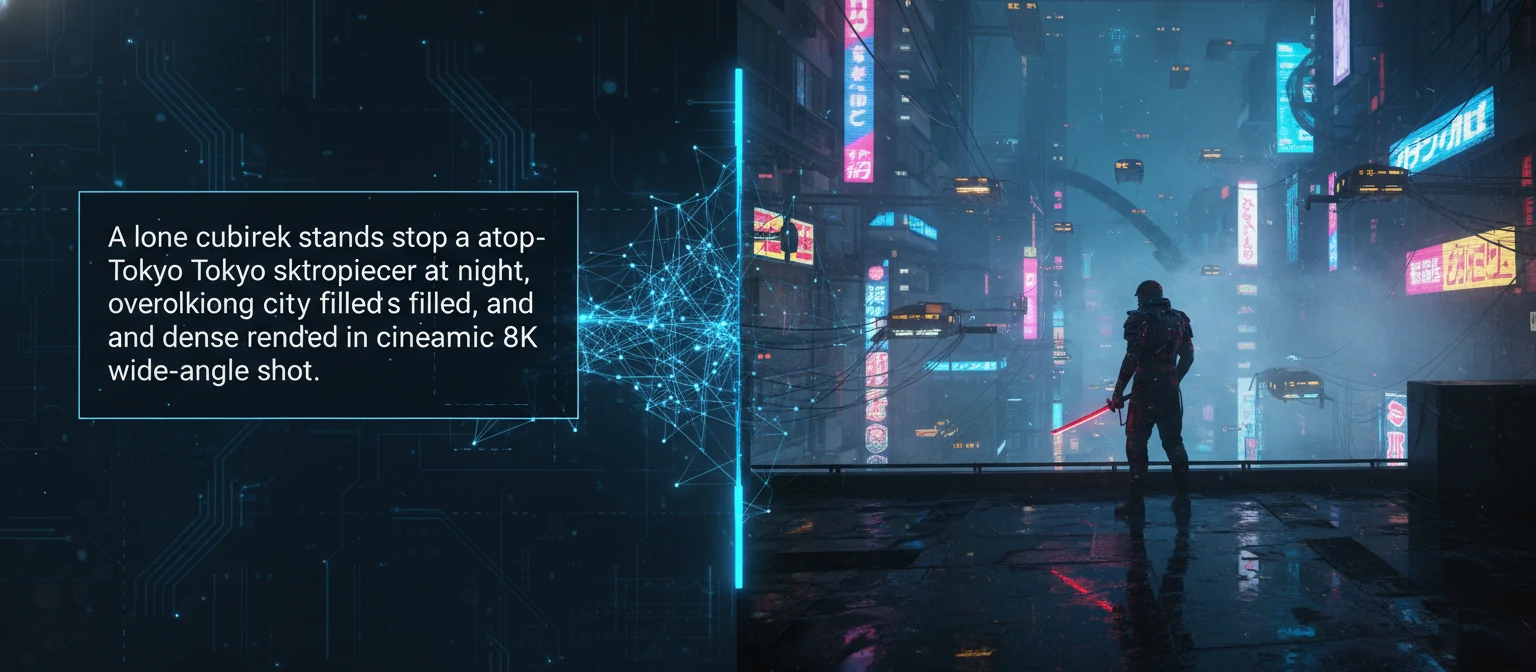
This guide cuts through the hype to deliver practical, tested insights. We've spent months experimenting with every major AI video generator, pushing their limits, and documenting what actually works. Whether you're a curious beginner or a professional looking to integrate AI into your workflow, you'll find actionable guidance here.
What is AI Video Generation?
AI video generation refers to the use of artificial intelligence—specifically deep learning models—to create video content from various inputs. These inputs might be text descriptions (prompts), still images, existing video clips, or combinations thereof. The AI synthesizes new visual content that never existed before, frame by frame, creating the illusion of captured footage.
Unlike traditional video editing or CGI, which manipulates existing assets, AI video generation creates pixels from scratch based on learned patterns. The models have been trained on millions of video clips, learning how objects move, how light behaves, how physics works, and how to maintain visual coherence across frames.
Types of AI Video Generation
Transform written descriptions into video clips. "A golden retriever running through autumn leaves" becomes reality.
Animate still images with intelligent motion. Your photograph becomes a living, breathing scene.
Transform existing footage into new styles—turn daytime to night, summer to winter, live-action to animation.
Generate synchronized visuals from audio tracks—music videos, podcast visualizations, and sound-reactive content.
The technology has advanced dramatically since early experiments. Current models can generate consistent characters across shots, understand complex spatial relationships, simulate realistic physics, and maintain visual coherence for increasingly longer durations. What seemed impossible in 2023 is routine in 2026.
How AI Video Generation Works
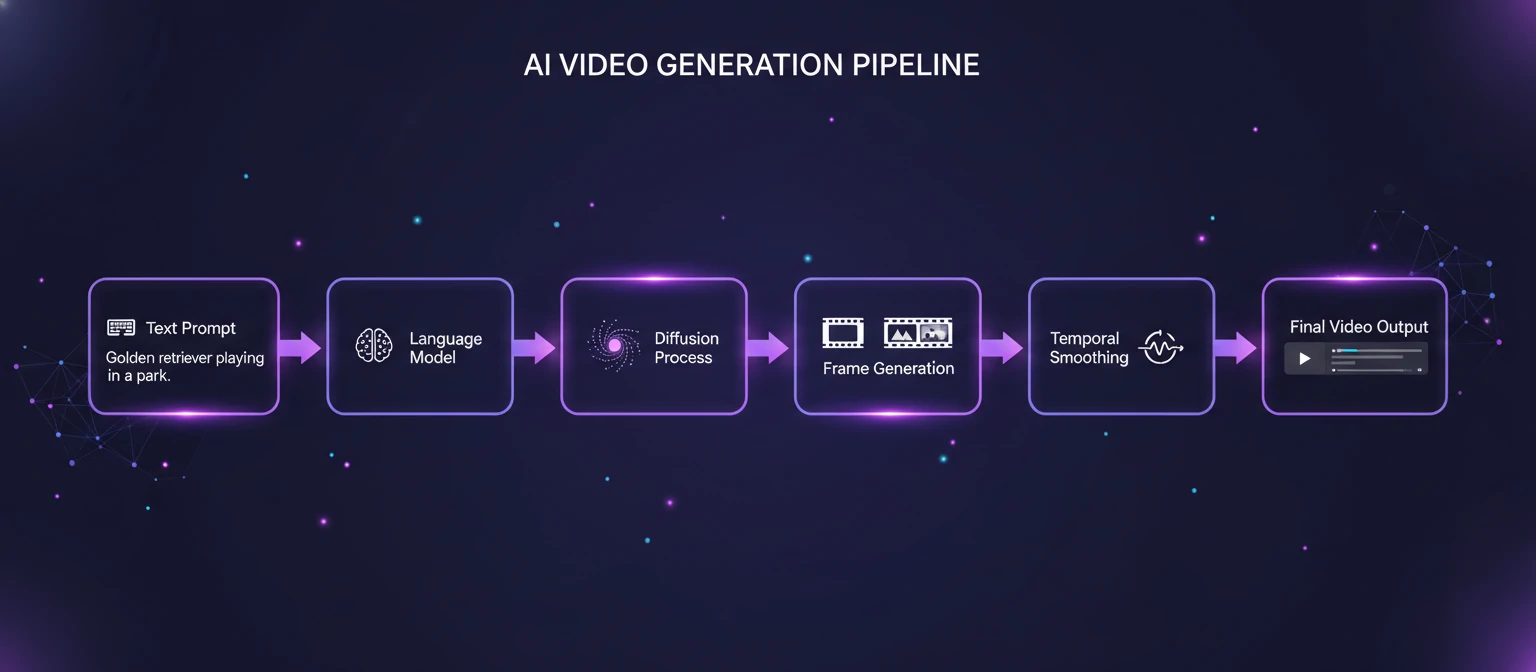
Understanding the underlying technology helps you use these tools more effectively. While the full technical details are incredibly complex, the core concepts are surprisingly intuitive.
Diffusion Models: The Foundation
Most AI video generators use diffusion models—the same technology behind Stable Diffusion and DALL-E. These models learn to gradually remove noise from random static until a coherent image emerges. For video, this process happens across multiple frames simultaneously, with the model learning temporal relationships between frames.
Transformers: Understanding Context
Transformer architectures (like those in ChatGPT) help the AI understand your text prompts and translate them into visual concepts. They process language contextually, understanding that "majestic" implies certain lighting and composition, or that "vintage" suggests specific color grading and film grain.
Temporal Coherence: The Video Challenge
The hardest part of video generation is maintaining consistency across frames. Objects must move naturally, lighting must remain consistent, and characters must look the same throughout. Modern models use attention mechanisms that let each frame "look at" surrounding frames to ensure smooth transitions.
Upscaling & Refinement
Videos are typically generated at lower resolutions first, then intelligently upscaled. Additional passes add detail, refine edges, and enhance quality. This cascading approach makes generation computationally feasible while still achieving high-resolution output.
What AI Video Generators Can (and Can't) Do in 2026
Setting realistic expectations is crucial. AI video generation has made incredible progress, but it's not magic—understanding both capabilities and limitations helps you get the best results.
Maximum resolution now achievable
Coherent clip duration possible
Smooth motion frame rates
✅ What Works Well
Animation, surreal imagery, abstract visuals, and stylized aesthetics
Flowing water, moving clouds, swaying trees, and environmental scenes
Pre-visualization, mood boards, pitch materials, and creative exploration
Short clips, attention-grabbing visuals, and trend-based content
⚠️ Current Limitations
Complex hand movements and intricate details still challenging
Synchronized speech remains difficult, though rapidly improving
Rendering readable text consistently is still problematic
Maintaining exact character appearance across multiple generations
15 Best AI Video Generators in 2026
After extensive testing across creative projects, commercial applications, and technical benchmarks, these fifteen AI video generators represent the current state of the art. Each excels in different areas—find the one that matches your needs.
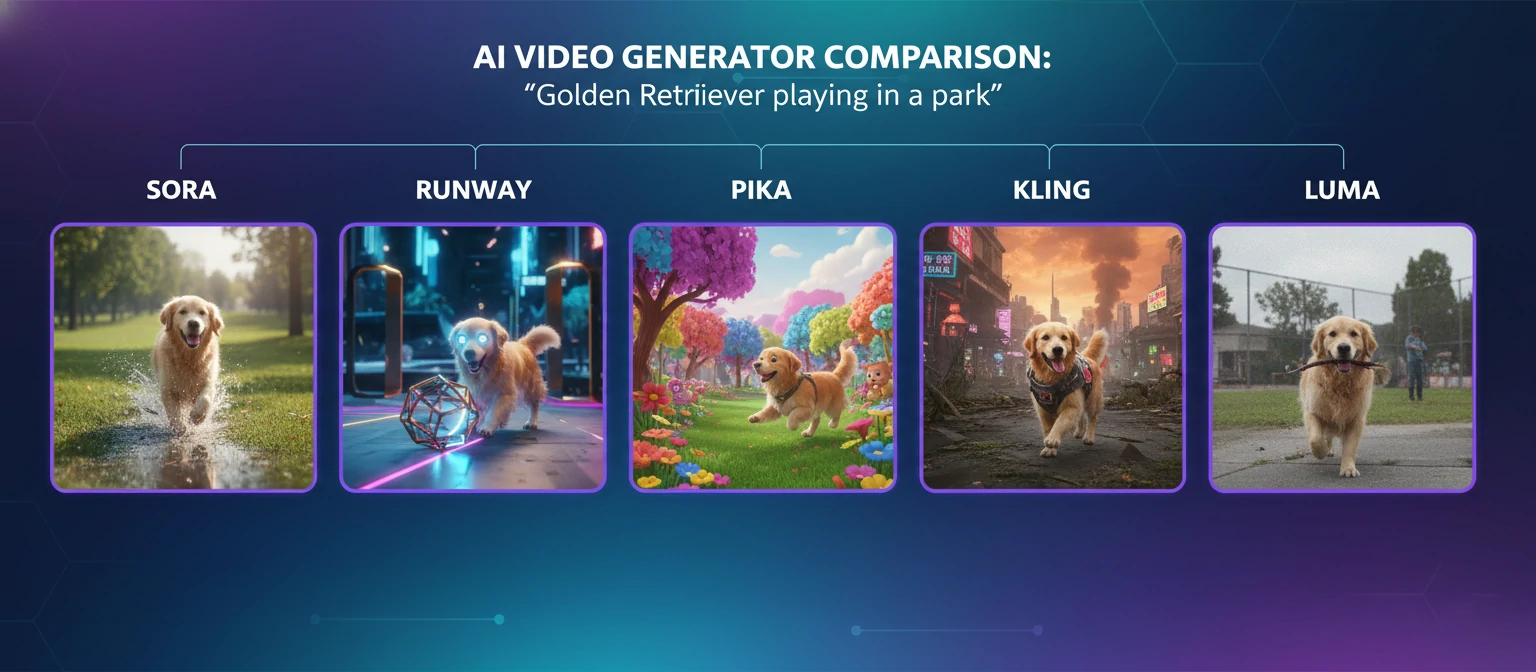
OpenAI Sora
Most Advanced Text-to-VideoSora redefined expectations for AI video generation when it launched. OpenAI's model demonstrates an unprecedented understanding of physics, spatial relationships, and temporal coherence. Videos can extend up to two minutes while maintaining remarkable consistency—something that seemed impossible just a year ago.
What sets Sora apart is its ability to simulate complex scenes: reflections in water, shadows moving with the sun, objects interacting with realistic physics. The model doesn't just generate images sequentially—it understands the 3D world and simulates it. Camera movements feel intentional rather than random, and the level of detail in textures and lighting approaches film quality.
Runway Gen-3 Alpha
Best for Creative ProfessionalsRunway has been at the forefront of AI creativity tools, and Gen-3 Alpha represents their most sophisticated video model. What distinguishes Runway is its integration into a complete creative suite—you're not just generating videos, you're working within a professional editing environment with AI-powered tools at every step.
Gen-3 Alpha excels at artistic interpretation. It understands cinematographic language—ask for "Wes Anderson style" and you'll get symmetrical compositions and distinctive color palettes. The image-to-video capabilities are particularly strong, breathing convincing life into still photographs or AI-generated images with natural motion.
Pika 2.0
Best for Quick GenerationPika burst onto the scene and quickly became a favorite for its speed and accessibility. Version 2.0 significantly improves quality while maintaining the fast generation times users love. The interface is refreshingly simple—type a prompt, get a video, iterate quickly.
Where Pika shines is in its unique features like "Inflate" (turning 2D images into 3D-like videos), "Modify Region" (editing specific areas of generated videos), and impressive lip-sync capabilities for adding speech to characters. It's the Swiss Army knife of AI video tools—maybe not the absolute best at any single task, but remarkably capable across the board.
Kling AI
Best for Realistic MotionDeveloped by Kuaishou (China's short-video giant), Kling AI has impressed the industry with its natural motion and physics understanding. Videos feature remarkably realistic movement—hair blows convincingly in the wind, water splashes naturally, and characters move with believable weight and momentum.
Kling can generate videos up to two minutes long at 1080p, with impressive consistency throughout. The model handles complex camera movements well, and its understanding of depth and spatial relationships rivals Sora. For realistic scenes with human subjects, Kling often produces the most natural results.
Luma Dream Machine
Best Free OptionLuma's Dream Machine offers exceptional quality at an unbeatable price—free tier users get generous daily generations. Built by the team behind Luma AI's 3D capture technology, Dream Machine understands spatial relationships and 3D space in ways that create uniquely immersive results.
The model handles camera motion particularly well, creating smooth dollies, pans, and tracking shots that feel intentional rather than random. For those starting with AI video generation or working with limited budgets, Dream Machine delivers professional-quality results without the professional price tag.
More Powerful AI Video Tools
#6 Stable Video Diffusion
OPEN SOURCEStability AI's open-source video model can run locally on your hardware. Perfect for developers, researchers, and those who need privacy or want to fine-tune models for specific use cases. The community has created countless custom models and workflows.
#7 HeyGen
AI AVATARSSpecialized in AI avatar videos with incredible lip-sync technology. Create talking head videos with digital humans that speak any language. Perfect for corporate training, marketing, and personalized video messages at scale.
#8 Synthesia
ENTERPRISEThe enterprise standard for AI presenter videos. Over 200 diverse AI avatars, 140+ languages, and custom avatar creation from your own likeness. Fortune 500 companies trust Synthesia for training, communications, and marketing videos.
#9 Hailuo AI (MiniMax)
FREE ACCESSChina's MiniMax offers surprisingly capable video generation through Hailuo. Known for excellent human motion and emotional expression. The free tier is generous, making it accessible for experimentation. Quality rivals more expensive alternatives.
#10 Vidu
RISING STARDeveloped by Shengshu Technology, Vidu generates 16-second clips with impressive coherence. Strong in cinematic shots and dramatic scenes. The U-ViT architecture enables unique visual styles and particularly good handling of lighting effects.
Five More Worth Exploring
Invideo AI
Complete video creation from text scripts. Automatically combines stock footage, AI narration, and graphics. Ideal for explainer videos and social media content without manual editing.
Kaiber
Artist-focused tool known for stunning music video generation. Transform existing footage into animated art styles. Popular with musicians and visual artists for its unique aesthetic capabilities.
Genmo
Creative sandbox combining video generation with interactive controls. Experiment with motion, camera paths, and style in real-time. Great for learning and creative exploration.
Pixverse
Specializes in character animation and anime-style generation. Strong community features for sharing and remixing. Excellent for character-focused content and stylized animation.
Leonardo Motion
From the makers of Leonardo AI image generator. Brings your Leonardo images to life with consistent style. Seamless workflow between image and video generation.
Feature Comparison Table
| Tool | Max Length | Resolution | Free Tier | Best Strength | Quality |
|---|---|---|---|---|---|
| Sora | 2 min | 4K | Limited | Physics | ★★★★★ |
| Runway Gen-3 | 40 sec | 4K | Yes | Style Control | ★★★★★ |
| Pika 2.0 | 15 sec | 1080p | Yes | Speed | ★★★★☆ |
| Kling AI | 2 min | 1080p | Yes | Motion | ★★★★★ |
| Luma Dream | 10 sec | 1080p | Generous | Camera | ★★★★☆ |
| HeyGen | Unlimited | 1080p | Limited | Avatars | ★★★★☆ |
| Synthesia | Unlimited | 1080p | No | Enterprise | ★★★★☆ |
Best Use Cases for AI Video Generation
Understanding where AI video generation excels helps you apply these tools effectively. Here are the scenarios where AI truly shines.
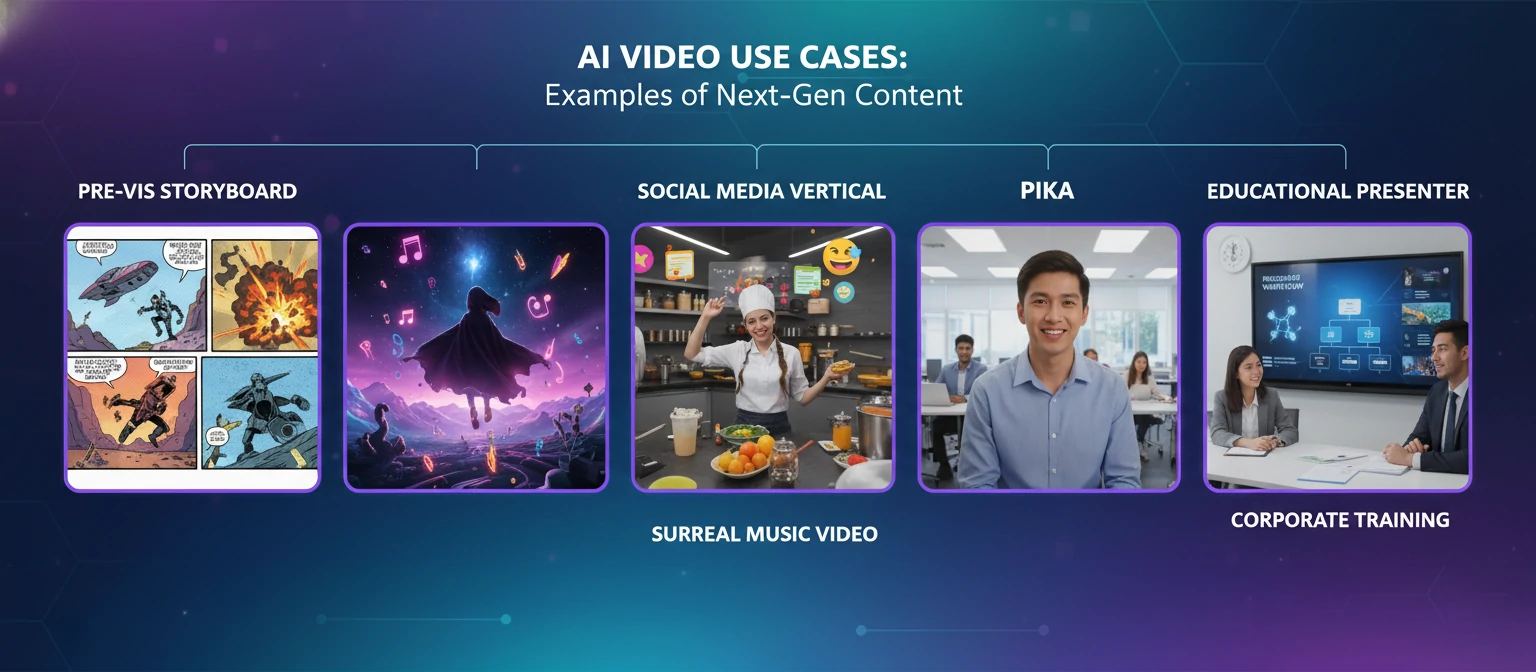
🎬 Pre-Visualization & Concept Development
Before committing budget to full production, visualize your concepts with AI. Directors, advertisers, and creative teams use AI video to pitch ideas, explore visual styles, and communicate vision to stakeholders.
📱 Social Media Content at Scale
Social platforms demand constant content. AI lets creators produce eye-catching videos rapidly, test multiple variations, and maintain posting consistency without burning out. Generate scroll-stopping visuals in minutes.
🎓 Educational & Training Content
Create engaging educational videos with AI presenters, visualize abstract concepts, and produce training materials in multiple languages. AI dramatically reduces production time and cost for instructional content.
🎵 Music Videos & Visual Art
Musicians and artists are embracing AI for experimental visuals impossible through traditional means. Create surreal imagery, style transfers, and reactive visuals that respond to audio. Democratizing music video production.
🏢 Corporate Communications
Internal communications, product demos, and corporate announcements can now feature professional presenter videos without scheduling shoots. Update videos instantly when information changes, localize for global teams.
Prompt Engineering for Better Results
The quality of your AI-generated videos depends heavily on how you communicate with the model. Master these prompting techniques to dramatically improve your results.
Be Specific About Visual Style
Instead of "a forest," try "a misty ancient redwood forest at golden hour, volumetric light rays filtering through the canopy, cinematic depth of field, shot on ARRI Alexa."
Describe Camera Movement
Specify how the camera should move: "slow dolly forward," "aerial tracking shot," "handheld following the subject," "static wide shot." This dramatically improves video coherence.
Include Lighting Details
Lighting transforms everything. Specify "harsh midday sun," "soft diffused overcast," "dramatic rim lighting," "neon-lit cyberpunk atmosphere," or "candlelit warmth."
Define Motion and Action
Describe what's moving and how: "leaves gently rustling," "hair flowing in the wind," "slow-motion water droplets," "bustling crowd in the background." Motion brings videos to life.
Iterate and Refine
Your first generation is rarely your best. Generate multiple variations, identify what works, and refine your prompt. Save successful prompts as templates for future use.
📝 Example Prompt Structure
[Action] walking slowly along a cliffside path
[Setting] overlooking a dramatic ocean coastline
[Time/Light] at golden hour with warm backlight
[Camera] tracking shot from the side, following her movement
[Style] cinematic, shot on 35mm film, shallow depth of field
[Motion] dress and hair flowing gently in the ocean breeze
Frequently Asked Questions
Can AI-generated videos be used commercially?
Generally yes, but it depends on the platform. Most paid plans grant commercial usage rights. Free tiers often have restrictions. Always read the terms of service carefully. Some platforms require attribution, others don't. Enterprise plans typically offer the clearest commercial licenses.
How long does AI video generation take?
Generation times vary by platform, resolution, and length. Simple clips might generate in 30 seconds to 2 minutes. Complex, high-resolution videos can take 5-15 minutes. Premium tiers often offer faster queue times. Batch generation can help optimize workflow.
Will AI video generators replace human filmmakers?
Not replace—transform. AI is a tool that amplifies human creativity. The best results come from human vision guided by AI capabilities. Directors, storytellers, and creative professionals will remain essential—they'll just work with more powerful tools. AI handles execution; humans provide meaning and intention.
Can I generate videos of real people?
Most platforms prohibit generating videos of real people without consent due to deepfake concerns. Avatar platforms like HeyGen and Synthesia require explicit consent for custom avatar creation. Using AI to create non-consensual content of real individuals is both ethically wrong and increasingly illegal.
What hardware do I need for AI video generation?
Most AI video generators are cloud-based—you just need a web browser and internet connection. For local tools like Stable Video Diffusion, you'll need a powerful GPU (NVIDIA RTX 3080 or better recommended), 16GB+ RAM, and fast storage. Cloud solutions eliminate hardware requirements entirely.
Which AI video generator is best for beginners?
Pika and Luma Dream Machine offer the most beginner-friendly experiences with generous free tiers. Their interfaces are intuitive, and you can start creating immediately. As you grow more sophisticated, explore Runway for creative control or Sora for maximum quality.
Are AI-generated videos detectable?
Currently, trained eyes can often spot AI artifacts—unusual hand movements, inconsistent physics, or temporal glitches. However, detection is becoming harder as technology improves. Platforms are developing watermarking and detection tools. Transparency about AI usage is increasingly expected in professional contexts.
How will AI video generation evolve in the next year?
Expect longer coherent videos, better character consistency, improved lip-sync for dialogue, and more intuitive controls. Real-time generation and interactive editing are emerging. The gap between AI and traditional production is closing rapidly. What seems cutting-edge today will be basic functionality tomorrow.
The Future is Being Written Now
We're at a pivotal moment in creative history. AI video generation has evolved from a curiosity to a legitimate production tool in just a few years. The technology isn't perfect—but it's already transforming how stories are told, products are marketed, and ideas are visualized.
The creators who thrive in this new landscape will be those who embrace AI as a creative partner rather than viewing it as a threat. These tools amplify human creativity—they don't replace it. Your unique vision, storytelling instincts, and creative judgment remain irreplaceable. AI simply gives you new ways to express them.
Start experimenting today. Pick one tool from this guide—Luma Dream Machine for free access, Pika for speed, Runway for creative control, or Sora for maximum quality—and begin exploring. Generate something. Iterate. Learn the language of prompting. Discover what these tools can do in your creative hands.
The future of video creation is being written right now, and you can be part of writing it.
Ready to Create Your First AI Video?
The barrier between imagination and visualization has never been lower. What will you create?
About the Author
AI Technology Analyst & Creative Technologist
Our team tracks the rapidly evolving AI creative tools landscape, testing new releases, analyzing capabilities, and documenting best practices. With backgrounds spanning film production, software development, and machine learning research, we bridge the gap between technical capabilities and creative applications.