Everything IT leaders and procurement teams need to know about Adobe's enterprise licensing, deployment options, security features, and organizational management.
Table of contents
- What is Adobe Enterprise Plan?
- Enterprise vs. Teams vs. Individual Plans
- Key Features of Adobe Enterprise Plan
- Security and Compliance Capabilities
- Applications Included in Enterprise Plans
- Pricing and Procurement Process
- Implementation and Deployment
- Enterprise Support and Customer Success
- Best Practices for Adobe Enterprise Success
- Frequently Asked Questions
- What's the minimum number of users for Adobe Enterprise?
- Can we mix Enterprise and Teams licenses?
- How does device licensing work exactly?
- What happens to our data if we don't renew?
- Does Enterprise include Adobe Stock?
- How do we handle contractors and temporary workers?
- Can we restrict which apps users access?
- What's the typical contract length?
- Making the Right Enterprise Decision
When your organization grows beyond a handful of creative licenses, managing Adobe software becomes significantly more complex. Individual subscriptions that work fine for freelancers quickly become administrative nightmares at scale. That's where Adobe Enterprise Plans come in—purpose-built solutions for organizations that need centralized control, enhanced security, and streamlined deployment across hundreds or thousands of users.
But navigating Adobe's enterprise offerings can feel overwhelming. The terminology is dense, the options are numerous, and the sales process differs dramatically from clicking "subscribe" on a website. IT leaders, procurement teams, and business stakeholders need clear information to make informed decisions that affect both budget and productivity.
This comprehensive guide breaks down everything you need to know about Adobe Enterprise Plans in 2026. We'll explore the different licensing options, deployment methods, administrative capabilities, security features, and practical considerations for choosing the right solution for your organization's needs.

What is Adobe Enterprise Plan?
Adobe Enterprise Plan refers to Adobe's business-oriented licensing and deployment solutions designed for medium to large organizations. Unlike individual or small team subscriptions purchased through Adobe's website, enterprise agreements provide centralized management, enhanced security controls, flexible deployment options, and dedicated support channels.
The enterprise tier encompasses several distinct offerings, each designed for different organizational needs and scales. Understanding the differences between these options is crucial for making the right choice—and avoiding paying for capabilities you don't need or missing features your organization requires.
The enterprise tier encompasses several distinct offerings, each designed for different organizational needs and scales. Understanding the differences between these options is crucial for making the right choice—and avoiding paying for capabilities you don't need or missing features your organization requires.
Adobe Enterprise Offerings
For most organizations seeking creative software, Creative Cloud for Enterprise is the relevant offering. This provides access to all creative applications—Photoshop, Illustrator, InDesign, Premiere Pro, After Effects, and more—along with enterprise-specific features not available in standard subscriptions.
Enterprise vs. Teams vs. Individual Plans
Adobe offers three primary tiers for Creative Cloud access, each designed for different scales and needs. Understanding the distinctions helps you choose appropriately—and avoid either overpaying for unnecessary features or struggling with limitations.
Creative Cloud Individual
The standard subscription purchased directly from Adobe's website. Simple billing, personal use licenses, 100GB cloud storage. No administrative controls, no centralized management, no deployment tools. Fine for individuals and very small operations, but becomes unmanageable as organizations grow.
Creative Cloud for Teams
The mid-tier offering for small to medium businesses, typically organizations with 3-100 users. Adds centralized license management through the Admin Console, 1TB cloud storage per user, shared team libraries, and basic administrative controls. Can be purchased directly online with business billing. Good for growing companies that need organization without enterprise complexity.
Creative Cloud for Enterprise
The full enterprise tier for large organizations, typically 100+ users or those with specific security and compliance requirements. Includes everything in Teams plus: SSO/SAML integration, advanced deployment options, named user or device licensing flexibility, 24/7 dedicated support, custom contracts, volume discounts, and enterprise security features. Requires working with Adobe sales and typically involves annual contracts.
💡 When to Choose Enterprise Over Teams
Consider Enterprise when: you need SSO integration with your identity provider, have regulatory compliance requirements, want device-based licensing for shared workstations, need 24/7 priority support, have 100+ users, or require custom contract terms. If you don't need these specific features, Teams may be more cost-effective.
Key Features of Adobe Enterprise Plan
Adobe Enterprise Plan provides capabilities specifically designed for organizational management, security, and scale. These features address real challenges IT teams face when deploying creative software across large user bases.
Admin Console and User Management
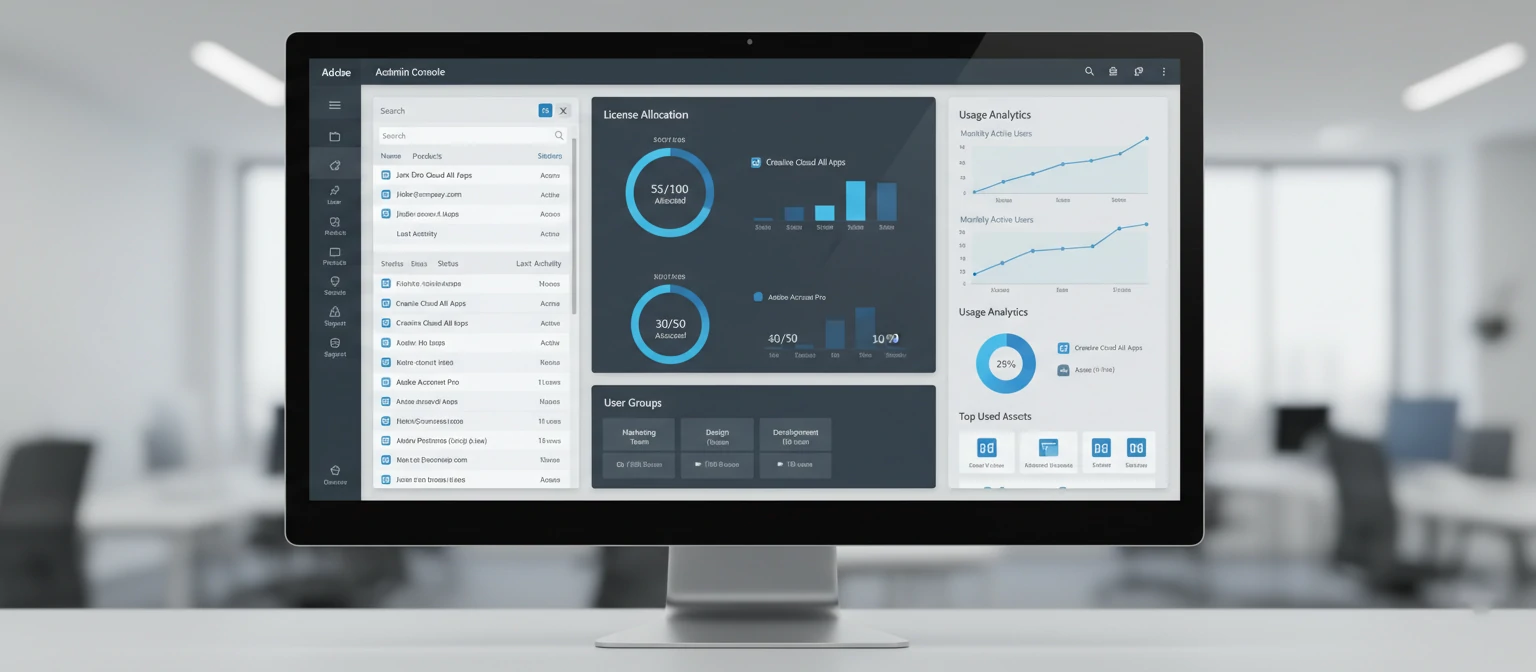
The Admin Console serves as your central command center for managing Adobe across the organization. Add or remove users, assign licenses, create user groups, set permissions, monitor usage analytics, and manage product access—all from a single web interface. For organizations with existing identity systems, directory sync keeps Adobe users aligned with your HR systems automatically.
Single Sign-On (SSO) Integration
Enterprise plans support SAML-based single sign-on, allowing users to access Adobe applications using the same credentials they use for other enterprise systems. Integration with identity providers like Okta, Azure AD, OneLogin, and others means no separate Adobe passwords to manage. This improves both security (one less password vector) and user experience (seamless access).
Flexible Licensing Options
Enterprise licensing offers flexibility beyond named-user assignments. Device licensing allows you to license specific machines rather than individuals—perfect for shared workstations in labs, studios, or production environments. This means the software is available to anyone who uses that device, without managing individual user accounts for each workstation.
Named User Licensing
License assigned to specific individuals. User can install on multiple personal devices but only one active session at a time. Best for dedicated creative professionals.
Shared Device Licensing
License assigned to specific machines. Anyone using that device can access Adobe apps. Best for labs, shared workstations, and production environments.
Deployment Options
IT teams can deploy Adobe applications using their preferred methods. Adobe provides deployment packages compatible with enterprise tools like SCCM, Jamf, Munki, and others. The Admin Console allows IT to create custom installation packages with pre-configured settings, removing specific apps, or including only what users need. This means consistent, standardized deployments across thousands of machines.
Advanced Security Features
Enterprise plans include security features essential for regulated industries. Data loss prevention controls limit how files can be shared. Asset link controls manage external sharing capabilities. Global policies can restrict certain features or services. Audit logs track administrative actions for compliance. These controls help organizations meet requirements for HIPAA, GDPR, SOC 2, and other regulatory frameworks.
Security and Compliance Capabilities
For organizations in regulated industries or those handling sensitive data, Adobe Enterprise provides security features that address real compliance requirements. Understanding these capabilities helps you assess whether Adobe meets your organization's security standards.
🔐 Enterprise Security Features
SSO/SAML Authentication
Integrate with enterprise identity providers. Enforce your existing password policies and MFA requirements through your IdP.
Data Encryption
Data encrypted at rest and in transit. AES-256 encryption for stored files. TLS 1.2+ for all data transmission.
Audit Logging
Comprehensive logs of administrative actions, user access, and file operations. Export logs for SIEM integration and compliance reporting.
Data Loss Prevention
Control file sharing, external collaboration, and data export capabilities. Prevent sensitive content from leaving organizational boundaries.
Compliance Certifications
SOC 2 Type II, ISO 27001, GDPR compliant, HIPAA BAA available. FedRAMP authorized for government organizations.
Global Policy Controls
Set organization-wide policies for feature access, storage usage, AI features, and third-party integrations from a central location.
Adobe maintains compliance certifications that many enterprise customers require. The company publishes detailed security documentation, compliance reports, and will sign Business Associate Agreements (BAAs) for organizations subject to HIPAA. Government organizations can access FedRAMP-authorized versions of Adobe services.
Applications Included in Enterprise Plans
Adobe Creative Cloud for Enterprise includes the complete suite of creative applications. Understanding what's included helps you communicate the value to stakeholders and plan deployment based on your organization's creative needs.
Beyond the major applications, Enterprise plans include: Acrobat Pro for PDF workflows, Adobe Express for quick design, Fresco for digital painting, Dimension for 3D visualization, InCopy for editorial workflows, Character Animator, Media Encoder, Animate, Dreamweaver, Bridge, and mobile apps for iOS and Android. Adobe Fonts provides access to thousands of typefaces at no additional cost.
Pricing and Procurement Process
Adobe Enterprise pricing isn't published on their website—it's negotiated based on your organization's specific needs, user count, contract length, and purchasing vehicle. This section provides realistic expectations for the procurement process.
Pricing Factors
Enterprise pricing typically starts around $80-85 per user per month for full Creative Cloud access, though this varies significantly based on volume. Large enterprises with thousands of users can negotiate substantial discounts—sometimes 30-50% below list pricing. Contract length matters too; three-year agreements typically secure better rates than annual terms.
Pricing Factors That Affect Your Quote
- User count: Higher volumes = better per-user pricing
- Contract length: Multi-year agreements secure discounts
- Product mix: Full suite vs. single apps vs. combinations
- Purchasing vehicle: Direct, reseller, or government contract
- Industry: Education and nonprofit pricing available
- Timing: Quarter-end and year-end often offer flexibility
The Procurement Process
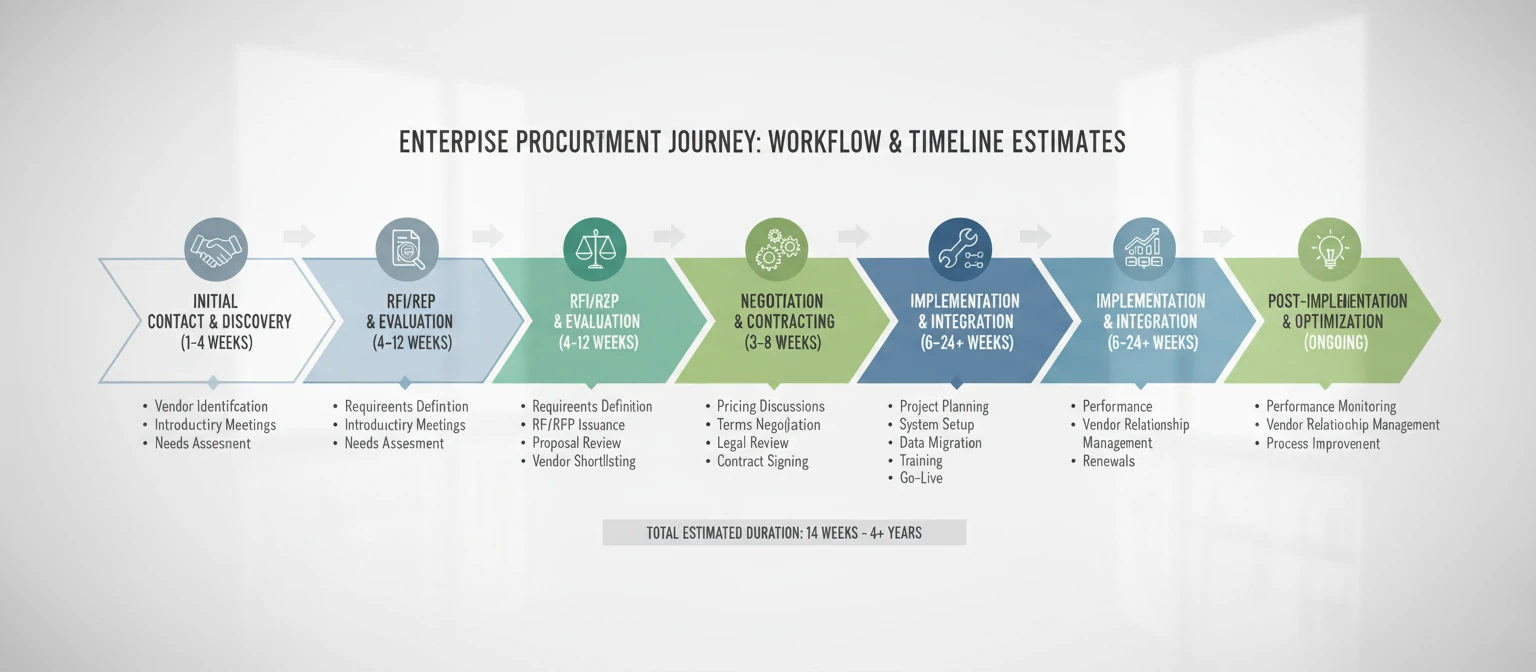
Enterprise procurement typically follows this path: Initial discovery call with Adobe sales to understand your needs. Technical discussions with solution engineers regarding deployment, security, and integration requirements. Proposal and quote negotiation. Legal review of contract terms. Implementation planning with Adobe's customer success team. The entire process often takes 4-12 weeks depending on organizational complexity.
Purchasing Vehicles
Organizations can purchase through several channels: direct from Adobe, through authorized resellers and distributors, or through existing procurement contracts. Government organizations can access GSA Schedule pricing. Many enterprises find working with resellers offers competitive pricing plus additional support and consolidated billing across vendors.
Implementation and Deployment
Deploying Adobe across an enterprise requires planning beyond simply purchasing licenses. IT teams need to consider identity integration, deployment mechanisms, update policies, and user training. Adobe provides resources and support for enterprise deployments, but success requires organizational preparation.
Identity Configuration
The first implementation step is configuring identity management. For organizations using SSO, this means setting up SAML integration with your identity provider—Okta, Azure AD, OneLogin, or others. Adobe's technical documentation covers integration specifics, and their implementation team can assist. Without SSO, you'll use Adobe's built-in identity or Enterprise ID system, which still allows centralized management but requires separate Adobe credentials.
Software Deployment Methods
Enterprise IT teams can deploy Adobe applications using standard enterprise deployment tools. Adobe Admin Console allows you to create customized installation packages—choose which apps to include, pre-configure settings, and generate packages for your deployment platform. These packages work with Microsoft SCCM, Intune, Jamf, Munki, and other enterprise deployment solutions.
Managed Deployment
IT controls what's installed, when updates occur, and which versions are deployed. Users can't install additional apps without IT approval. Maximum control.
User Self-Service
Users install apps themselves via Creative Cloud desktop app. IT controls license assignment but users choose their applications. More flexibility.
Hybrid Approach
IT deploys core applications; users can add others from an approved list. Balances control with user autonomy. Common enterprise choice.
Update Management
Adobe releases updates frequently—both feature updates and security patches. Enterprise administrators can control update behavior: allow automatic updates, delay updates for testing, or push specific versions through deployment tools. Many organizations maintain a testing group that receives updates first, then roll out to the broader organization after validation.
Enterprise Support and Customer Success
Enterprise customers receive enhanced support beyond what's available to individual or Teams subscribers. Understanding these resources helps you maximize the value of your Adobe investment.
24/7 Technical Support
Enterprise agreements include around-the-clock technical support with faster response times than standard support channels. Critical issues receive priority handling with committed response times defined in your agreement. Support is available via phone, chat, and case submission through the Admin Console.
Customer Success Management
Larger enterprise accounts are assigned dedicated Customer Success Managers who proactively help maximize Adobe adoption and value. They provide guidance on best practices, help with technical challenges, facilitate feature requests, and keep you informed about relevant product updates. Regular business reviews track usage metrics and identify optimization opportunities.
Training and Enablement
Adobe provides enterprise customers with training resources to help users become proficient. This includes access to Adobe's learning platform with tutorials and courses, the ability to arrange instructor-led training sessions, and custom onboarding programs for large deployments. Many organizations supplement this with internal training specific to their workflows.
💡 Maximizing Enterprise Support
- Designate internal Adobe admins who know the Admin Console thoroughly
- Build relationships with your Customer Success Manager
- Use the support portal for tracking and escalation capabilities
- Participate in beta programs to influence product direction
- Attend Adobe MAX and enterprise-focused events for training and networking
Best Practices for Adobe Enterprise Success
Organizations that get the most value from Adobe Enterprise follow certain practices that maximize adoption, minimize administrative burden, and ensure security compliance.
Right-Size Your Licenses
Not every user needs every app. Use Admin Console analytics to understand actual usage patterns. Consider single-app licenses for users who only need Acrobat or specific tools. Over-licensing wastes budget; under-licensing frustrates users.
Establish Governance
Define clear policies for license requests, storage usage, and external sharing. Document who can approve new users and how departing employee licenses are reclaimed. Good governance prevents sprawl and security gaps.
Invest in Training
Untrained users underutilize powerful tools. Budget for training programs that help users master applications relevant to their work. Track skill development and provide ongoing learning opportunities.
Monitor and Optimize
Regularly review usage reports in Admin Console. Identify underutilized licenses for reallocation. Track which applications are actually used versus assigned. Continuous optimization ensures maximum ROI.
Frequently Asked Questions
What's the minimum number of users for Adobe Enterprise?
There's no strict minimum, but Adobe typically engages enterprise sales for organizations with 100+ users. Smaller organizations are usually better served by Creative Cloud for Teams, which can be purchased directly online for as few as 3 users. Some large organizations negotiate enterprise agreements with fewer users if they have specific requirements (SSO, compliance needs) that justify the enterprise tier.
Can we mix Enterprise and Teams licenses?
Yes, though it adds complexity. Some organizations maintain an enterprise agreement for core creative teams while using Teams licenses for departments with occasional needs. However, mixing means managing two separate systems. Many find consolidating on one tier simpler, even if it means slightly higher per-user costs for low-usage departments.
How does device licensing work exactly?
Shared Device Licensing assigns Adobe access to specific machines rather than named users. When deployed, the computer has Adobe applications available to anyone who logs into that device—no individual Adobe ID required. This is ideal for computer labs, shared workstations, and production environments. The license stays with the device, and IT controls which machines are licensed through the Admin Console.
What happens to our data if we don't renew?
Adobe provides a grace period after contract expiration during which you can export data. Cloud-stored files remain accessible during this period, but editing capabilities in applications cease. Local files created with Adobe apps remain yours and are accessible with future licenses. It's crucial to have data retention plans and export critical cloud assets before contract end.
Does Enterprise include Adobe Stock?
Adobe Stock is not automatically included in Creative Cloud Enterprise—it's a separate purchase. However, enterprise customers can negotiate bundled Stock agreements, often at favorable rates. Stock Pro plans offer bulk asset credits and enhanced licensing terms suitable for organizational use. Contact your Adobe representative for Stock enterprise pricing.
How do we handle contractors and temporary workers?
Enterprise agreements can include provisions for temporary users. Options include maintaining a pool of floating licenses for contractors, using device licensing for contractor workstations, or adding/removing named user licenses as needed. Discuss your contractor workforce patterns during negotiations to ensure appropriate flexibility in your agreement.
Can we restrict which apps users access?
Yes. Admin Console allows you to create product profiles that include only specific applications. You might give video editors access to Premiere, After Effects, and Audition while designers get Photoshop, Illustrator, and InDesign. This helps manage deployment, though most enterprise licenses include access to all apps by default.
What's the typical contract length?
Enterprise agreements typically run 1-3 years, with three-year terms offering the best pricing. Annual contracts provide flexibility but at higher per-user costs. Some organizations negotiate true-up provisions allowing them to add users throughout the contract period at agreed rates. Early termination clauses and terms vary by negotiation.
Making the Right Enterprise Decision
Adobe Enterprise Plans provide the control, security, and scalability that organizations need when creative software becomes critical infrastructure. The additional investment over Teams or individual licenses pays dividends through centralized management, reduced administrative burden, enhanced security compliance, and dedicated support resources.
The key is matching the tier to your actual needs. If you need SSO integration, device licensing, or operate in regulated industries requiring specific compliance certifications—Enterprise is likely your answer. If you primarily need centralized billing and basic license management for under 100 users, Teams may serve you well at lower cost.
Regardless of which tier you choose, success depends on thoughtful implementation: configure identity management properly, deploy through controlled channels, establish clear governance policies, and invest in user training. Adobe provides the tools; your organization provides the strategy to use them effectively.