The Complete Guide to Choosing the Right Web Design Company in 2026
Everything you need to know about finding, evaluating, and working with professional web design companies to create stunning, effective websites
 Pro Pixel Agency

Everything you need to know about finding, evaluating, and working with professional web design companies to create stunning, effective websites
Table of contents
- Introduction
- What is a Web Design Company?
- The Critical Importance of Professional Web Design
- Key Services Offered by Web Design Companies
- How to Choose the Right Web Design Company
- The Web Design Process Explained
- Web Design Trends for 2026
- Case Studies: Successful Web Design Projects
- Frequently Asked Questions
- Conclusion: Investing in Your Digital Future
- Ready to Transform Your Online Presence?
Introduction
In today's digital landscape, your website serves as the cornerstone of your online presence. It's often the first interaction potential customers have with your brand, making it crucial to create a lasting positive impression. This is where a professional web design company becomes invaluable.
A web design company specializes in creating visually appealing, user-friendly, and functionally robust websites that not only look great but also drive business results. From small local businesses to large corporations, organizations across all industries rely on web design companies to establish and maintain their digital presence.
This comprehensive guide will walk you through everything you need to know about web design companies – what they do, why they're important, how to choose the right one, and what to expect from the design process. Whether you're launching a new business or looking to revamp your existing website, this guide will equip you with the knowledge to make informed decisions.

What is a Web Design Company?
A web design company is a specialized agency that focuses on creating, developing, and maintaining websites for businesses and organizations. These companies combine creative design expertise with technical development skills to produce websites that are both visually appealing and functionally effective.
Core Functions of a Web Design Company
🎨 Visual Design
Creating aesthetically pleasing layouts, selecting appropriate color schemes, typography, and imagery that align with brand identity and user preferences.
⚙️ Technical Development
Building the functional aspects of websites using various programming languages, content management systems, and ensuring cross-browser compatibility.
📱 Responsive Design
Ensuring websites work seamlessly across all devices, from desktop computers to smartphones and tablets.
🔍 SEO Integration
Implementing search engine optimization best practices to help websites rank higher in search results and attract organic traffic.
Types of Web Design Companies
-
Full-Service
Full-Service Agencies: Offer comprehensive digital services including web design, development, digital marketing, branding, and ongoing maintenance.
-
Specialized
Specialized Design Studios: Focus primarily on visual design and user experience, often partnering with developers for technical implementation.
-
Freelance
Freelance Designers: Individual professionals who offer personalized service and often specialize in specific industries or design styles.
-
Enterprise
Enterprise-Level Firms: Large agencies that handle complex, high-budget projects for major corporations and organizations.

The Critical Importance of Professional Web Design
Web Design Impact Statistics
of first impressions are design-related
time users take to form an opinion about your website
of users will stop engaging if content/layout is unattractive
Why Professional Web Design Matters
🎯 First Impressions Are Everything
Research shows that users form opinions about websites within milliseconds of landing on them. A professionally designed website immediately establishes credibility and trust, while a poorly designed one can drive potential customers away before they even explore your content.
💰 Direct Impact on Revenue
Professional web design directly correlates with business success. Well-designed websites have higher conversion rates, longer user engagement times, and better search engine rankings, all of which translate to increased revenue and business growth.
📱 Mobile-First World
With over 60% of web traffic coming from mobile devices, responsive design is no longer optional. Professional web design companies ensure your site works flawlessly across all devices, providing consistent user experiences regardless of how visitors access your site.
🔍 SEO and Visibility
Search engines favor well-designed, fast-loading, and user-friendly websites. Professional web design incorporates SEO best practices from the ground up, helping your site rank higher in search results and attract more organic traffic.
The Cost of Poor Web Design
Investing in professional web design isn't just about looking good – it's about avoiding the significant costs associated with poor design:
- ❌ Lost Customers: 57% of users won't recommend a business with a poorly designed mobile site
- ❌ Reduced Credibility: 75% of users judge a company's credibility based on website design
- ❌ Higher Bounce Rates: Poor design can increase bounce rates by up to 90%
- ❌ SEO Penalties: Slow, poorly structured sites rank lower in search results

Key Services Offered by Web Design Companies
Modern web design companies offer a comprehensive range of services that go far beyond just creating attractive layouts. Here's a detailed breakdown of the key services you can expect:
🎨 Custom Web Design
Creating unique, brand-specific designs that reflect your company's personality and values. This includes:
- Brand identity integration
- Custom graphics and illustrations
- Color scheme development
- Typography selection
- Layout and composition
- Visual hierarchy planning
⚙️ Web Development
Bringing designs to life with clean, efficient code and robust functionality:
- Frontend development (HTML, CSS, JavaScript)
- Backend development and databases
- Content Management Systems (CMS)
- E-commerce integration
- API integrations
- Performance optimization
👥 User Experience (UX) Design
Optimizing how users interact with your website for maximum engagement and conversions:
- User research and personas
- Information architecture
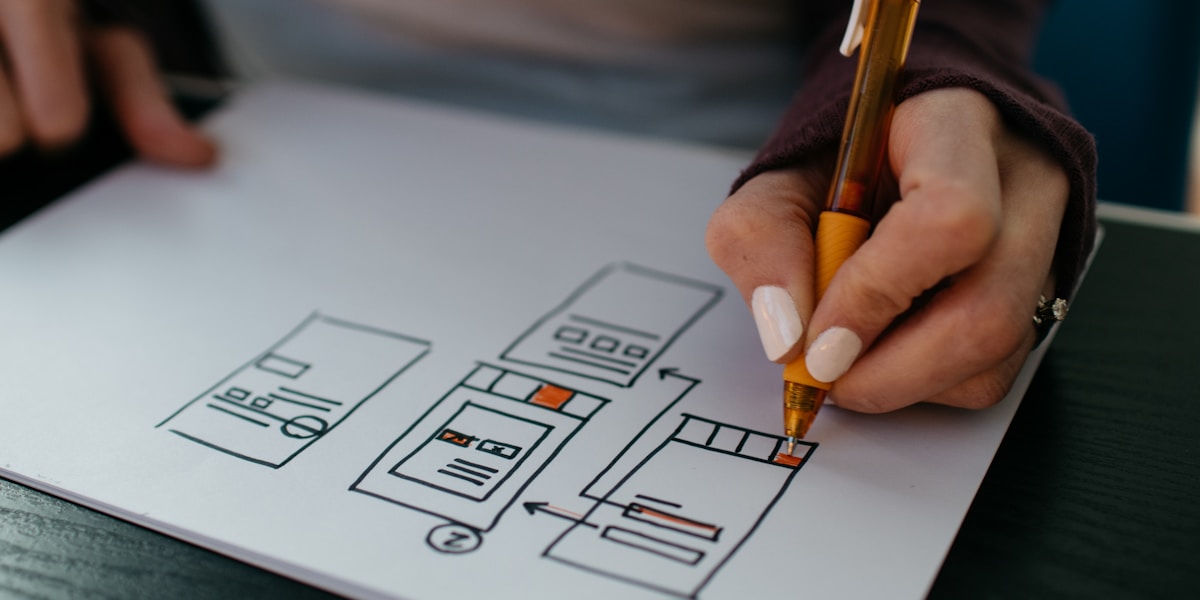
- Wireframing and prototyping
- Usability testing
- Conversion rate optimization
- Accessibility compliance
🔍 SEO and Digital Marketing
Ensuring your website is discoverable and attracts the right audience:
- On-page SEO optimization
- Technical SEO implementation
- Content strategy development
- Social media integration
- Analytics setup and tracking
- Local SEO optimization
🛠️ Maintenance and Support
Keeping your website secure, updated, and performing optimally:
- Regular security updates
- Content updates and changes
- Performance monitoring
- Backup and recovery services
- Technical support
- Feature enhancements

How to Choose the Right Web Design Company
Selecting the right web design company is crucial for your project's success. Here's a comprehensive guide to help you make an informed decision:
🎯 Step 1: Define Your Requirements
Before reaching out to web design companies, clearly define what you need:
- Project scope and objectives
- Target audience and user personas
- Desired features and functionality
- Budget range and timeline
- Brand guidelines and preferences
- Content management requirements
- Integration needs (CRM, e-commerce, etc.)
- Ongoing maintenance expectations
Key Evaluation Criteria
Portfolio and Experience
Review their previous work to assess:
- Design quality and creativity
- Industry experience relevant to your business
- Variety of project types and sizes
- Technical capabilities demonstrated
Technical Expertise
Ensure they have the technical skills you need:
- Proficiency in relevant technologies
- Mobile-responsive design capabilities
- SEO knowledge and implementation
- Security best practices
Communication and Process
Evaluate their working style:
- Clear communication and responsiveness
- Structured project management approach
- Regular updates and milestone reporting
- Collaborative design process
Client References and Reviews
Research their reputation:
- Client testimonials and case studies
- Online reviews and ratings
- References from similar projects
- Long-term client relationships
🚩 Red Flags to Avoid
Communication Issues
- Slow response times
- Vague or unclear proposals
- Reluctance to provide references
- No clear project timeline
Quality Concerns
- Outdated portfolio examples
- No mobile-responsive designs
- Extremely low pricing
- No ongoing support offered
❓ Essential Questions to Ask
Project Approach
- What is your design and development process?
- How do you handle revisions and feedback?
- What happens if the project scope changes?
Technical Details
- What technologies will you use for my project?
- How will you ensure my site is mobile-friendly?
- What SEO practices will you implement?
Post-Launch Support
- What ongoing support do you provide?
- How do you handle website maintenance?
- What are your response times for support requests?

The Web Design Process Explained
Understanding the web design process helps set proper expectations and ensures smooth collaboration with your chosen web design company. Here's a detailed breakdown of the typical phases:
Discovery & Planning
Duration: 1-2 weeks
This crucial first phase involves understanding your business, goals, and requirements in detail.
Key Activities:
- Stakeholder interviews
- Competitor analysis
- Target audience research
- Technical requirements gathering
Deliverables:
- Project brief and scope
- Site map and user flows
- Technical specifications
- Project timeline
Design & Wireframing
Duration: 2-4 weeks
Creating the visual foundation and user experience structure for your website.
Key Activities:
- Wireframe creation
- Visual design concepts
- Brand integration
- User interface design
Deliverables:
- Wireframes and mockups
- Design system and style guide
- Interactive prototypes
- Design revisions
Development & Build
Duration: 4-8 weeks
Bringing the approved designs to life with clean, efficient code and functionality.
Key Activities:
- Frontend development
- Backend programming
- CMS integration
- Responsive optimization
Deliverables:
- Functional website
- Content management system
- Mobile-responsive design
- Basic SEO implementation
Testing & Quality Assurance
Duration: 1-2 weeks
Comprehensive testing to ensure everything works perfectly across all devices and browsers.
Key Activities:
- Cross-browser testing
- Mobile device testing
- Performance optimization
- Security testing
Deliverables:
- Bug fixes and optimizations
- Performance reports
- Security assessments
- Final quality checklist
Launch & Post-Launch Support
Duration: 1 week + ongoing
Going live with your new website and providing ongoing support and maintenance.
Key Activities:
- Domain and hosting setup
- Website deployment
- Analytics configuration
- Training and handover
Deliverables:
- Live website
- Training materials
- Maintenance plan
- Support documentation

Web Design Trends for 2026
Staying current with web design trends is essential for creating modern, engaging websites that resonate with users. Here are the key trends shaping web design in 2026:
🎨 AI-Powered Personalization
Artificial intelligence is revolutionizing how websites adapt to individual users, creating personalized experiences that increase engagement and conversions.
Key Features:
- Dynamic content adaptation
- Personalized product recommendations
- Intelligent chatbots and assistants
- Behavioral-based UI adjustments
Benefits:
- Higher user engagement
- Improved conversion rates
- Enhanced user satisfaction
- Reduced bounce rates
🌱 Sustainable Web Design
Environmental consciousness is driving the adoption of eco-friendly web design practices that reduce carbon footprints and energy consumption.
Implementation:
- Optimized images and media
- Efficient coding practices
- Green hosting solutions
- Minimal resource usage
Impact:
- Faster loading times
- Lower hosting costs
- Improved SEO rankings
- Enhanced brand reputation
🎭 Immersive 3D Experiences
Three-dimensional elements and interactive experiences are becoming more accessible, creating engaging and memorable user interactions.
Applications:
- 3D product visualizations
- Interactive animations
- Virtual showrooms
- Parallax scrolling effects
Technologies:
- WebGL and Three.js
- CSS 3D transforms
- AR/VR integration
- Motion graphics
🗣️ Voice User Interface (VUI)
Voice interactions are becoming integral to web experiences, offering hands-free navigation and accessibility improvements.
Features:
- Voice search functionality
- Audio content navigation
- Voice-activated commands
- Accessibility enhancements
Benefits:
- Improved accessibility
- Enhanced user convenience
- Competitive differentiation
- Future-ready design
🎨 Neumorphism and Glassmorphism
These design styles create depth and tactile experiences through subtle shadows, highlights, and transparency effects.
Neumorphism:
- Soft, extruded elements
- Subtle shadow effects
- Monochromatic color schemes
- Tactile button designs
Glassmorphism:
- Frosted glass effects
- Background blur filters
- Transparent overlays
- Layered compositions
⚡ Micro-Interactions and Animations
Small, purposeful animations that provide feedback and guide users through interactions, enhancing the overall user experience.
Types:
- Hover state animations
- Loading indicators
- Form validation feedback
- Scroll-triggered animations
Benefits:
- Enhanced user engagement
- Improved usability
- Brand personality expression
- Reduced cognitive load

Case Studies: Successful Web Design Projects
Real-world examples demonstrate the impact of professional web design on business success. Here are three detailed case studies showcasing different industries and challenges:
Case Study 1: E-commerce Transformation
Fashion Retailer Increases Online Sales by 340%
The Challenge
A mid-sized fashion retailer was struggling with their outdated e-commerce website. Key issues included:
- High bounce rate (78%)
- Poor mobile experience
- Complicated checkout process
- Slow loading times (8+ seconds)
- Low search engine rankings
The Solution
The web design company implemented a comprehensive redesign focusing on:
- Mobile-first responsive design
- Streamlined user experience
- Advanced product filtering
- One-click checkout process
- Performance optimization
Results Achieved
"The new website exceeded all our expectations. Not only does it look amazing, but our sales have tripled, and customer feedback has been overwhelmingly positive. The investment in professional web design was the best business decision we made this year."
— Sarah Johnson, CEO, Fashion Forward
Case Study 2: Healthcare Practice Growth
Medical Clinic Doubles Patient Appointments Through Better UX
The Challenge
A family medical practice needed to modernize their online presence to attract new patients and improve service delivery:
- Outdated, non-mobile website
- No online appointment booking
- Poor local search visibility
- Limited patient resources
- Inefficient contact methods
The Solution
A patient-centered design approach was implemented with:
- Intuitive appointment booking system
- Patient portal integration
- Local SEO optimization
- Comprehensive service information
- HIPAA-compliant contact forms
Results Achieved
"The new website has transformed how we interact with patients. Online appointment booking has reduced our administrative workload while making it easier for patients to access our services. We've seen a significant increase in new patient registrations."
— Dr. Michael Chen, Family Medicine Clinic
Case Study 3: B2B Lead Generation Success
Software Company Increases Qualified Leads by 280%
The Challenge
A B2B software company struggled to generate quality leads through their website:
- Complex, technical messaging
- Poor lead capture mechanisms
- Unclear value propositions
- Low conversion rates (0.8%)
- Ineffective content strategy
The Solution
A conversion-focused redesign was implemented featuring:
- Clear, benefit-driven messaging
- Strategic lead magnets
- Progressive profiling forms
- Social proof integration
- A/B tested landing pages
Results Achieved
"The redesigned website has become our most effective sales tool. The clear messaging and strategic lead capture have dramatically improved our lead quality and quantity. Our sales team is now working with more qualified prospects than ever before."
— Lisa Rodriguez, VP Marketing, TechSolutions Inc.

Frequently Asked Questions
Here are answers to the most common questions about working with web design companies:
Web design costs vary significantly based on complexity, features, and the company you choose. Basic websites typically range from $2,000-$10,000, while complex e-commerce or enterprise sites can cost $15,000-$100,000+. Factors affecting cost include:
- Number of pages and complexity
- Custom functionality requirements
- Design complexity and customization
- Content management system needs
- Timeline and urgency
- Ongoing maintenance and support
Timeline depends on project scope and complexity. Typical timeframes include:
- Simple websites (5-10 pages): 4-8 weeks
- Medium complexity (10-25 pages): 8-12 weeks
- Complex/E-commerce sites: 12-20 weeks
- Enterprise solutions: 20+ weeks
Factors that can extend timelines include client feedback cycles, content preparation, custom functionality development, and revision requests.
While often used interchangeably, web design and web development serve different purposes:
Web Design:
- Visual appearance and layout
- User experience (UX) planning
- Color schemes and typography
- Wireframes and mockups
- Brand integration
Web Development:
- Coding and programming
- Functionality implementation
- Database integration
- Server configuration
- Performance optimization
Content responsibility varies by project and web design company:
- Client-provided content: You provide all text, images, and media (most common and cost-effective)
- Collaborative approach: You provide key information, the design company helps organize and optimize it
- Full content creation: The design company creates all content (additional cost)
Most companies can provide guidance on content structure, SEO optimization, and best practices regardless of who creates the actual content.
Yes, any reputable web design company should create mobile-responsive websites as standard practice. This includes:
- Responsive design that adapts to all screen sizes
- Touch-friendly navigation and buttons
- Optimized loading speeds for mobile networks
- Mobile-specific user experience considerations
- Testing across multiple devices and browsers
With over 60% of web traffic coming from mobile devices, mobile optimization is essential for both user experience and search engine rankings.
Post-launch support varies by company but typically includes:
- Immediate support: Bug fixes and technical issues (usually 30-90 days)
- Training: How to use your content management system
- Ongoing maintenance: Security updates, backups, and performance monitoring
- Content updates: Adding new pages, updating information
- Analytics setup: Tracking website performance and user behavior
- SEO monitoring: Ongoing optimization for search engines
Many companies offer maintenance packages to keep your website secure, updated, and performing optimally.

Conclusion: Investing in Your Digital Future
In today's digital-first world, your website is often the first and most important touchpoint between your business and potential customers. The decision to work with a professional web design company isn't just about creating a beautiful website – it's about investing in a powerful business tool that drives growth, builds credibility, and creates lasting customer relationships.
Key Takeaways:
- Professional web design directly impacts business success
- The right web design company becomes a strategic partner
- Investment in quality design pays dividends long-term
- User experience is paramount in today's competitive landscape
Next Steps:
- Define your project requirements and goals
- Research and evaluate potential design partners
- Request proposals and compare approaches
- Begin your website transformation journey
Remember that choosing a web design company is about finding a partner who understands your business, shares your vision, and has the expertise to bring that vision to life. Take the time to evaluate your options carefully, ask the right questions, and select a company that aligns with your goals and values.
Your website is an investment in your business's future. Make it count by partnering with professionals who can help you create a digital presence that not only looks exceptional but also drives real business results.
Where to go next
- Pixel-Perfect Images for Pixel-Perfect Websites
- Thumbnails That Look Perfect Everywhere
- Crafting Beautiful Digital Experiences
More useful paths
Use these paths to continue with the closest practical topic, service, or decision guide.
Spotted something wrong? Report an error on this page. We correct on the page and say what changed.