Clipping Path vs Background Removal: Are They the Same?
Many people use these terms interchangeably, but clipping paths and background removal are fundamentally different techniques.
 Pro Pixel Agency
Many people use these terms interchangeably, but clipping paths and background removal are fundamentally different techniques. Learn the differences, when to use each, and which delivers better results for your specific image editing needs.
Key Takeaways
- Clipping paths use vector curves to create sharp, hard-edged selections around subjects with well-defined boundaries
- Background removal is a broader category that includes clipping paths, masking, AI tools, and other techniques to isolate subjects
- Every clipping path is a form of background removal, but not every background removal uses a clipping path
- The right choice depends on image complexity: simple product edges suit clipping paths, complex edges like hair need masking-based background removal
- AI-powered background removal tools are changing the landscape, but professional results still require understanding when to use each technique
Introduction: Clearing Up the Confusion
In the world of photo editing, few terms are used as interchangeably and misunderstood as clipping path and background removal. Many professionals, clients, and even tutorial creators use these terms as if they mean the same thing, leading to confusion in project specifications, pricing negotiations, and learning materials. The reality is that clipping path is one specific technique within the broader category of background removal, and understanding the distinction is essential for effective communication with photo editing services and for choosing the right approach for your images.
Background removal is the overarching goal: isolating a subject from its original background so it can be placed on a new background or used independently. There are multiple ways to achieve this goal. Clipping paths use vector-based bezier curves to create precise outlines. Image masking uses pixel-based techniques for complex edges. AI-powered tools use machine learning to automate selection. Color range selection uses color information. Each method has strengths and weaknesses, and the right choice depends entirely on the specific image you are working with.
This guide explains the exact differences between clipping paths and background removal, clarifies the relationship between the two concepts, and provides practical guidance for choosing the right technique for your images. We cover the technical distinctions, quality implications, cost differences, and workflow considerations. By the end, you will be able to specify exactly what your images need and communicate effectively with editing professionals about the best approach for each project.
1. What Is a Clipping Path?
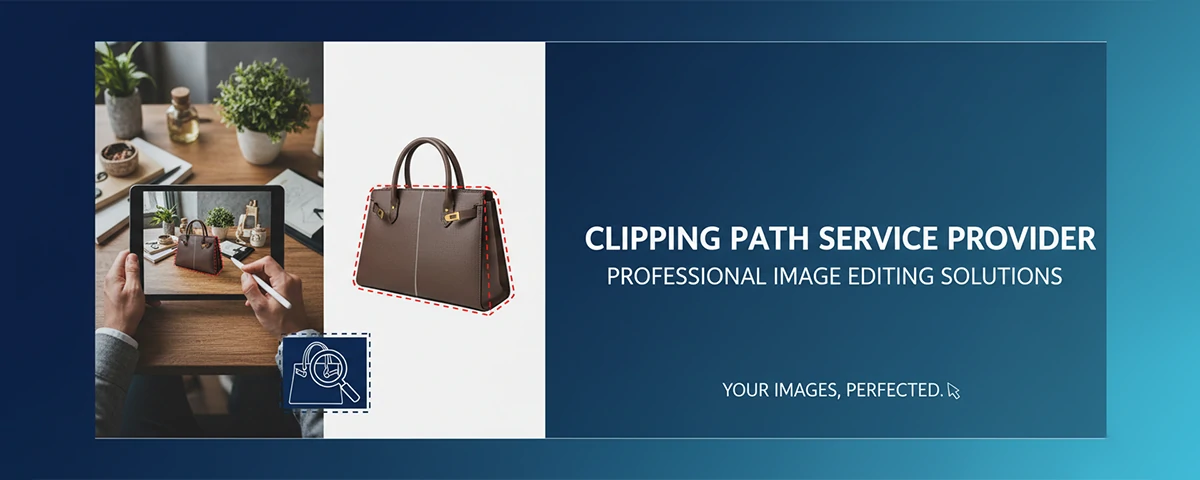
A clipping path is a vector-based selection method that uses the Pen Tool in Photoshop or similar software to draw precise outlines around a subject. The path consists of anchor points connected by straight or curved segments that follow the exact edge of the object. Once closed, this path can be saved, named, and applied to clip the image, making everything outside the path transparent. The result is a clean, sharp isolation with mathematically perfect edges.
The defining characteristic of a clipping path is precision. Every anchor point is deliberately placed to follow the subject's edge exactly. The curves between points are adjusted using bezier handles to match the subject's contours. This manual process requires skill, patience, and attention to detail, but it produces results that automated tools cannot match for subjects with well-defined edges. The path is resolution-independent, meaning the edge quality remains perfect whether the image is printed on a business card or a billboard.
Clipping paths are the appropriate technique when the subject has clearly defined, hard edges. Products against white backgrounds, geometric objects, bottles, boxes, electronics, jewelry, and any item where the boundary between subject and background is unambiguous are ideal candidates. The path creates a clean, sharp edge that gives the isolated subject a professional appearance. For products that will be used in catalogs, on white backgrounds, or in layouts where a crisp edge is desired, clipping paths are the technique of choice.
2. What Is Background Removal?
Background removal is the general process of separating a subject from its background, regardless of the specific technique used. It is the goal, not the method. When someone requests background removal on an image, they want the subject isolated so it can be placed on a different background. The technique used to achieve this removal can be a clipping path, a layer mask, a channel mask, an AI-powered tool, a color range selection, or any combination of these methods.
The breadth of background removal techniques reflects the variety of challenges different images present. A simple product on a white background might be perfectly handled by an automatic AI tool in seconds. A portrait with hair blowing in the wind against a complex background requires a much more sophisticated approach, likely combining channel masking with manual refinement. A glass product with reflections and transparency requires yet another approach that preserves the translucency. The right background removal technique varies with every image, and professional editors choose their approach based on the specific requirements of each file.
Modern background removal has been transformed by AI tools. Services like Remove.bg, Adobe Photoshop's Select Subject, and various Photoshop plugins can produce reasonable initial selections in seconds. These AI tools are trained on millions of images and can handle many common scenarios effectively. However, AI-generated selections are almost always imperfect and require human refinement for professional-quality results. Understanding when to use AI for initial processing and when to apply manual techniques is the hallmark of an efficient photo editing workflow.
3. The Key Differences Explained
Understanding the relationship between clipping paths and background removal comes down to recognizing that one is a method and the other is an outcome. A clipping path is a specific technique used within Photoshop to create a vector selection. Background removal is the broad category of any technique used to isolate a subject. Every clipping path achieves background removal, but not every background removal uses a clipping path. This distinction has practical implications for how you specify work, estimate costs, and evaluate quality.
The technical differences are significant. Clipping paths produce hard, vector-defined edges that are perfectly sharp at any resolution. Background removal achieved through masking creates pixel-based edges that can be soft, feathered, or partially transparent. Clipping paths excel at creating clean outlines but fail with soft edges, hair, and transparency. Mask-based background removal handles these complex edges but creates larger files and can show pixelation at extreme enlargements. AI background removal offers speed but lacks the precision of manual methods for challenging images.
Cost and time differences also distinguish these approaches. A simple clipping path on a straightforward product might take 2 to 5 minutes and cost $1 to $3. A complex background removal involving channel masking for hair might take 15 to 30 minutes and cost $5 to $15. An AI-powered background removal might take 10 seconds and cost pennies but require additional cleanup time. When you request a clipping path from an editing service, you are specifying a particular method. When you request background removal, you are specifying the goal and trusting the editor to choose the best method for your specific image.
4. When to Use a Clipping Path for Background Removal
A clipping path is the best background removal method when the subject has clear, well-defined edges and the goal is a clean, sharp isolation. This scenario describes the majority of e-commerce product photography. For online catalogs where products are photographed on white backgrounds, clipping paths are the industry standard because they produce consistent, high-quality results efficiently. The hard edge of a clipping path matches the clean, professional look that e-commerce requires.
Specific product categories that are ideal for clipping path background removal include electronics with sharp edges, books and media with straight lines, bottles and containers with defined silhouettes, boxes and packaged goods, jewelry and watches, and automotive parts. Any product with a clear boundary between itself and its background can be cleanly isolated with a clipping path. The path will follow the product's edge precisely, creating a natural-looking separation that appears professional and intentional.
Clipping paths are also the preferred method when the isolated product will be used at multiple sizes or in print applications. Because the vector path is resolution-independent, the edge quality remains perfect regardless of output size. A product isolated with a clipping path can be scaled from a tiny thumbnail to a large billboard without any degradation in edge quality. This makes clipping paths the standard for catalog photography, print advertising, and any application where the image may be used at varying sizes.
5. When AI-Powered Background Removal Is the Better Choice
AI-powered background removal tools have advanced dramatically and are now the best choice for certain scenarios. When speed is the priority and the subject is relatively simple, AI tools can produce acceptable results in seconds. For bulk processing of large catalogs where the images are consistent and the backgrounds are uniform, AI removal can dramatically reduce costs and turnaround times. Understanding when AI is sufficient and when manual techniques are required is essential for efficient workflow management.
AI background removal excels with images that match its training data: clear subjects against contrasting backgrounds, portraits with simple backgrounds, and standard product photography. Tools like Adobe Photoshop's Select Subject, Remove.bg, and various Photoshop plugins can handle these scenarios with impressive accuracy. The AI can create an initial selection in 5 to 10 seconds that would take a human editor several minutes. For social media content, blog images, and applications where absolute perfection is not required, AI removal is a practical and cost-effective choice.
However, AI background removal has significant limitations. It struggles with fine details like hair strands, transparent objects, subjects that blend into the background, and images with multiple overlapping subjects. The AI creates selections based on pattern recognition, not understanding, so it makes mistakes that a human editor would not. Edges can be jagged or unnatural, and fine details are often lost. For professional product photography, catalog images, and any application where quality matters, AI removal should be used as a starting point that is refined by a human editor, not as a final solution.
6. Deep Image Masking: The Premium Background Removal Method
Deep image masking is the most advanced background removal technique, reserved for the most challenging images. It involves creating complex selections using a combination of channel masking, layer masks, and manual refinement to isolate subjects with fine details, transparency, or soft edges. Deep masking is the technique of choice for high-end fashion photography, portrait retouching, and any image where the subject cannot be cleanly separated with simpler methods.
The process typically begins with channel masking, where the editor analyzes the image's color channels to find the one with the highest contrast between the subject and background. This channel is duplicated, adjusted with levels or curves to maximize contrast, and used to create an initial selection. This selection captures fine details like hair strands that would be impossible to trace manually. The editor then refines the selection using Select and Mask, paints adjustments on a layer mask, and checks the result against different background colors to ensure quality.
Deep image masking is significantly more time-consuming and expensive than standard clipping paths or AI removal. A complex masking job can take 30 to 60 minutes or more, compared to 2 to 5 minutes for a simple clipping path. However, for images where quality is paramount, deep masking is the only technique that produces professional results. Fashion editorials, luxury brand catalogs, high-end portrait photography, and product images for premium brands all require the level of detail that only deep masking can provide.
7. Color Range Removal: The Underutilized Technique
Color range selection is a background removal technique that is often overlooked but can be incredibly effective for specific scenarios. This method uses Photoshop's Color Range command to select all pixels within a specified color range, making it ideal for removing solid-colored backgrounds. When the background is a consistent color that contrasts well with the subject, Color Range can create a selection in seconds that would take minutes to trace manually.
The Color Range command works by sampling a color from the image and selecting all pixels that fall within a specified tolerance. The fuzziness slider controls how strictly the selection matches the sampled color. Higher fuzziness selects a broader range of similar colors, while lower fuzziness restricts the selection to very close matches. This technique is particularly effective for removing green screen backgrounds, solid white or gray backdrops, and any background where the color is relatively uniform and distinct from the subject.
Color Range removal is often combined with other techniques for best results. An editor might use Color Range for the initial bulk selection, then refine the edges using Select and Mask or a layer mask. This hybrid approach captures the speed of automated color selection with the precision of manual refinement. For product photography on controlled backgrounds, Color Range is an excellent first step that dramatically reduces the manual work required. Understanding when to use Color Range versus other techniques is a mark of an efficient editor.
8. Communicating with Photo Editing Services: Getting What You Need
One of the most practical benefits of understanding the difference between clipping paths and background removal is improved communication with photo editing services. When you request a clipping path for an image that actually needs deep masking, you will receive a poor result because the editor applied the wrong technique. When you simply request background removal without specifying the technique, you rely on the editor to choose appropriately, which can lead to unexpected costs or quality issues.
For best results, describe your images accurately and specify the desired outcome rather than the technique. Instead of saying this image needs a clipping path, say this product needs to be isolated from its white background for catalog use. The editor can then choose the most efficient and effective technique. For challenging images, mention the specific challenges: this portrait has fine hair details that must be preserved, or this glass bottle has transparent areas that should remain visible on the new background.
Sample images are the most effective communication tool. Provide examples of similar work that has been done well, and specify any quality requirements. If the isolated images will be used on both white and dark backgrounds, mention this, as it affects the edge treatment. If the images are for print, mention the output size and resolution. Clear communication about your specific requirements ensures you receive the appropriate technique applied to the appropriate quality standard, saving time, money, and frustration for both parties.
9. Quality Comparison: Clipping Path vs AI Removal vs Deep Masking
The quality of background removal directly impacts how professional your images look and how customers perceive your brand. Understanding the quality differences between clipping paths, AI removal, and deep masking helps you match the technique to the quality requirements of each project. Not every image requires deep masking quality, but knowing when it does prevents disappointing results.
Clipping paths produce excellent quality for their intended use case: hard-edged subjects on simple backgrounds. The vector edges are perfectly sharp and clean, ideal for catalog presentations. However, the quality breaks down completely when applied to inappropriate images. A clipping path on a portrait with hair will look amateurish, with chopped edges and unnatural silhouettes. The limitation is not the technique's quality but its appropriate application. For the right images, clipping paths produce the best quality for the cost.
AI removal quality has improved dramatically but remains inconsistent. On simple images with good contrast between subject and background, AI can produce quality comparable to manual methods. On complex images, AI quality drops significantly, with jagged edges, lost details, and artifacts. The quality of AI removal also varies between tools and updates, making it unreliable for consistent production work. For professional applications where quality must be guaranteed, AI removal should be used as a starting point with human refinement to ensure consistent results.
Deep masking produces the highest quality background removal for complex images. When done by a skilled editor, deep masking preserves every hair strand, maintains natural transparency, and creates edges that look perfect on any background. The quality is consistent across all image types because the human editor adapts their approach to each image's specific challenges. For premium brands, fashion catalogs, and any application where image quality directly impacts brand perception, deep masking delivers the quality that justifies the higher cost.
10. Cost-Benefit Analysis: Choosing the Most Economical Method
Every photo editing decision involves balancing quality against cost. Understanding the economics of each background removal method helps you make informed decisions that maximize value for your specific needs. The most expensive method is not always the best choice, and the cheapest method can end up costing more if poor quality requires rework or damages your brand image.
For high-volume product photography with simple backgrounds, clipping paths offer the best cost-benefit ratio. A batch of 500 product images can be processed quickly and consistently, with costs as low as $0.50 to $2 per image. The quality is excellent for the intended use, and the vector paths provide flexibility for future use at different sizes. For e-commerce catalogs on platforms like Amazon, eBay, and Shopify, clipping paths are the industry standard for good reason: they deliver the quality needed at a cost that scales with catalog size.
AI-powered removal is the most cost-effective for non-critical applications where speed matters more than perfection. Social media content, blog images, internal presentations, and low-resolution web graphics can often be handled adequately by AI tools at minimal cost. However, the hidden cost of AI removal is the time spent checking and correcting mistakes. For every 100 AI-processed images, expect 10 to 20 that need significant manual correction. Factor this review and correction time into your cost calculation when considering AI removal for professional use.
Deep masking is the most expensive method but delivers value that justifies the cost for premium applications. Fashion catalogs, luxury brand imagery, high-end portrait photography, and images used in large-format print advertising require the quality that only deep masking provides. The cost difference between a $3 clipping path and a $15 deep mask is insignificant when the image is being used in a $50,000 advertising campaign. For images that represent your brand at its most visible touchpoints, investing in the best possible background removal is a smart business decision.
11. Workflow Integration: Adding Background Removal to Your Production Pipeline
Integrating background removal into your production workflow requires careful planning to maintain efficiency without sacrificing quality. Whether you are a solo photographer handling your own post-production or a large e-commerce operation processing thousands of images daily, the way you incorporate background removal into your pipeline directly affects turnaround time, consistency, and cost. Understanding the workflow implications of each technique helps you design a process that maximizes productivity while maintaining the quality standards your brand requires.
For high-volume operations, batch processing is essential. Clipping paths lend themselves well to batch workflows because they can be applied using Photoshop actions and scripts that automate the path creation process. When combined with a structured file naming convention and folder hierarchy, batch clipping path processing can handle hundreds of images per hour. The key to efficient batch processing is consistency in your source images. If your product photos are shot with consistent lighting, positioning, and background color, automated and semi-automated techniques will work more reliably, reducing the need for individual image attention.
For mixed workflows where some images need simple background removal and others require complex masking, consider a triage system. Sort images by complexity before sending them for editing. Simple images with solid backgrounds and hard edges can be processed with clipping paths or AI tools at lower cost and faster turnaround. Complex images with hair, transparency, or intricate details should be routed to deep masking specialists. By separating images by technique requirement, you avoid paying for deep masking on simple images and avoid poor quality on complex images. This tiered approach optimizes both cost and quality across your entire image library.
Integration with your photo editing service or in-house team also requires clear specifications for file delivery. Establish standards for file formats, color profiles, resolution, and naming. Raw files might be delivered as PSDs with editable paths, while final images should be delivered as high-quality PNGs with transparency or JPEGs on white backgrounds. Consistent delivery specifications reduce back-and-forth communication and ensure that your isolated images are ready for immediate use in catalogs, websites, or marketing materials. A well-designed workflow with clear specifications transforms background removal from a bottleneck into a streamlined part of your production process.
12. Common Mistakes in Background Removal and How to Avoid Them
Even experienced editors and photographers make mistakes when removing backgrounds. Recognizing these common errors helps you avoid them in your own work and identify quality issues in images produced by others. The most frequent mistake is using the wrong technique for the image, typically applying a clipping path when masking is required. This creates images with unnatural edges, missing details, and a distinctly amateur appearance that undermines brand credibility. Always assess each image individually before deciding on a technique, regardless of how similar it looks to others in your batch.
Another common mistake is incomplete edge refinement. Even with the correct technique, failing to refine edges produces visible artifacts. Harsh edges on soft subjects, leftover background pixels, and jagged outlines are telltale signs of rushed work. Professional background removal includes zooming in to 200% or 300% magnification to inspect edges pixel by pixel, especially around challenging areas. Edges should be inspected against multiple background colors, not just the replacement background, to ensure the isolation is truly clean. This level of attention is what separates professional results from amateur work.
Color contamination and reflection issues are frequently overlooked but equally damaging. When a subject is photographed against a bright colored background, light reflecting from the background onto the subject carries that color. After background removal, the subject retains a colored edge or halo that looks unnatural on a new background. Professional editors use techniques like decontaminate colors, remove color fringing, and selective color adjustments to eliminate these traces. Without this step, the isolated image will not look natural on any background other than the original one, defeating the purpose of the background removal.
Finally, inconsistent quality standards are a workflow mistake that compounds over time. When some images receive thorough background removal while others are rushed, your catalog exhibits uneven quality that customers notice. Establish clear quality benchmarks for each image type and use a review process that checks every image against those standards. Implement a feedback loop with your editing team or service provider so that recurring issues are identified and corrected at the source. Quality control is not just about catching mistakes; it is about continuously improving your process to prevent them from occurring in the first place.
13. Future Trends: Where Background Removal Technology Is Heading
Background removal technology continues to evolve rapidly, driven by advances in artificial intelligence, machine learning, and computer vision. Understanding where the technology is heading helps you make informed decisions about which tools and techniques to invest in today. The trend is clear: AI-powered background removal will become increasingly capable of handling complex images, but human expertise will remain essential for premium quality work for the foreseeable future.
Real-time background removal is one of the most exciting developments in this space. New AI models can now remove and replace backgrounds in video streams with minimal latency, enabling live streaming applications, virtual presentations, and real-time content creation. These technologies use depth sensing and semantic segmentation to distinguish subjects from backgrounds without the need for green screens. While the quality is not yet comparable to manual masking for high-resolution still images, the technology is improving rapidly and will soon meet professional standards for many applications.
Generative AI is also transforming background replacement, moving beyond simple removal to intelligent scene generation. Instead of just isolating a subject, these tools can generate entirely new backgrounds that match the lighting, perspective, and color palette of the original image. This creates composite images that look natural and cohesive, rather than obviously Photoshopped. For e-commerce, this means the ability to place products in realistic lifestyle settings without expensive photoshoots. For portrait photographers, it means the ability to create any background the client imagines with minimal additional editing.
The trajectory of background removal technology suggests a future where the skill required shifts from manual execution to creative direction. Editors will increasingly supervise AI processes, correcting outputs and making creative decisions about how images should appear rather than spending hours on pixel-level work. The best results will continue to come from combining AI efficiency with human judgment, but the balance will shift increasingly toward automation. Professionals who invest in understanding both traditional techniques and new AI tools will be best positioned to deliver exceptional results efficiently and profitably.
Frequently Asked Questions
Is a clipping path the same as background removal?
No. A clipping path is one specific technique used to achieve background removal. Background removal is the broad category that includes clipping paths, masking, AI tools, and other methods.
Which is better for product photography: clipping path or AI removal?
For professional product catalogs, clipping paths are more reliable and produce consistent quality. AI removal is faster but less reliable and often requires manual correction for professional results.
Can AI background removal replace manual editing?
For simple images, AI removal can replace manual editing. For complex images with hair, transparency, or fine details, AI cannot match the quality of skilled human editors and should be used as a starting point only.
How much does professional background removal cost?
Prices range from $0.50 to $3 per image for simple clipping paths, $3 to $10 for standard masking, and $10 to $30 or more for deep masking of complex images like fine hair or transparent objects.
What method should I use for hair removal background?
Deep image masking using channel masking is the best method for isolating hair. It preserves individual strands and creates natural-looking edges that clipping paths and AI tools cannot achieve.
How do I know which background removal method my image needs?
Evaluate your image's edges: hard, simple edges suit clipping paths. Complex edges with hair or fur need masking. Transparent objects require masking. Consistent backgrounds can use Color Range or AI.
Need Professional Image Background Removal?
Technique
Clipping Path vs Image Masking: Which to Use?
Compare clipping paths and image masking techniques to understand which method is best for different types of image isolation challenges.
Software
Best Background Removal Tools Compared
Compare the top background removal software and services, from Photoshop to AI-powered tools, for quality, speed, and value.
E-Commerce
Product Photo Editing for E-Commerce
Essential product photo editing guide covering background removal, color correction, retouching, and optimization for online marketplaces.
Related Services
Service
Background Removal Service
Professional background removal services using the right technique for each image, from simple clipping paths to complex deep masking.
Service
Clipping Path Service
High-volume clipping path services for e-commerce product images with fast turnaround, consistent quality, and competitive volume pricing.
Service
Image Masking Service
Expert image masking services for complex subjects including hair, fur, transparency, and fine details requiring channel masking and manual refinement.
Copyright 2025 — Clipping Path vs Background Removal: Are They the Same? — All Rights Reserved
Where to go next
Spotted something wrong? Report an error on this page. We correct on the page and say what changed.