Master the art of 3D animation with comprehensive insights, expert techniques, and professional best practices for creating stunning visual content
🎬 Introduction to 3D Animation Studio
A 3D animation studio represents the pinnacle of digital creativity, combining cutting-edge technology with artistic vision to bring imagination to life. In today's rapidly evolving digital landscape, 3D animation studios have become the backbone of entertainment, marketing, education, and countless other industries, transforming how we communicate, learn, and experience visual content.
🌟 What Makes 3D Animation Studios Essential?
3D animation studios are specialized environments equipped with professional-grade software, hardware, and expertise to create three-dimensional animated content. They serve as creative powerhouses where artists, technicians, and storytellers collaborate to produce everything from blockbuster movies to interactive marketing campaigns.
The Digital Revolution Impact
The significance of 3D animation studios in today's digital ecosystem cannot be overstated. With the global animation market projected to reach $270 billion by 2025, these studios are at the forefront of technological innovation and creative expression. They've revolutionized industries by:
- Entertainment Industry: Creating immersive worlds in films, TV shows, and video games
- Marketing & Advertising: Developing compelling visual narratives that engage audiences
- Education & Training: Producing interactive learning materials and simulations
- Architecture & Design: Visualizing concepts before physical construction
- Medical & Scientific: Illustrating complex processes and procedures
Benefits for Different Audiences
👨🎓 For Beginners
- Accessible entry point into digital arts
- Structured learning environment
- Portfolio development opportunities
- Industry-standard skill acquisition
- Creative expression outlet
🏆 For Experienced Users
- Advanced technique refinement
- Collaborative project opportunities
- Access to cutting-edge technology
- Professional network expansion
- Specialization development
Whether you're a creative professional looking to expand your skillset, a business owner seeking to enhance your marketing strategy, or an enthusiast passionate about digital art, understanding 3D animation studios opens doors to unlimited creative possibilities and career opportunities in the digital age.
🔍 Understanding 3D Animation Studio
A comprehensive understanding of what constitutes a 3D animation studio is essential for anyone looking to enter this dynamic field. Modern 3D animation studios are sophisticated ecosystems that blend artistic creativity with technical precision, utilizing an array of specialized tools, cutting-edge technologies, and refined creative processes to produce stunning visual content.
Core Components of a 3D Animation Studio
🛠️ Software Arsenal
- Modeling: Blender, Maya, 3ds Max
- Animation: Cinema 4D, Houdini
- Rendering: V-Ray, Arnold, Cycles
- Compositing: After Effects, Nuke
- Texturing: Substance Painter, Mari
💻 Hardware Infrastructure
- Workstations: High-end CPUs, GPUs
- Render Farms: Distributed computing
- Storage: High-speed NAS systems
- Displays: Color-accurate monitors
- Input Devices: Graphics tablets, 3D mice
👥 Human Resources
- Artists: Modelers, animators, riggers
- Technical: TDs, pipeline engineers
- Creative: Directors, supervisors
- Production: Coordinators, managers
- Support: IT, administration
The 3D Animation Pipeline
📋 Production Workflow
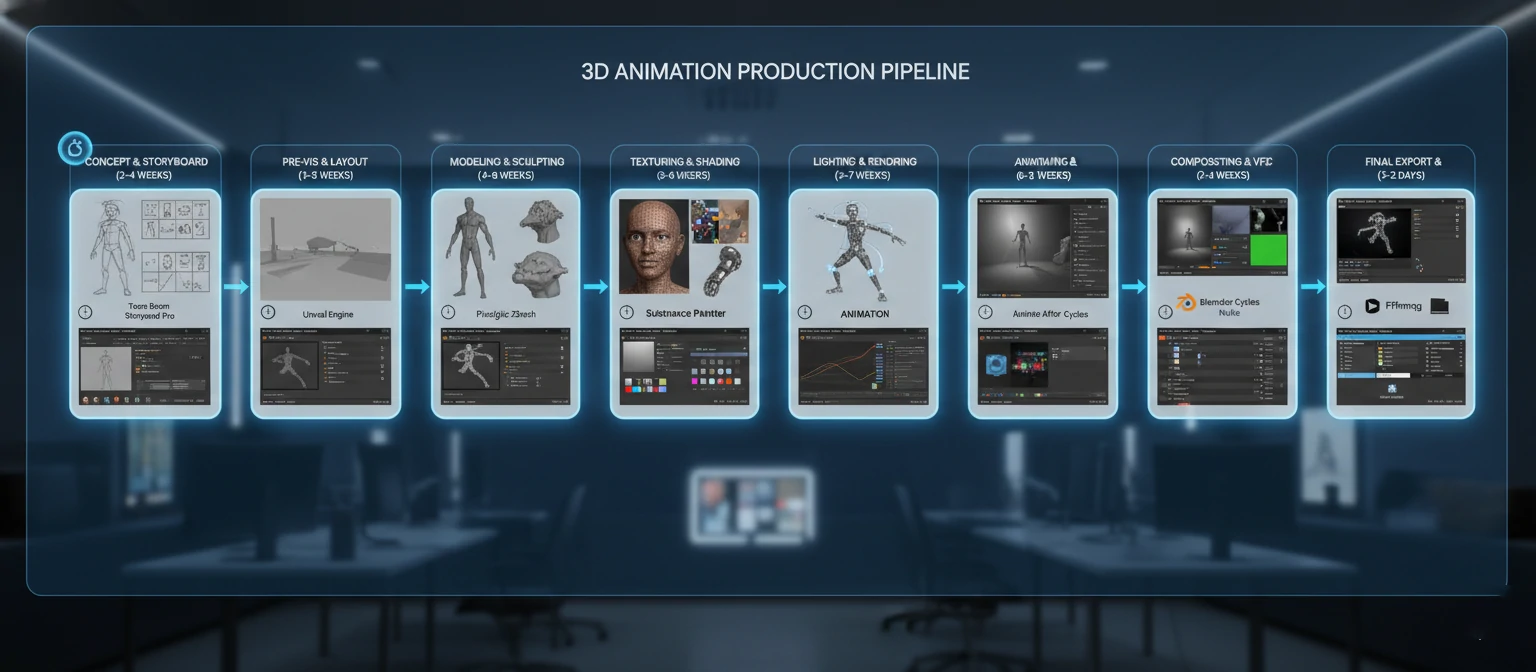
Pre-Production
Concept development, storyboarding, asset planning
Modeling & Texturing
3D model creation, UV mapping, material application
Rigging & Animation
Character setup, keyframe animation, motion capture
Lighting & Rendering
Scene illumination, camera setup, final rendering
Post-Production
Compositing, color correction, final delivery
Industry Applications & Use Cases
🎬 Entertainment Industry
The entertainment sector remains the largest consumer of 3D animation services, driving innovation and setting industry standards.
- Feature Films: Pixar, DreamWorks, and Disney productions showcasing photorealistic animation
- Television: Animated series, visual effects for live-action shows
- Gaming: Character models, environments, cutscenes for AAA titles
- Streaming Content: Original animated content for Netflix, Amazon Prime, Disney+
📈 Marketing & Advertising
3D animation has revolutionized how brands communicate with their audiences, offering unprecedented creative flexibility.
- Product Visualization: Detailed 3D models for e-commerce and catalogs
- Explainer Videos: Complex concepts simplified through animation
- Brand Campaigns: Memorable animated advertisements and social media content
- Interactive Experiences: AR/VR marketing applications
🎓 Education & Training
Educational institutions and corporate training programs leverage 3D animation for enhanced learning experiences.
- Scientific Visualization: Molecular structures, astronomical phenomena
- Historical Recreations: Ancient civilizations, historical events
- Medical Training: Surgical procedures, anatomical studies
- Safety Training: Hazardous environment simulations
🏗️ Architecture & Product Design
Design professionals use 3D animation to visualize and present concepts before physical implementation.
- Architectural Visualization: Building walkthroughs, urban planning
- Product Prototyping: Design validation, manufacturing planning
- Interior Design: Space planning, material selection
- Industrial Design: Machinery operation, assembly processes
💡 Key Insight
Modern 3D animation studios are not just creative spaces—they're technology-driven businesses that require careful balance of artistic vision, technical expertise, and project management skills. Success in this field demands continuous learning and adaptation to emerging technologies and industry trends.
🚀 Getting Started with 3D Animation Studio
Embarking on your 3D animation journey can seem overwhelming, but with the right approach and systematic planning, anyone can master the fundamentals and build a successful career in this exciting field. This comprehensive guide will walk you through every essential step, from initial setup to creating your first professional-quality animation.
Step 1: Assess Your Starting Point
📊 Self-Assessment Checklist
Technical Skills
- □ Basic computer proficiency
- □ Understanding of 3D space concepts
- □ Familiarity with digital art tools
- □ Basic math and geometry knowledge
Creative Skills
- □ Drawing and sketching ability
- □ Color theory understanding
- □ Storytelling and composition
- □ Attention to detail
Step 2: Hardware Requirements & Setup
💻 Minimum System Requirements
Essential Components
- CPU: Intel i5/AMD Ryzen 5 (minimum)
- RAM: 16GB DDR4 (32GB recommended)
- GPU: NVIDIA GTX 1060/AMD RX 580
- Storage: 500GB SSD + 1TB HDD
- Display: 24" 1080p IPS monitor
Professional Setup
- CPU: Intel i9/AMD Ryzen 9
- RAM: 64GB+ DDR4
- GPU: NVIDIA RTX 3080/4080
- Storage: 2TB NVMe SSD
- Display: 27" 4K color-accurate monitor
💡 Budget Planning Tip
Start with minimum requirements and upgrade gradually. A good graphics card is more important than the fastest CPU for most 3D work. Consider used professional workstations for better value.
Step 3: Software Selection & Installation
🆓 Free Options (Beginners)
Blender
Complete 3D creation suite with modeling, animation, rendering, and compositing
Recommended for beginnersDaVinci Resolve
Professional video editing and color correction
GIMP
Image editing and texture creation
💰 Professional Options
Autodesk Maya
Industry standard for character animation and VFX
$215/monthCinema 4D
User-friendly interface, excellent for motion graphics
$94/monthAdobe Creative Suite
After Effects, Photoshop, Premiere Pro
$53/month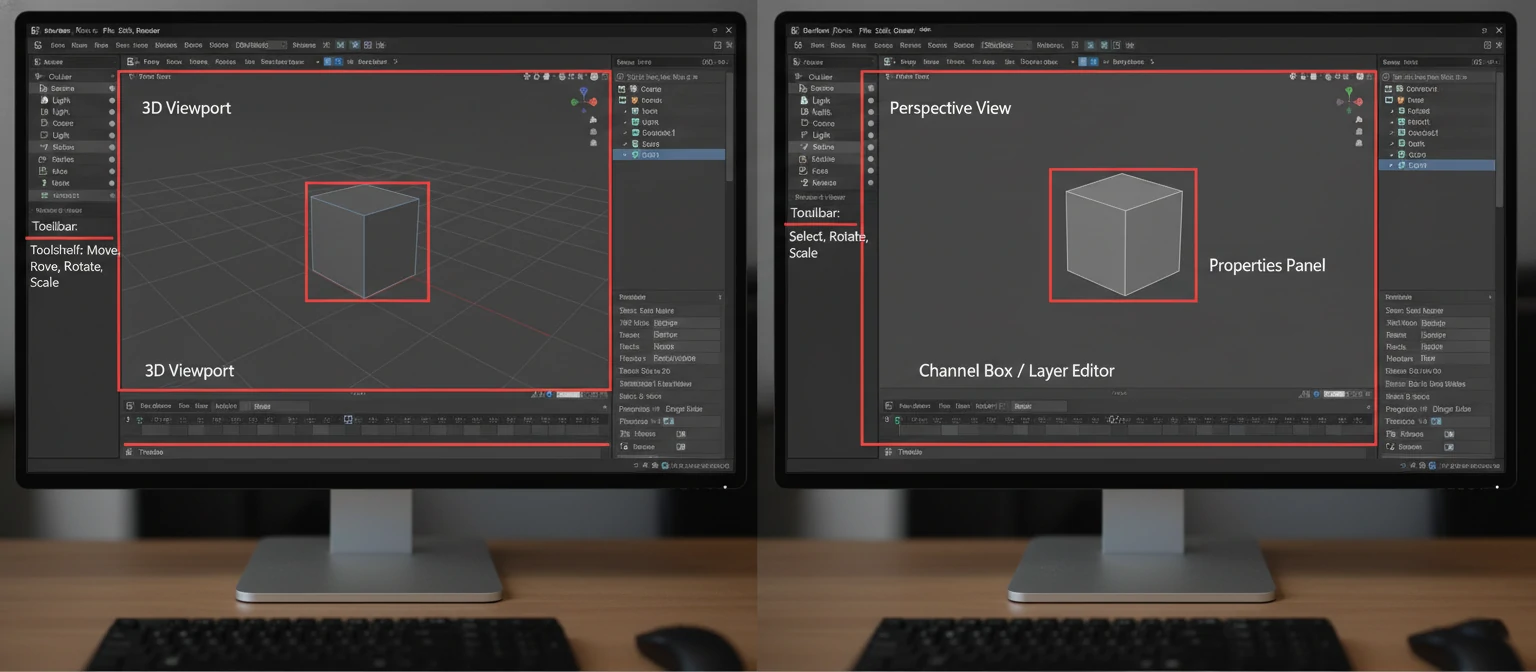
Step 4: Learning Path & Skill Development
📚 Structured Learning Timeline (12-Week Program)
Weeks 1-2: Fundamentals
- Interface navigation and basic tools
- 3D viewport manipulation
- Basic modeling techniques (extrude, scale, rotate)
- Understanding coordinate systems
Weeks 3-4: Modeling Mastery
- Advanced modeling tools and modifiers
- Topology and edge flow principles
- Creating complex organic and hard-surface models
- UV unwrapping basics
Weeks 5-6: Materials & Texturing
- Material creation and shader networks
- Texture painting and procedural textures
- PBR workflow understanding
- Substance Painter integration
Weeks 7-8: Lighting & Rendering
- Three-point lighting setup
- HDRI environment lighting
- Render engine comparison (Cycles, Eevee, Arnold)
- Render optimization techniques
Weeks 9-10: Animation Principles
- 12 principles of animation
- Keyframe animation and interpolation
- Basic rigging for simple objects
- Camera animation and cinematography
Weeks 11-12: Portfolio Project
- Complete project from concept to final render
- Post-production and compositing
- Portfolio presentation and documentation
- Industry feedback and iteration
Step 5: Your First Project - Animated Logo
🎯 Project Brief: 3D Logo Animation
Create a 5-second animated logo reveal that demonstrates your understanding of modeling, materials, lighting, and animation principles.
Project Requirements
- □ 3D text or logo model
- □ Appropriate materials/textures
- □ Professional lighting setup
- □ Smooth camera movement
- □ 1080p final render
Learning Objectives
- Apply modeling techniques
- Understand material properties
- Practice lighting principles
- Learn animation timing
- Master render settings
Sample Blender Python Script - Automated Logo Setup
import bpy import bmesh

# Clear existing mesh objects
bpy.ops.object.select_all(action='SELECT')
bpy.ops.object.delete(use_global=False)

# Create text object
bpy.ops.object.text_add(location=(0, 0, 0))
text_obj = bpy.context.active_object
text_obj.data.body = "YOUR LOGO"
text_obj.data.extrude = 0.2
text_obj.data.bevel_depth = 0.02

# Add material
material = bpy.data.materials.new(name="Logo_Material")
material.use_nodes = True
text_obj.data.materials.append(material)

# Set up basic lighting
bpy.ops.object.light_add(type='SUN', location=(5, 5, 10))
sun = bpy.context.active_object
sun.data.energy = 3

print("Logo setup complete! Ready for animation.")
Step 6: Building Your Learning Network
🎥 YouTube Channels
- Blender Guru
- CG Cookie
- Grant Abbitt
- Ducky 3D
🌐 Online Communities
- BlenderArtists.org
- Reddit r/blender
- Discord servers
- ArtStation
📚 Paid Courses
- CG Cookie
- Udemy courses
- Pluralsight
- CGMA workshops
🎯 Success Tips for Beginners
- Practice Daily: Even 30 minutes of consistent practice beats weekend marathons
- Start Simple: Master basic shapes before attempting complex characters
- Study References: Always work from real-world references and photo studies
- Join Communities: Get feedback early and often from experienced artists
- Document Progress: Keep a learning journal and portfolio of your work
⚡ Optimizing 3D Animation Studio for Best Results
Achieving professional-quality results in 3D animation requires more than just creative vision—it demands technical expertise, efficient workflows, and strategic optimization across every aspect of production. This comprehensive guide reveals industry-proven techniques to maximize your studio's effectiveness, reduce render times, and deliver exceptional quality consistently.
Performance Optimization Strategies
🚀 Render Optimization
Sample Count Management
- Preview: 32-64 samples
- Production: 128-512 samples
- Final: 1024+ samples (if needed)
Denoising Techniques
- OptiX/OpenImageDenoise
- Compositor denoising nodes
- AI-powered post-processing
💾 Memory Management
Texture Optimization
- Use appropriate resolutions
- Compress textures efficiently
- Implement texture streaming
Geometry Optimization
- Level-of-detail (LOD) systems
- Instancing for repeated objects
- Efficient subdivision surfaces
Advanced Lighting Techniques
💡 Professional Lighting Setups
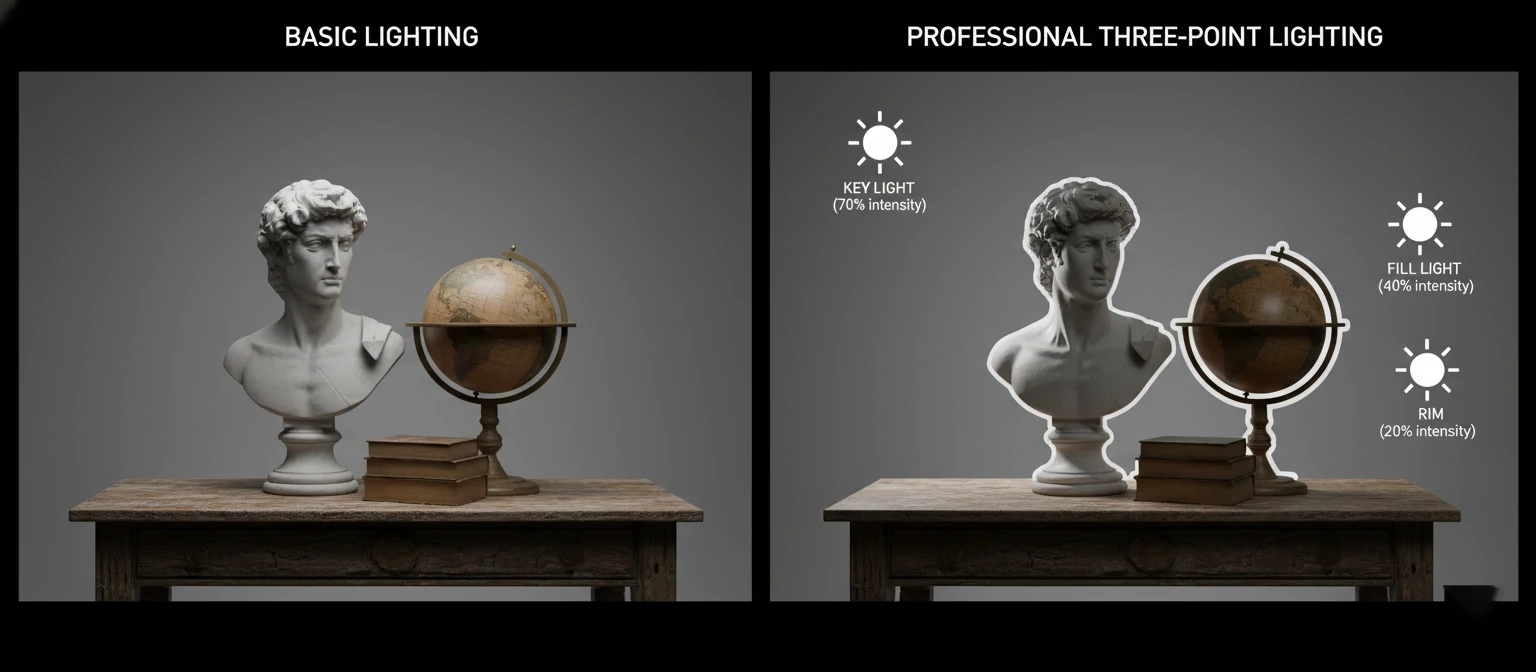
Three-Point Lighting System
- 45° angle from subject
- Highest intensity
- Defines main shadows
- Opposite side of key
- 25-50% key intensity
- Softens harsh shadows
- Behind subject
- Creates edge definition
- Separates from background
HDRI Environment Lighting
High Dynamic Range Images provide realistic environmental lighting and reflections.
- Use 32-bit HDR files
- Match lighting to scene mood
- Adjust strength and rotation
- HDRI Haven (free)
- Poly Haven
- HDR Labs
Animation Quality Enhancement
🎭 The 12 Principles of Animation
- 1. Squash and Stretch: Gives weight and flexibility
- 2. Anticipation: Prepares audience for action
- 3. Staging: Presents idea clearly
- 4. Straight Ahead/Pose to Pose: Two animation approaches
- 5. Follow Through: Parts continue moving after stop
- 6. Slow In/Slow Out: Natural acceleration/deceleration
- 7. Arc: Natural movement follows curved paths
- 8. Secondary Action: Supports main action
- 9. Timing: Speed gives meaning to movement
- 10. Exaggeration: Pushes reality for effect
- 11. Solid Drawing: Understanding form and weight
- 12. Appeal: Charismatic design and movement
⚙️ Technical Animation Optimization
Keyframe Efficiency
- Use minimal keyframes
- Smart interpolation modes
- Graph editor optimization
- Consistent timing
Rigging Best Practices
- Clean topology
- Efficient bone hierarchy
- Custom controllers
- Constraint systems
Motion Capture Integration
- Clean mocap data
- Retargeting workflows
- Blend with keyframes
- Facial capture sync
Workflow Optimization
🔄 Production Pipeline Efficiency
Asset Management System
Implement organized file structures and version control
Project/
├── Assets/
│   ├── Models/
│   ├── Textures/
│   ├── Materials/
│   └── References/
├── Scenes/
├── Renders/
└── Archive/
Automated Backup Systems
Regular automated backups prevent data loss
- Cloud storage integration (Google Drive, Dropbox)
- Local NAS backup solutions
- Version control with Git LFS
Render Farm Setup
Distribute rendering across multiple machines
- Network rendering with Blender
- Cloud render services (AWS, Google Cloud)
- Local render farm management
Hardware & Software Maintenance
🔧 Hardware Maintenance
Regular Maintenance Tasks
- Clean dust from components monthly
- Monitor temperatures and voltages
- Update GPU drivers regularly
- Check storage health (SSD/HDD)
- Calibrate monitors quarterly
Performance Monitoring
- GPU-Z for graphics monitoring
- HWiNFO for system sensors
- CrystalDiskInfo for storage
💻 Software Optimization
System Optimization
- Disable unnecessary startup programs
- Optimize virtual memory settings
- Regular system cleanup
- Update software regularly
- Configure power settings
Application Settings
- Optimize viewport performance
- Configure memory limits
- Set appropriate cache sizes
🎯 Pro Optimization Tips
Render Time Reduction
- Use render regions for testing
- Implement render layers strategically
- Optimize material complexity
- Use efficient light sampling
Quality Enhancement
- Study real-world lighting
- Use reference images consistently
- Master color theory principles
- Develop consistent style guides
🛠️ Common Challenges and Solutions
Every 3D animation professional encounters obstacles that can derail projects and frustrate creative workflows. Understanding these common challenges and having proven solutions at your disposal is crucial for maintaining productivity and delivering high-quality results consistently. This comprehensive troubleshooting guide addresses the most frequent issues faced by 3D animation studios and provides expert-tested solutions.
Technical Performance Issues
⚠️ Challenge: Slow Viewport Performance
Laggy viewport navigation, especially with complex scenes, making it difficult to work efficiently.
Symptoms:
- Choppy viewport rotation
- Delayed object selection
- Slow playback animation
- High GPU/CPU usage
Solutions:
- Reduce viewport subdivision levels
- Use simplified display modes
- Enable viewport culling
- Implement proxy objects
- Optimize texture resolutions
⚠️ Challenge: Memory Overflow Crashes
Application crashes due to insufficient RAM, especially during rendering or with high-resolution textures.
Quick Diagnostic Steps:
- 1. Monitor RAM usage during operations
- 2. Check texture memory consumption
- 3. Identify memory-heavy operations
- 4. Review scene complexity metrics
Immediate Fixes:
- • Reduce texture resolutions
- • Use texture compression
- • Enable out-of-core rendering
- • Implement render regions
Long-term Solutions:
- • Upgrade system RAM
- • Implement asset streaming
- • Use render farm distribution
- • Optimize scene architecture
⚠️ Challenge: Render Artifacts and Noise
Unwanted visual artifacts in final renders, including fireflies, banding, and excessive noise.
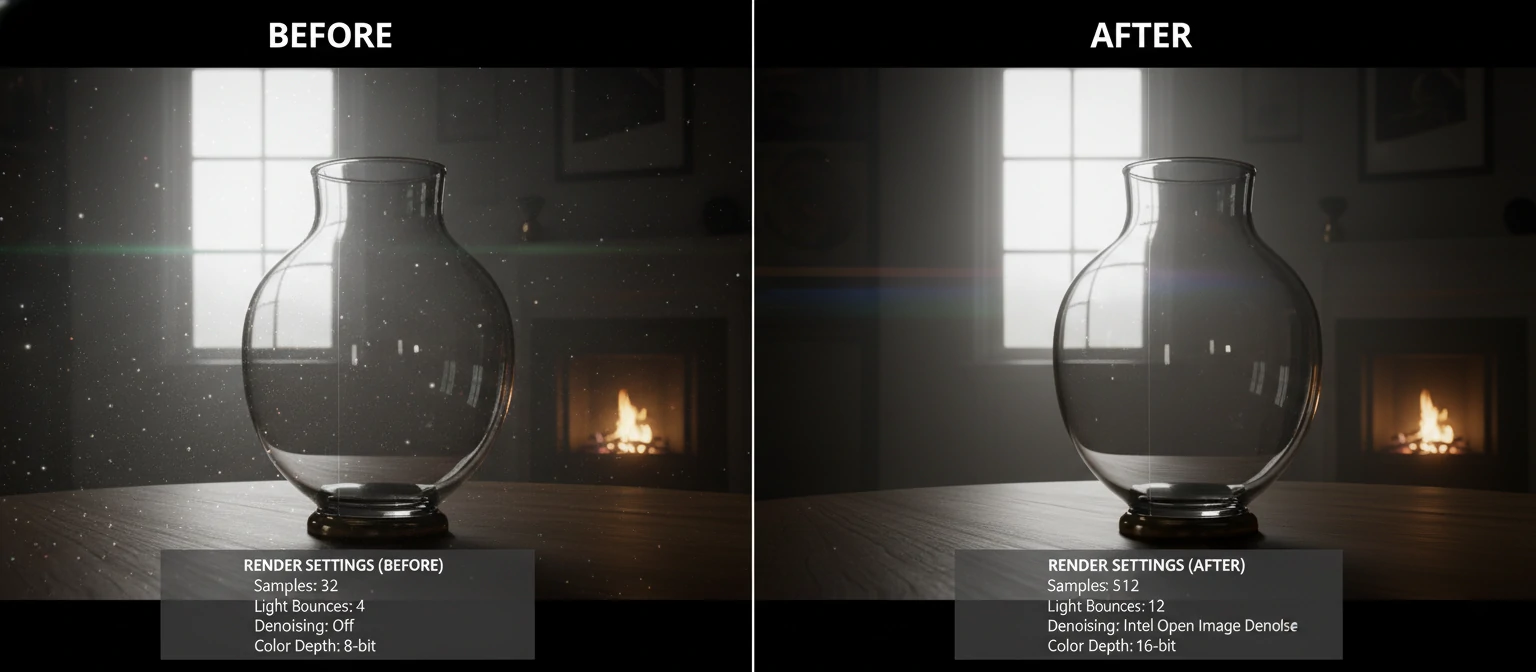
Fireflies (Bright Pixels)
- Caustics from glass/water
- Small bright light sources
- Insufficient sampling
- Enable light path clamping
- Increase sample counts
- Use denoising algorithms
Color Banding
- 8-bit color depth
- Insufficient dithering
- Gradient compression
- Render in 16/32-bit
- Apply dithering in post
- Use linear color space
Workflow and Project Management Issues
⚠️ Challenge: File Corruption and Data Loss
Project files becoming corrupted or accidentally deleted, resulting in lost work and missed deadlines.
Prevention Strategy (Critical):
- Every 15 minutes locally
- Daily cloud sync
- Weekly archive creation
- Git with LFS for assets
- Incremental saves
- Branch for experiments
- Regular integrity checks
- Redundant storage
- Recovery procedures
Emergency Recovery Steps:
- 1. Check auto-save/temp directories
- 2. Attempt file repair utilities
- 3. Restore from most recent backup
- 4. Reconstruct from reference materials
⚠️ Challenge: Inconsistent Asset Quality
Varying quality levels across different assets in the same project, creating visual inconsistencies.
Quality Control Checklist:
- □ Consistent polygon density
- □ Clean topology (no n-gons)
- □ Proper scale and proportions
- □ Optimized geometry
- □ Uniform texture resolution
- □ Consistent UV mapping
- □ Proper material setup
- □ Color space compliance
Implementation Solutions:
- Create detailed style guides and asset libraries
- Implement peer review processes
- Use automated quality checking scripts
- Establish clear approval workflows
Creative and Artistic Challenges
⚠️ Challenge: Achieving Photorealistic Results
Difficulty creating convincing, photorealistic renders that match real-world references.
Key Realism Factors:
- Accurate light temperatures
- Realistic shadow softness
- Proper exposure values
- Environmental reflections
- Physically accurate properties
- Subtle surface imperfections
- Proper fresnel reflections
- Realistic wear patterns
- Micro-surface variations
- Dust and fingerprints
- Edge wear and aging
- Atmospheric effects
Practical Improvement Steps:
- Study high-quality photography extensively
- Use real-world HDRI environments
- Add subtle imperfections to all surfaces
- Match camera settings to real photography
- Apply proper color management workflow
⚠️ Challenge: Animation Timing and Spacing
Creating natural-looking movement with proper timing, spacing, and weight distribution.
Common Timing Issues:
- Robotic, linear movement
- Inconsistent frame rates
- Poor anticipation timing
- Unrealistic acceleration
Solutions & Techniques:
- Study real-world motion references
- Use graph editor for smooth curves
- Apply ease-in/ease-out principles
- Add secondary animation layers
Animation Reference Tools:
- High-speed camera footage
- Motion studies
- Sports analysis videos
- Frame-by-frame breakdown
- Motion tracking software
- Timing charts
- Bouncing ball animation
- Walk cycle studies
- Weight lifting exercises
Advanced Troubleshooting Resources
🔧 Diagnostic Tools & Resources
System Monitoring
- GPU-Z: Graphics card monitoring
- HWiNFO64: Comprehensive system info
- Process Monitor: File system activity
- MemTest86: RAM stability testing
Software Debugging
- Console Logs: Error message analysis
- Crash Dumps: Post-mortem debugging
- Performance Profilers: Bottleneck identification
- Memory Analyzers: Leak detection
Community Support
- Stack Overflow: Technical Q&A
- Reddit Communities: r/blender, r/Maya
- Discord Servers: Real-time help
- Official Forums: Software-specific support
🎯 Expert Problem-Solving Approach
1. Systematic Diagnosis
Always isolate variables and test one change at a time to identify root causes accurately.
2. Documentation
Keep detailed logs of issues and solutions to build your personal troubleshooting database.
3. Community Engagement
Actively participate in forums and communities—helping others often leads to learning new solutions.
4. Preventive Measures
Implement robust backup systems and quality control processes before problems occur.
🎯 Conclusion and Next Steps
Mastering the art and science of 3D animation studio operations is a journey that combines technical expertise, creative vision, and continuous learning. Throughout this comprehensive guide, we've explored the fundamental concepts, practical techniques, and professional strategies that form the foundation of successful 3D animation work. The knowledge you've gained here provides a solid framework for building your skills and advancing your career in this dynamic field.
Key Takeaways Summary
🎨 Creative Foundations
- Understanding the Pipeline: From pre-production through final delivery, each stage requires specific skills and attention to detail
- Quality Standards: Professional results demand consistent application of industry best practices and quality control measures
- Artistic Principles: The 12 principles of animation and fundamental design concepts remain timeless guides for creating compelling content
- Reference-Based Work: Real-world observation and reference materials are essential for achieving believable results
⚙️ Technical Mastery
- Optimization Strategies: Efficient workflows and render optimization can dramatically improve productivity and quality
- Hardware Knowledge: Understanding system requirements and maintenance ensures reliable performance
- Software Proficiency: Mastering multiple tools provides flexibility and career opportunities
- Problem-Solving Skills: Systematic troubleshooting approaches save time and reduce frustration
💡 The Most Important Insight
Success in 3D animation isn't just about mastering software or having the fastest hardware—it's about developing a deep understanding of visual storytelling, maintaining consistent quality standards, and building efficient workflows that allow your creativity to flourish. The technical skills are tools; your artistic vision and problem-solving abilities are what create truly exceptional work.
Your Action Plan: Next 30 Days
📅 Week-by-Week Implementation Guide
Week 1: Foundation Setup
- □ Assess and upgrade your hardware setup based on our recommendations
- □ Install and configure your chosen 3D software (Blender recommended for beginners)
- □ Set up organized project folder structures and backup systems
- □ Join 2-3 online communities for ongoing support and learning
- □ Create accounts on learning platforms (YouTube, CG Cookie, etc.)
Week 2: Skill Building
- □ Complete basic modeling tutorials (donut tutorial for Blender users)
- □ Practice fundamental operations: extrude, scale, rotate, loop cuts
- □ Learn viewport navigation and basic interface customization
- □ Create your first simple 3D model from reference
- □ Document your learning progress with screenshots and notes
Week 3: Advanced Techniques
- □ Learn material creation and basic texturing workflows
- □ Experiment with different lighting setups and HDRI environments
- □ Practice render optimization techniques from our guide
- □ Create a simple animated sequence (5-10 seconds)
- □ Apply troubleshooting techniques to any issues encountered
Week 4: Portfolio Development
- □ Complete the animated logo project outlined in our getting started section
- □ Create high-quality renders showcasing your best work
- □ Set up an online portfolio (ArtStation, personal website)
- □ Get feedback from community members and iterate on your work
- □ Plan your next learning objectives and project goals
Continuing Education Resources
🎓 Structured Learning Paths
Free Resources
- Blender Guru: Comprehensive Blender tutorials
- CG Cookie: Free courses and community
- Grant Abbitt: Beginner-friendly modeling tutorials
- Ducky 3D: Motion graphics and animation
- Default Cube: Weekly Blender news and tips
Premium Courses
- CG Cookie: Structured learning paths ($19/month)
- Pluralsight: Professional development ($29/month)
- CGMA: Mentored online workshops ($700-2000)
- School of Motion: Motion graphics specialization
- Gnomon: Industry-standard training
📚 Essential Reading & References
Books
- "The Animator's Survival Kit" - Richard Williams
- "Digital Lighting & Rendering" - Jeremy Birn
- "The Art of 3D Computer Animation" - Isaac Kerlow
Websites
- 80.lv - Industry insights
- CGSociety - Professional community
- Polycount - Technical discussions
Podcasts
- CG Garage
- The Collective Podcast
- Animation Podcast
🌐 Professional Networks & Communities
Online Communities
- ArtStation: Portfolio platform and job board
- LinkedIn: Professional networking
- Discord Servers: Real-time community interaction
- Reddit: r/blender, r/3Dmodeling, r/animation
- Facebook Groups: Software-specific communities
Industry Events
- SIGGRAPH: Premier computer graphics conference
- GDC: Game Developers Conference
- BlenderCon: Annual Blender community event
- Local Meetups: Regional 3D artist gatherings
- Online Workshops: Virtual learning events
Career Development Pathways
🚀 Specialization Options
Technical Specializations
- Technical Director (TD): Pipeline development, tool creation, problem-solving
- Lighting Artist: Scene illumination, mood creation, render optimization
- Rigging Artist: Character setup, deformation systems, animation tools
- VFX Supervisor: Project oversight, technical leadership, client communication
Creative Specializations
- Character Animator: Performance, acting, storytelling through movement
- Environment Artist: World building, architectural visualization, set design
- Motion Graphics Designer: Brand animation, UI/UX animation, broadcast graphics
- Creative Director: Vision development, team leadership, client relations
🎯 Your Journey Starts Now
The 3D animation industry offers unlimited creative possibilities and career growth opportunities. Whether you're aiming to work at major studios like Pixar and ILM, start your own animation business, or simply express your creativity through digital art, the foundation you build today will determine your success tomorrow.
Ready to Begin?
Start with Week 1 of your action plan today!
📞 Stay Connected
The 3D animation community is incredibly supportive and collaborative. Don't hesitate to reach out, ask questions, and share your progress. Remember that every expert was once a beginner, and the community thrives on helping newcomers succeed.
Your creative journey in 3D animation starts with a single click, a first tutorial, and the commitment to continuous learning. The tools and knowledge are at your fingertips—now it's time to create something amazing!